
Akamai MFA
The Akamai MFA app for Chrome is the companion to the Akamai MFA mobile app. The Akamai MFA Chrome extension makes it possible to…
As of June 2026, Akamai MFA has 6,000 users and a 4.00/5 rating from 4 reviews in the Privacy & Security category.
Usersno change0%
6.0K
6,000
Ratingno change0%
4.00
4 reviews
Reviewsno change0%
4
Version
2.6.2
Manifest V3
90-day change · In the last 90 days this extension 2 version updates, changed permissions.
History
2 snapshotsTracking since Apr 29, 2026.
View as table
| Date | Users | Rating | Reviews | Version |
|---|---|---|---|---|
| Apr 29, 2026 | 6.0K | 4.00 | 4 | 2.3.0 |
| May 4, 2026 | 6.0K | 4.00 | 4 | 2.6.1 |
| Now | 6.0K | 4.00 | 4 | 2.6.2 |
Changelog
- Apr 29, 2026description
The Akamai MFA app for Chrome is the companion to the Akamai MFA mobile app for your smart phone. The Akamai MFA app for Chrome is the companion to the Akamai MFA mobile app for your smart phone.

The Akamai MFA Chrome extension makes it possible to use your phone as a security key authenticator with the Chrome browser.

Akamai MFA makes authentication easy and secure:
- No more passwords or 6-digit codes
- Push to login
- Immune to phishing

Akamai MFA utilizes the standardized FIDO Universal 2nd Factor (U2F) and WebAuthn (FIDO2) protocol to provide secure, un-phishable authentication on the web, now in the convenient form factor that is your phone.

Get started in 3 steps:
1. Download the Akamai MFA authenticator app for your smart phone
2. Enable the Akamai MFA Chrome browser extension
3. Scan the QR code using the Akamai MFA app on your phone

==Zero Trust==
Akamai MFA is built on top of an end-to-end verified and encrypted architecture. This means zero trust. We never get access to any of your keys or login information. The keys only live in the app on your phone.

Learn more here: https://akamai.com/mfa
The Akamai MFA app for Chrome is the companion to the Akamai MFA mobile app.

The Akamai MFA Chrome extension makes it possible to use your phone or tablet as a security key authenticator with the Chrome browser.

Akamai MFA makes authentication easy and secure:
- No more passwords or 6-digit codes
- Push to login
- Phishing resistant

Akamai MFA utilizes the standardized FIDO2, U2F, and WebAuthn protocols to provide secure, phishing resistant authentication on the web with your mobile device.

Get started in 3 steps:
1. Download the Akamai MFA authenticator app on your mobile device
2. Enable the Akamai MFA Chrome browser extension
3. Scan the QR code using the Akamai MFA app

==Zero Trust==
Akamai MFA is built on top of an end-to-end verified and encrypted architecture to perform authentication with zero trust. Your keys are stored in your device's secure hardware and never leave your device.

Learn more here: https://www.akamai.com/mfa
- Apr 29, 2026short_description
The Akamai MFA app for Chrome is the companion to the Akamai MFA mobile app for your smart phone. The Akamai MFA app for Chrome is…
The Akamai MFA app for Chrome is the companion to the Akamai MFA mobile app.

The Akamai MFA Chrome extension makes it possible to…
- Apr 29, 2026category
productivity/workflow
make_chrome_yours/privacy
- Apr 29, 2026host_permissions
http://localhost/*, http://*.localhost/*, https://*.local/*, https://*.pr.pushzero-dev.akamai.com/*, https://pushzero-dev.akamai.com/*, https://pushzero-test.akamai.com/*, https://pushzero-staging.akamai.com/*, https://mfa.akamai.com/*, https://try-webauthn.appspot.com/*, https://webauthn.bin.coffee/*, https://webauthn.io/*, https://webauthn.me/*, https://sso.rediris.es/*, https://*.idpnube.rediris.es/*, https://mfa.sir2.rediris.es/*
http://localhost/*, http://*.localhost/*, https://*.local/*, https://*.pr.pushzero-dev.akamai.com/*, https://pushzero-dev.akamai.com/*, https://pushzero-test.akamai.com/*, https://mfa.akamai.com/*, https://try-webauthn.appspot.com/*, https://webauthn.bin.coffee/*, https://webauthn.io/*, https://webauthn.me/*
Permissions & access
- Permissions
- activeTabstorage
- Host access
- http://localhost/*, http://*.localhost/*, https://*.local/*, https://*.pr.pushzero-dev.akamai.com/*, https://pushzero-dev.akamai.com/*, https://pushzero-test.akamai.com/*, https://mfa.akamai.com/*, https://try-webauthn.appspot.com/*, https://webauthn.bin.coffee/*, https://webauthn.io/*, https://webauthn.me/*
Screenshots
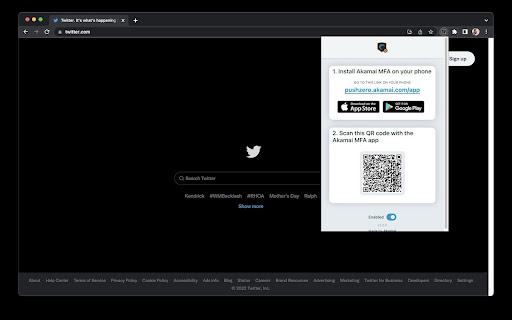
About
The Akamai MFA app for Chrome is the companion to the Akamai MFA mobile app.

The Akamai MFA Chrome extension makes it possible to use your phone or tablet as a security key authenticator with the Chrome browser.

Akamai MFA makes authentication easy and secure:
- No more passwords or 6-digit codes
- Push to login
- Phishing resistant

Akamai MFA utilizes the standardized FIDO2, U2F, and WebAuthn protocols to provide secure, phishing resistant authentication on the web with your mobile device.

Get started in 3 steps:
1. Download the Akamai MFA authenticator app on your mobile device
2. Enable the Akamai MFA Chrome browser extension
3. Scan the QR code using the Akamai MFA app

==Zero Trust==
Akamai MFA is built on top of an end-to-end verified and encrypted architecture to perform authentication with zero trust. Your keys are stored in your device's secure hardware and never leave your device.

Learn more here: https://www.akamai.com/mfa
Technical
- Version
- 2.6.2
- Manifest
- V3
- Size
- 1.51MiB
- Min Chrome
- 88
- Languages
- 1
- Featured
- No
Metadata
- ID
- jinalojeaecnfjefpehkibbenhbdgdip
- Developer ID
- ufda013ca14c93bfe91bc8c8b68f4685a
- Developer Email
- [email protected]
- Created
- May 14, 2022
- Last Updated (Store)
- Apr 29, 2026
- Last Scraped
- Jun 14, 2026
- Website
- —
- Privacy Policy
- https://akamai.com/legal
Similar extensions
Alternatives to Akamai MFA, ranked by description similarity.

Authenticator app
Authenticator app for two factor authentication. Scan authenticator QR codes & generate 2FA codes directly in Google Chrome browser.
20.0K
★ 4.6

2FA Live
2FA Live - Secure authenticator app for two-factor authentication. Generate 2fa codes instantly in your browser for easy access.
1.0K
★ 5.0
2FAS Auth - Two Factor Authentication
2FAS Browser Extension is simple, private, and secure: 1 click, 1 tap, and your token is automatically entered!
80.0K
★ 3.6

2FA Authenticator Guard
Free 2FA on Browser! Multi-layered encryption secures data. Replaces Google Authenticator, no phone needed. Ultimate security focus.
10.0K
★ 3.8

Authenticator App
Provides secure two-factor authentication(2FA). Safeguard your digital life with ease.
10.0K
★ 2.6

Authenticator for PC
A desktop authenticator for saving and managing your 2FA codes
787

2FAS Pass Browser Extension
Keep all your data safe, private and secure with 2FAS Pass.
10.0K
★ 4.6

StrongPass
StrongPass - Login with Ease, Surf With Confidence
163
★ 4.4
Data sourced from the Chrome Web Store · last verified Jun 14, 2026.