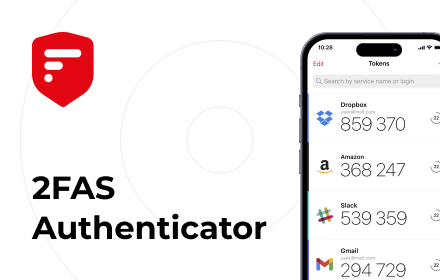
2FAS Auth - Two Factor Authentication
2FAS Browser Extension is simple, private, and secure: 1 click, 1 tap, and your token is automatically entered!
As of June 2026, 2FAS Auth - Two Factor Authentication has 80,000 users and a 3.60/5 rating from 124 reviews in the Privacy & Security category.
Usersup 33.3 percent+33.3%
80.0K
80,000
Ratingdown 0.8 percent−0.8%
3.60
124 reviews
Reviewsup 0.8 percent+0.8%
124
Version
1.8.2
Manifest V3
90-day change · In the last 90 days this extension gained 20.0K users, 2 version updates.
History
9 snapshotsTracking since Apr 17, 2026.
View as table
| Date | Users | Rating | Reviews | Version |
|---|---|---|---|---|
| Apr 17, 2026 | 60.0K | 3.63 | 123 | 1.8.0 |
| Apr 22, 2026 | 60.0K | 3.63 | 123 | 1.8.0 |
| May 3, 2026 | 70.0K | 3.61 | 122 | 1.8.0 |
| May 6, 2026 | 60.0K | 3.61 | 122 | 1.8.1 |
| May 11, 2026 | 70.0K | 3.61 | 122 | 1.8.1 |
| May 23, 2026 | 70.0K | 3.63 | 123 | 1.8.1 |
| May 26, 2026 | 80.0K | 3.63 | 123 | 1.8.1 |
| May 29, 2026 | 70.0K | 3.63 | 123 | 1.8.1 |
| Jun 11, 2026 | 80.0K | 3.63 | 123 | 1.8.2 |
| Now | 80.0K | 3.60 | 124 | 1.8.2 |
Permissions & access
- Permissions
- activeTabtabsstoragenotificationscontextMenuswebNavigation
- Host access
- *://*.2fas.com/*
Screenshots



About
Add 2FAS Auth to your web browser with our extension! Enter 2FA tokens automatically without re-typing for better security!

The 2FAS Auth Browser Extension allows you to log in to any online service with 2-factor authentication enabled, faster!

Easy set up in three steps:
1. Install the extension on your desktop browser
2. Open the 2FAS Auth app on your phone and pair your phone with your desktop browser
3. Start using the 2FAS Auth Browser Extension

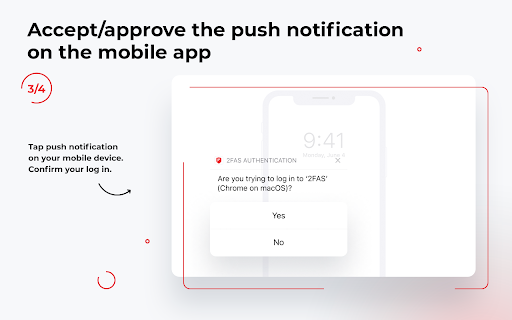
When you want to log in using a 2FA token, simply select two-factor authentication token input field, click the 2FAS Auth Browser Extension icon, and confirm login on your phone!

Secure and fast log in.

Simply pair the service you want to login to with your 2FAS Auth app, then 2FAS Auth will automatically select your token for future logins, no searching or typing required!

Free access — no account required.

2FAS Auth is an easy-to-use authentication app that protects access to your online services and accounts.

Relying on a single password for your personal accounts, like Facebook or Instagram, often puts your data and sensitive information at risk.

The 2FAS Authenticator App generates one-time codes called Time-based One-time Passwords (TOTP) or HMAC-based (event-based) One-time Passwords (HOTP) for your account. By creating these codes offline and changing them every 30 seconds or every login, 2FAS drastically increases the security of your information.
Technical
- Version
- 1.8.2
- Manifest
- V3
- Size
- 5.24MiB
- Min Chrome
- 88
- Languages
- 1
- Featured
- No
Metadata
- ID
- dbfoemgnkgieejfkaddieamagdfepnff
- Developer ID
- u4c1e072689c73c9dbd2594c1385c84d1
- Developer Email
- [email protected]
- Created
- Jul 28, 2022
- Last Updated (Store)
- May 27, 2026
- Last Scraped
- Jun 24, 2026
- Website
- https://2fas.com/
- Support URL
- https://2fas.com/help-center/
- Privacy Policy
- https://2fas.com/privacy-policy/
Similar extensions
Alternatives to 2FAS Auth - Two Factor Authentication, ranked by description similarity.

Fast 2FA
Generate TOTP codes for 2FA authentication
4

2FAS Pass Browser Extension
Keep all your data safe, private and secure with 2FAS Pass.
10.0K
★ 4.6

2FA Live
2FA Live - Secure authenticator app for two-factor authentication. Generate 2fa codes instantly in your browser for easy access.
1.0K
★ 5.0

Authenticator app
Authenticator app for two factor authentication. Scan authenticator QR codes & generate 2FA codes directly in Google Chrome browser.
20.0K
★ 4.6

Authenticator App
Provides secure two-factor authentication(2FA). Safeguard your digital life with ease.
10.0K
★ 2.6

Web2FA - Authenticator
Add 2FA security to your accounts and generate codes in Chrome with Web2FA Authenticator
10.0K
★ 3.4

2FAuth
Generate your 2FA passwords with 2FAuth directly from your browser
823
★ 4.8

2FA Authenticator Guard
Free 2FA on Browser! Multi-layered encryption secures data. Replaces Google Authenticator, no phone needed. Ultimate security focus.
10.0K
★ 3.8
Data sourced from the Chrome Web Store · last verified Jun 24, 2026.