Click to Remove Element
Remove annoying elements with a single click
As of June 2026, Click to Remove Element has 100,000 users and a 4.28/5 rating from 644 reviews in the Functionality & UI category.
Usersno change0%
100.0K
100,000
Ratingno change0%
4.28
644 reviews
Reviewsup 1.3 percent+1.3%
644
Version
3.1.5
Manifest V3
History
3 snapshotsTracking since Apr 1, 2026.
View as table
| Date | Users | Rating | Reviews | Version |
|---|---|---|---|---|
| Apr 1, 2026 | 100.0K | 4.28 | 636 | 3.1.5 |
| May 3, 2026 | 90.0K | 4.28 | 636 | 3.1.5 |
| Jun 2, 2026 | 100.0K | 4.28 | 639 | 3.1.5 |
| Now | 100.0K | 4.28 | 644 | 3.1.5 |
Permissions & access
- Permissions
- commandsscripting
- Host access
- *://*/*
Screenshots


About
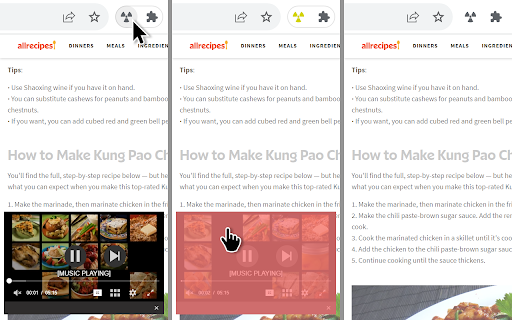
Allows you to remove any element from a website. Temporarily or permanently. Be it an advertisment missed by your ad-blocker, fixed menu, distracting GIF image, overly animated slideshow or anything else getting in your way.

Features:
- easily remove multiple elements in a row (no need for a cumbersome context menu)
- highlights elements under the cursor
- customizable keyboard shortcut for activation
- remember removed elements for a particular website or hide only temporarily
- works flawlessly with iframes, embeds and ads
- minimal memory and performance footprint
- power user feature - customize CSS selectors

New in v3:
- preview which elements were removed
- use space to remove elements resistant to mouse clicks
- improved CSS selectors
- more resilient UI
- the much requested import/export feature
- undo removed elements (Ctrl+Z / ⌘+Z)
- dark mode
Technical
- Version
- 3.1.5
- Manifest
- V3
- Size
- 28.63KiB
- Min Chrome
- 88
- Languages
- 1
- Featured
- Yes
Metadata
- ID
- jcgpghgjhhahcefnfpbncdmhhddedhnk
- Developer ID
- u7e07de9b11fe1fb881f59bd6fb2fe681
- Developer Email
- [email protected]
- Created
- Oct 11, 2012
- Last Updated (Store)
- Nov 29, 2023
- Last Scraped
- Jun 2, 2026
- Website
- http://blade.sk/
- Support URL
- http://blade.sk/
- Privacy Policy
- —
Similar extensions
Alternatives to Click to Remove Element, ranked by description similarity.

Element Remover
Remove Unwanted Elements on Websites
121
★ 3.7

Remove From Page
Click the extension icon to highlight and remove elements from the page
—
★ 5.0

Element Remover
Click elements to permanently remove them. Features a terminal-style management interface.
10

Click To Obliterate
Click to remove page elements with style!
21
★ 5.0

Focus Mode
Customize any web page for your needs
196
★ 4.0

Element Hider Pro
Hide annoying blocks on a site by clicking them. Stores per-site rules and reapplies them when you open the popup.
5

Hide Anything - Element Hider for Chrome™
Best element hider for Chrome™. Remove distractions in a breeze.
1.0K
★ 2.1

Selective Content Hider
Hide distracting sections of any website with one click. Clean up your browsing experience by removing unwanted elements instantly.
168
★ 5.0
Data sourced from the Chrome Web Store · last verified Jun 2, 2026.