
Hide Anything - Element Hider for Chrome™
Best element hider for Chrome™. Remove distractions in a breeze.
As of June 2026, Hide Anything - Element Hider for Chrome™ has 1,000 users and a 2.14/5 rating from 7 reviews in the Functionality & UI category.
Usersno change0%
1.0K
1,000
Ratingno change0%
2.14
7 reviews
Reviewsno change0%
7
Version
1.0.7
Manifest V3
History
2 snapshotsTracking since Apr 16, 2026.
View as table
| Date | Users | Rating | Reviews | Version |
|---|---|---|---|---|
| Apr 16, 2026 | 1.0K | 2.14 | 7 | 1.0.7 |
| Apr 27, 2026 | 1.0K | 2.14 | 7 | 1.0.7 |
| Now | 1.0K | 2.14 | 7 | 1.0.7 |
Permissions & access
- Permissions
- storage
- Host access
- None declared
Screenshots

About
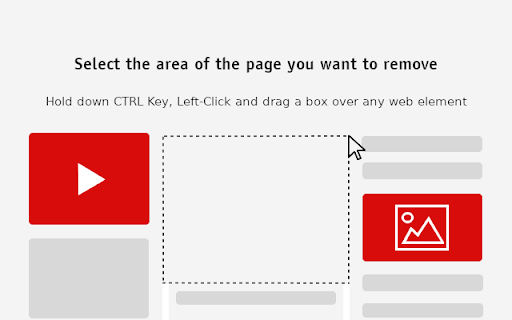
Hold down Ctrl key, then left-click and use the mouse to drag a box over any element or intrusive ad to erase it from the page.

Hide any distracting web element and clean up your favorite websites with just a few clicks.

✔️Easy to use
✔️Works on any web element
✔️Automatic background color selection
✔️Save blocked elements
✔️Many more features to explore

With over a million downloads on Play Store, Excelling Apps is now offering Chrome extensions.
Technical
- Version
- 1.0.7
- Manifest
- V3
- Size
- 27.67KiB
- Min Chrome
- 88
- Languages
- 7
- Featured
- No
Metadata
- ID
- gkjljknnkogcgndejajchomapofgiinf
- Developer ID
- u779a3a47711d72fcc7f4bbdf50a7845a
- Developer Email
- [email protected]
- Created
- Nov 9, 2022
- Last Updated (Store)
- Jan 29, 2026
- Last Scraped
- Jun 7, 2026
- Website
- —
- Support URL
- —
- Privacy Policy
- http://www.excellingapps.com/extensions/privacy-policy
Similar extensions
Alternatives to Hide Anything - Element Hider for Chrome™, ranked by description similarity.

Selective Content Hider
Hide distracting sections of any website with one click. Clean up your browsing experience by removing unwanted elements instantly.
168
★ 5.0

Focus Mode
Customize any web page for your needs
196
★ 4.0

Element Remover
Remove Unwanted Elements on Websites
121
★ 3.7

PageCleaner – Make items disappear
Easily hide unwanted elements on any website with your own customised rules.
578
★ 4.5

Click to Remove Element
Permanently remove ads, popups, and any annoying element. Just point, click, and it's gone forever from that domain.
13

Element Hider Pro
Hide annoying blocks on a site by clicking them. Stores per-site rules and reapplies them when you open the popup.
5

Element Remover
Click elements to permanently remove them. Features a terminal-style management interface.
10
Click to Remove Element
Remove annoying elements with a single click
100.0K
★ 4.3
Data sourced from the Chrome Web Store · last verified Jun 7, 2026.