
Focus Mode
Customize any web page for your needs
As of May 2026, Focus Mode has 196 users and a 4.00/5 rating from 4 reviews in the Functionality & UI category.
Usersdown 9.3 percent−9.3%
196
196
Ratingno change0%
4.00
4 reviews
Reviewsno change0%
4
Version
1.0.9
Manifest V3
History
2 snapshotsTracking since Apr 25, 2026.
View as table
| Date | Users | Rating | Reviews | Version |
|---|---|---|---|---|
| Apr 25, 2026 | 216 | 4.00 | 4 | 1.0.9 |
| May 21, 2026 | 189 | 4.00 | 4 | 1.0.9 |
| Now | 196 | 4.00 | 4 | 1.0.9 |
Permissions & access
- Permissions
- activeTabscripting
- Host access
- None declared
Screenshots



About
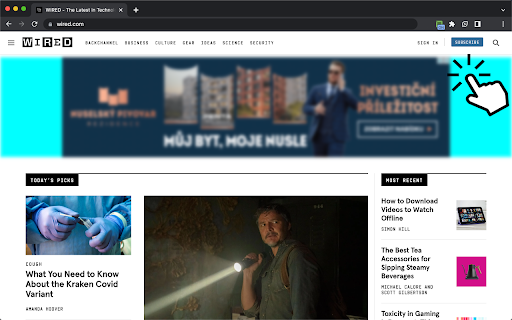
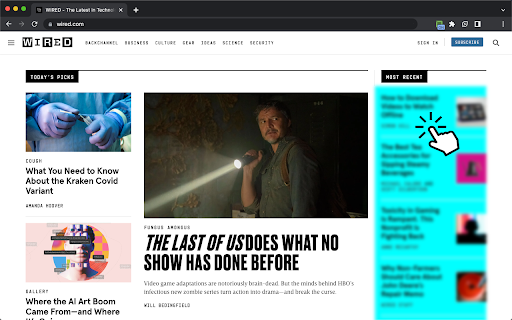
A versatile tool for customizing web pages, allowing you to hide selected elements by clicking on them as you hover your mouse over the page. Unlike other focus mode extensions, this tool works on any website.

A few examples of use cases:
- clean up a flashy or cluttered UI and keep only important content on your screen
- clean up a web page before printing or taking a screenshot
- unhide content behind blocking dialogs
- remove distractors (ads, auto play videos, annoying popups, huge headers and banners, etc.)

How to use:
- Install the extension
- Activate the extension (click its icon) when you wish to adjust a web page
- Move your mouse to the element you want to hide
- Click on selected element and watch it disappear
- Deactivate the extension (click its icon again) to continue normal browsing

A few facts about the tool:
- It is small and simple, free and open-source
- It does not collect any information and does not interact with internet
- It is not active while you are surfing and does not consume any resources unlike adblockers
- It was inspired by a same-name Google example

Due to the static linking in the manifest, the Chrome Web Store might display a security warning. However, this method is the most efficient and reliable way to grant users full control over the content of any website.

Enjoy!
Technical
- Version
- 1.0.9
- Manifest
- V3
- Size
- 11.8KiB
- Min Chrome
- 88
- Languages
- 1
- Featured
- Yes
Metadata
- ID
- npmdigoapkknhppmkeipamgclfemkigo
- Developer ID
- u77517ecd60da85782a11b2380645b2d7
- Developer Email
- [email protected]
- Created
- Jan 17, 2023
- Last Updated (Store)
- Aug 2, 2024
- Last Scraped
- May 21, 2026
- Website
- —
- Support URL
- —
- Privacy Policy
- —
Similar extensions
Alternatives to Focus Mode, ranked by description similarity.

Selective Content Hider
Hide distracting sections of any website with one click. Clean up your browsing experience by removing unwanted elements instantly.
168
★ 5.0

Manual Popup Hider (Simple)
Manually hide intrusive popups on the current page by selecting them.
—

Hidden Eye
Hide or view HTML elements on a web page.
631
★ 3.0

Hide Anything - Element Hider for Chrome™
Best element hider for Chrome™. Remove distractions in a breeze.
1.0K
★ 2.1

Remove From Page
Click the extension icon to highlight and remove elements from the page
—
★ 5.0

Hide Scrollbar
Automatically hides scrollbars for a cleaner interface. Supports whitelist and toggle.
596
★ 5.0

Image Blocker
Toggle images on websites with a single click. Reduce distractions and improve page load times with this simple image blocker.
223

Microsoft Help Remover
Removes the 'Need help?' widget on pages containing 'microsoft' in the URL.
—
Data sourced from the Chrome Web Store · last verified May 21, 2026.