
MZ Color Palette
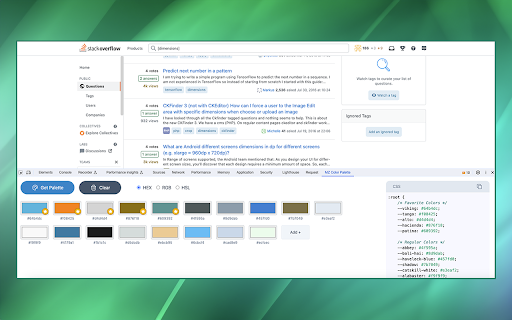
MZ Color Palette allows you to analyze and extract the color palette of the visible area within any open tab.
As of June 2026, MZ Color Palette has 19 users in the Developer Tools category.
Usersup 46.2 percent+46.2%
19
19
Ratingno change0%
—
— reviews
Reviewsno change0%
—
Version
1.0.0
Manifest V3
History
3 snapshotsTracking since Apr 1, 2026.
View as table
| Date | Users | Rating | Reviews | Version |
|---|---|---|---|---|
| Apr 1, 2026 | 13 | — | — | 1.0.0 |
| May 3, 2026 | 15 | — | — | 1.0.0 |
| Jun 2, 2026 | 14 | — | — | 1.0.0 |
| Now | 19 | — | — | 1.0.0 |
Permissions & access
- Permissions
- storage
- Host access
- <all_urls>
Screenshots
About
MZ Color Palette allows you to analyze and extract the color palette of the visible area within any open tab. Whether you're a web developer aiming to match a website's color scheme or a designer seeking inspiration from the visual elements of different web pages, the MZ Color Palette extension simplifies the process and provides the tools you need to work efficiently and creatively.

FEATURES: ⭐

1. Color Extraction: The extension can extract colors from the visible area of any web page, providing insight into the website's color scheme.

2. Color Format Support: It supports HEX, RGB, and HSL color types, allowing you to work with colors in your preferred format.

3. CSS Color Variables: Generate CSS with color variables for the extracted colors, making it easy to integrate them into your projects with a professional and consistent look.

4. Color Storage: All extracted colors are conveniently stored within the extension, ensuring that you have a comprehensive record of the palettes you've encountered and created.

5. Favorite Colors: The extension has a favorite colors support system, enabling you to mark and organize colors that inspire you or that you plan to use frequently.

6. Secure and Privacy-Focused 🛡️: privacy is a top priority. The extension does not track or store user data, ensuring a secure and private browsing experience.

How to Use: 📔

1. Installation: Start by installing the MZ Color Palette Chrome Extension from the Chrome Web Store. Simply search for the extension and click "Add to Chrome."

2. Accessing the Extension: After installation, open your Chrome browser and navigate to a web page you'd like to analyze for its color palette.

3. Open Developer Tools: To access the extension's functionality, open Chrome's Developer Tools. You can do this by right-clicking anywhere on the web page and selecting "Inspect" or by pressing Ctrl+Shift+I (or Cmd+Option+I on Mac).

4. Extension Tab: In the Developer Tools panel, you'll notice a new tab added by the extension. Click on the tab labeled "MZ Color Palette".
Technical
- Version
- 1.0.0
- Manifest
- V3
- Size
- 2.78MiB
- Min Chrome
- 88
- Languages
- 1
- Featured
- Yes
Metadata
- ID
- jcglmnnfjggddcobmefpmhkcofofojan
- Developer ID
- u3bc1f8255e2873f1f6ec0dfffcfc66fb
- Developer Email
- [email protected]
- Created
- Oct 16, 2023
- Last Updated (Store)
- Oct 16, 2023
- Last Scraped
- Jun 2, 2026
- Website
- —
- Support URL
- —
- Privacy Policy
- —
Similar extensions
Alternatives to MZ Color Palette, ranked by description similarity.

MZ Color Picker
MZ Color Picker Chrome extension allows you to capture colors directly from your browser's web pages.
38

Color Palette Inspector
Returns the color palette of a website or of an image
124
★ 5.0

Web Color Palette Extractor
Extract and manage web color palettes from web pages
2.0K
★ 5.0

Website Color Palette Extractor & Analyzer
Extract color palettes from any website, analyze colors for accessibility, and create custom palettes with ease.
39
★ 5.0

Color Finder
Install Color Finder with eyedropper tool to activate color identifier online with RGB and HEX code finder from screen.
8.0K
★ 4.3

Colorlab - Color Extractor
Extracts and displays colors used on any website
25
★ 5.0

ColorZila
ColorZila is a simple color picker that helps you extract colors from images and view them in formats like HEX and RGB.
2.0K
★ 5.0

Colorpicker Extractor
Instantly grab HEX and RGB codes from webpages and turn your browsing into a creative playground with Colorpicker Extractor!
54
★ 5.0
Data sourced from the Chrome Web Store · last verified Jun 2, 2026.