
MZ Color Picker
MZ Color Picker Chrome extension allows you to capture colors directly from your browser's web pages.
As of May 2026, MZ Color Picker has 38 users in the Developer Tools category.
Usersdown 2.6 percent−2.6%
38
38
Ratingno change0%
—
— reviews
Reviewsno change0%
—
Version
1.0.2
Manifest V3
History
2 snapshotsTracking since Apr 25, 2026.
View as table
| Date | Users | Rating | Reviews | Version |
|---|---|---|---|---|
| Apr 25, 2026 | 39 | — | — | 1.0.2 |
| May 22, 2026 | 41 | — | — | 1.0.2 |
| Now | 38 | — | — | 1.0.2 |
Permissions & access
- Permissions
- activeTabstoragetabs
- Host access
- None declared
Screenshots
About
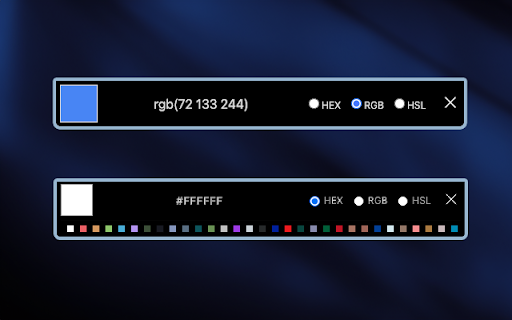
MZ Color Picker Chrome extension allows you to capture colors directly from your browser's web pages. It simplifies the process of color selection. With a single click, you can effortlessly sample any color you encounter while browsing the web. Whether you stumble upon a visually stunning website, inspiring artwork, or a beautifully designed interface, this extension lets you instantly identify and extract the exact hues that catch your eye.

Features: 🎨

1. Intuitive Interface: select colors directly from the Chrome extension icon. There are no annoying pop-ups or additional windows to contend with.

2. Color Formats: the extension supports Hex, RGB, and HSL color formats.

3. Copy to Clipboard: users can copy the selected color code to their clipboard with a single click.

4. Secure and Privacy-Focused 🛡️: privacy is a top priority. The extension does not track or store user data, ensuring a secure and private browsing experience.

5. Color History: The extension keeps a history of recently picked colors, making it convenient for users to revisit and reuse their selected colors without the need for repeated sampling.

How to Use: 📔

1. Start by installing the extension from the Chrome Web Store.
2. After installation, you should see the extension's icon in the Chrome toolbar, typically located in the top-right corner of your browser. It might look like a puzzle piece, a gear, or another icon, depending on your browser version and theme.
3. Click on it and pin the MZ Color Picker extension to the top bar.
4. Click on the MZ Color Picker extension icon to pick colors.
Technical
- Version
- 1.0.2
- Manifest
- V3
- Size
- 358KiB
- Min Chrome
- 88
- Languages
- 1
- Featured
- Yes
Metadata
- ID
- fkfhoikblphemkgkdfhcfbebgkmdmkni
- Developer ID
- u3bc1f8255e2873f1f6ec0dfffcfc66fb
- Developer Email
- [email protected]
- Created
- Sep 26, 2023
- Last Updated (Store)
- Oct 12, 2023
- Last Scraped
- May 22, 2026
- Website
- —
- Support URL
- —
- Privacy Policy
- —
Similar extensions
Alternatives to MZ Color Picker, ranked by description similarity.

MZ Color Palette
MZ Color Palette allows you to analyze and extract the color palette of the visible area within any open tab.
19

Color Picker
Simple color picker - click to pick any color from the page and copy it
8

Easy Color Picker
A beautiful, professional color picker with Hex, RGB, and transparency support
10
★ 5.0

Color Picker for Chrome™
HEX, RGB Color picker, Advanched Eyedropper, Find color code on any page
700.0K
★ 4.0

Better Color Picker
A beautiful color picker extension to easily copy colors from any website
8

Color Picker
Easily pick any color on the screen, view a history of picked colors, and copy or clear them with a single click.
11

Color Picker Chrome extension
Color Picker Chrome extension addon lets you to pick color from any webpage
70.0K
★ 4.1

Color-Picker
With our Color Picker Extension, you can easily and accurately capture colors from any web page with just a click.
2.0K
★ 5.0
Data sourced from the Chrome Web Store · last verified May 22, 2026.