
Color Finder
Install Color Finder with eyedropper tool to activate color identifier online with RGB and HEX code finder from screen.
As of June 2026, Color Finder has 8,000 users and a 4.33/5 rating from 12 reviews in the Developer Tools category.
Usersup 33.3 percent+33.3%
8.0K
8,000
Ratingno change0%
4.33
12 reviews
Reviewsno change0%
12
Version
1.1.0
Manifest V3
90-day change · In the last 90 days this extension gained 2.0K users.
History
3 snapshotsTracking since Apr 16, 2026.
View as table
| Date | Users | Rating | Reviews | Version |
|---|---|---|---|---|
| Apr 16, 2026 | 6.0K | 4.33 | 12 | 1.1.0 |
| Apr 26, 2026 | 7.0K | 4.33 | 12 | 1.1.0 |
| Jun 6, 2026 | 7.0K | 4.33 | 12 | 1.1.0 |
| Now | 8.0K | 4.33 | 12 | 1.1.0 |
Permissions & access
- Permissions
- backgroundstoragescripting
- Host access
- http://*/*, https://*/*
Screenshots
About
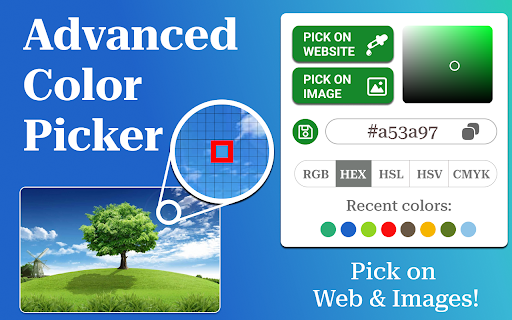
❤️ Find colors effortlessly with Color Finder, the ultimate tool for designers, developers, and digital artists. It simplifies color extraction and improves workflow efficiency by up to 40%. Supports 5 major color models – HEX, RGB, HSL, HSV, and CMYK. Whether you need to pick, save, or analyze them, this extension has everything you need:

🎯 Whether you’re designing a website, working on digital art, or coding an app, Color Finder makes your job easier. No more guessing or using outdated tools - get accurate results with modern precision.

1. Get precise color values from any webpage.
2. Extract from images in real time.
3. Convert between HEX, RGB, HSL, HSV and CMYK formats.
4. Generate harmonious palettes instantly.
5. Identify shades with AI-assisted analysis.

🚨 The Problem: Web designers, marketers, and developers frequently struggle to accurately identify color codes from images or webpage elements. Extracting precise information from complex designs, PDFs, or UI components can be time-consuming and frustrating.

✅ The Solution: Color Finder instantly detects the exact color code of any element or pixel with a single click. It works on web pages, images, and even local files like PDFs, DOCs, and Excel spreadsheets. This tool serves as a fast and reliable alternative to ColorZilla, with added features for color grading, naming, and analysis.

▸ Identify styles from gradients and complex images
▸ Capture shades that match your brand identity
▸ Convert values between multiple formats with one tap
▸ Adjust opacity levels for more customization
▸ Instantly generate complementary color schemes
▸ Get codes directly from live previews

🏆 Why do users love this eyedropper tool?

✅ Trusted by 6,000+ active users;
✅ 4.7★ average rating on the Chrome Web Store;
✅ Used across 50+ countries by professionals.

• Essential for anyone needing a precise color code finder tool.
• Perfect for UI/UX designers and front-end developers.
• A must-have tool for artists and digital creators.
• Useful for marketers building consistent branding.
• Helps students and professionals working on design theory.

📌 Instead of relying on unreliable online tools, use this extension for real-time accuracy. The built-in HSL, HSL and CMYK color picker feature ensures that you get full control over your work without switching apps.

1. Select a pixel-perfect color from any page
2. Convert to different models in one click
3. Compare multiple shades side by side
4. Get a real-time preview of color combinations
5. Adjust transparency and tone with advanced controls

☝️ This tool is more than just a color code finder - it’s a complete toolkit designed for anyone working with digital styles. Say goodbye to guesswork and start using precision-based tools.

🎨 Color finder app adapts to your needs with intuitive controls. Save, modify, and copy codes effortlessly - turning your ideas into stunning visual creations.

🔍 Additional Features:
• Zoom in on pixels for precise selection;
• Detect multiple values at once from any area;
• Save custom palettes for future projects;
• Quick-access history for previously picked values;
• Dark mode support for better accesibility.

📌 The next time you need a precise color, don’t waste time searching - color dropper tool is here to help. Install now and simplify your creative workflow!

🧐 Frequently Asked Questions:

1. How can I find the HEX code of a color on a webpage?
🧷 Just open the page, activate color finder, and click on the element you want to analyze. The HEX code will be copied automatically, no extra steps needed!

2. How do I quickly identify a color in any image?
🧷 Simply open the image in your browser, enable color finder app, and move your cursor over the desired spot. The tool will instantly detect and display the exact color code.

3. How can I easily find complementary colors?
🧷 Use smart palette feature in the color identifier tool! You can instantly generate color combinations, including complementary shades.

4. Is it compatible with web-design platforms, IDEs, and browsers?
🧷 Yes! The extension seamlessly works with Google Docs, Canva, Figma, Adobe XD, Sketch, and popular development environments (VS Code, Sublime, IntelliJ, WebStorm). Compatible with Chrome, Edge, Brave, and Opera.

📝 I’m Bill, a productivity software developer and creator of Color Finder. With 20+ years in web development and 8+ years building browser tools, my products are trusted by many talented designers, developers, and marketing professionals. Before launching this tool, I conducted 30+ in-depth interviews with industry experts to create a tool tailored to real-world design needs.

👉 Click Add to Chrome button, Install the Extension and Enhance Your Work Today!
Technical
- Version
- 1.1.0
- Manifest
- V3
- Size
- 1.72MiB
- Min Chrome
- 88
- Languages
- 52
- Featured
- No
Metadata
- ID
- onnmbokhmpeheaggdmglfffafmioikfi
- Developer ID
- uec1a6e65b0f405e0559a0c50dc05c383
- Developer Email
- [email protected]
- Created
- Aug 13, 2024
- Last Updated (Store)
- Mar 10, 2026
- Last Scraped
- Jun 10, 2026
- Website
- —
- Support URL
- —
Similar extensions
Alternatives to Color Finder, ranked by description similarity.

Color Code Finder
Utilize Color Code Finder with RGB color finder as screen color picker to get HEX code from image and find HEX color code.
10.0K
★ 4.4

Color Picker Chrome Extension
Use Color Picker Chrome Extension to capture exact shades with the image color picker. Eyedropper tool inside your browser!
399
★ 5.0
Color Finder
Install color finder Chrome extension & detect RGB & HEX color codes with ease. Best Color Identifier for Chrome.
20.0K
★ 2.1

Color Finder From Image
Use Color Finder From Image to get color code from image instantly! Built-in picture color picker for Chrome!
398
★ 5.0

Color Picker
A color picker extension
6
★ 5.0

Color Picker Chrome extension
Color Picker Chrome extension addon lets you to pick color from any webpage
70.0K
★ 4.1

Color Grabber
Quickly pick precise HEX, RGB & HLS colors from any webpage with Color Grabber — fast eyedropper, color history, and easy copy.
109

Advanced color picker
Helps developers and designers to pick colors
47
★ 5.0
Data sourced from the Chrome Web Store · last verified Jun 10, 2026.