
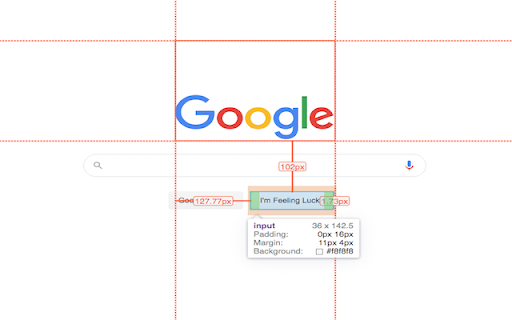
Hover inspector like in Zeplin , Figma
Inspector is the tool which mimic display dimension between selected and hover element. It would be good for designers, QA
As of June 2026, Hover inspector like in Zeplin , Figma has 9,000 users and a 4.78/5 rating from 32 reviews in the Developer Tools category.
Usersup 12.5 percent+12.5%
9.0K
9,000
Ratingno change0%
4.78
32 reviews
Reviewsno change0%
32
Version
3.1.1
Manifest V3
90-day change · In the last 90 days this extension gained 1.0K users.
History
4 snapshotsTracking since Apr 1, 2026.
View as table
| Date | Users | Rating | Reviews | Version |
|---|---|---|---|---|
| Apr 1, 2026 | 8.0K | 4.78 | 32 | 3.1.1 |
| Apr 21, 2026 | 9.0K | 4.78 | 32 | 3.1.1 |
| May 18, 2026 | 9.0K | 4.78 | 32 | 3.1.1 |
| Jun 1, 2026 | 10.0K | 4.78 | 32 | 3.1.1 |
| Now | 9.0K | 4.78 | 32 | 3.1.1 |
Permissions & access
- Permissions
- activeTabscriptingbackgroundstorage
- Host access
- *://*/*
Screenshots



About
version 3.1.1
- fix bugs,
- - fix esc key press behavior
- - fix formation css rule
- - fix popup display position
- add hovered element


version 3.1.0
- update UI
- add new features
- prepare project to new features

version 3.0.2
- fix bug:  prevent click(thanks Marcelo Alejandro)
- add background rule permission for save setting

version 3.0.1
- fix bug: extension dropped (thanks @invisioN7)

version 3.0.0
- refactor core(prepare for the new features)
- add sidebar (setting, more details of selected element)
- add freezing selected element after 2 click
- press 'space' for unfreeze selected element
- add link to discord
- add uninstall form
- fixed calculation position of popup

version 2.0.0
- used ReactJS (expected simplifying of maintain and support)
- add data: padding, margin, font, color, background, line-height, class, id
- fixed calculation position of popup

version 1.1.0
- add highline padding(green color) and margin(orange color).
- fix bugs

version 1.0.5.1
- minify file for more faster loading

version 1.0.5
- add top bar with styles(padding, margin, font-size, height, width) for hover and selected element
- fixed  bugs (when user scroll label and lines position not display correctly)
- add change style for label which display height and width hovered element
- change active and regular icon:
- add 2 hotkeys:
-- command + enter / ctrl + enter - for hide/show topbar
-- esc for close extension

version 1.0.4
- add functionality when start scroll
- change color of labels
- add dimension calculating when selected located in hovered element

version 1.0.3
- add dimension calculating when hovered located outside selected element
Technical
- Version
- 3.1.1
- Manifest
- V3
- Size
- 429KiB
- Min Chrome
- 88
- Languages
- 1
- Featured
- Yes
Metadata
- ID
- jbhnejndccdjigppalbbiphlbaaehpln
- Developer ID
- ucd8fb3734d61f4eb98ca0b8cbdbb2393
- Developer Email
- [email protected]
- Created
- Sep 17, 2018
- Last Updated (Store)
- Jun 3, 2025
- Last Scraped
- Jun 1, 2026
- Website
- —
Similar extensions
Alternatives to Hover inspector like in Zeplin , Figma, ranked by description similarity.

SkySpark Tweaks
Adds small tweaks to SkySpark.
18

Text
A text editor for Chrome OS and Chrome.
—
★ 4.0

Archetype Code Editor
A fast, offline code editor for all Chromebooks, based on the Monaco editor from VS Code.
659
★ 4.7

eDoC
eDoC is both an offline and an online editor with dropbox and local file integration. Built on top of the ace editor it offers many…
417
★ 3.3

Web Maker
Blazing fast & offline playground for your web experiments
50.0K
★ 4.8

CSS Stacking Context inspector
Helps inspecting the css stacking contexts and solving the z-index war.
9.0K
★ 3.7

User JavaScript and CSS
User JavaScript and CSS on any website
200.0K
★ 4.8

fonts infos
An extention to show/inspect and analyze fonts in web-pages, on single element or the whole document.
10.0K
★ 4.5
Data sourced from the Chrome Web Store · last verified Jun 1, 2026.