sFTP Client
Access your Local/Remote FTP server (including your NAS drive), local server, VPS, dedicated server, cloud server or shared hosting.
As of June 2026, sFTP Client has 50,000 users and a 2.12/5 rating from 1,012 reviews in the Developer Tools category.
Usersno change0%
50.0K
50,000
Ratingno change0%
2.12
1.0K reviews
Reviewsdown 0.1 percent−0.1%
1.0K
Version
2.9.3.0
Manifest V2
History
1 snapshotsTracking since May 3, 2026.
View as table
| Date | Users | Rating | Reviews | Version |
|---|---|---|---|---|
| May 3, 2026 | 50.0K | 2.12 | 1.0K | 2.9.3.0 |
| Now | 50.0K | 2.12 | 1.0K | 2.9.3.0 |
Permissions & access
- Permissions
- storageclipboardWriteclipboardReadunlimitedStoragecontextMenusfullscreenwebviewnotifications
- Host access
- <all_urls>, https://www.purpleio.uk/, https://api.purpleio.uk/, https://payments.purpleio.uk/, https://www.googleapis.com/
Screenshots


About
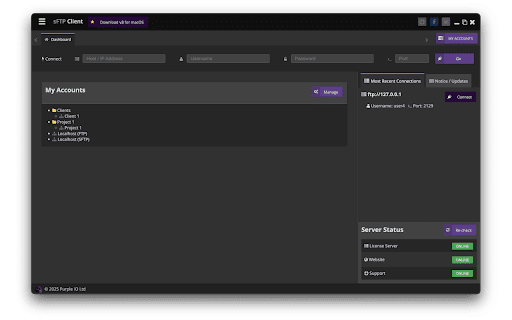
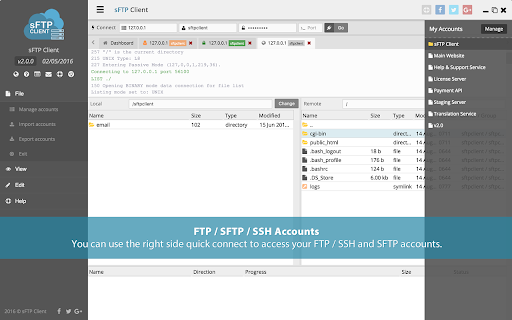
sFTP Client is all about simplicity, it has been built on the Google Chrome / Chrome OS packaged app interface allowing the app to be fast and responsive. Some of the functionality includes an FTP / SFTP Account Manager to store away and organise your most used and favourite FTP / SFTP connections allowing you to access them with a single click, File/Folder Queue to see your currently uploading/downloading items, powerful text editor (So you don't even need an extra program to modify your code), and much more...

Take a look at all of the great features on the sFTP Client app below.

Features:
=========
- Standard FTP Connections
- SSH over File Transfer Protocol (sFTP) Connections
- Permission Key File (SSH Key - RSA) for SSH Connections
- FTP/SFTP Passive Mode
- Connect to Remote (External) & Local (Internal) FTP / SFTP / SSH servers.
- Change File / Folder Permissions (By Checkbox or Value: e.g. 777)
- Upload / Download Multiple Files & Folders
- Quick Connect
- Editor Options: Tabbed Files, Customisation
- Drag and Drop Files / Folders
- Manage FTP / SFTP / SSH Accounts (Stored using the Google Chrome Local storage with password encryption for security)
- Powerful Text Editor with Syntax Highlighting (Save, Autosave and Auto Upload Features)
- Keyboard Selection (Move up, down, into (Enter) and back out (Backspace) of directories, includes a search ability to quickly access files / folders by typing on your keyboard)
- Import Accounts: sFTP Client
- Export Accounts
- Rename & Delete Files
- Create New File / Directory
- Refresh Local and Remote Lists
- Sort and Resize Columns
- Multi-Select Files & Folders
- Browse Local & Remote Folders by Path
- Local Directory: Select default local directory per connection as suppose to globally
- Quick Account Menu (One-click to open FTP / SFTP / SSH account connection from your saved list)
- Multiple FTP / SFTP / SSH Account Connections (Tabbed with scroll if you have a lot of connections open)
- Close Connection (Disconnects from server and removes all activity)
- Console Log (Shows all FTP / SFTP / SSH activity log)
- Transfer Queue (Queued files and folders, failed files and folders, completed files and folders)
- New Google Sockets API
- Remote & Local Menus
- Connect and list UNIX and MS-DOS directories
- Copy URLs to Clipboard
- 10 Most Recent Connections
- KeepAlive Connection
- Master Password Login (Keep all your FTP connections safe with 1 login)
- Synchronised Browsing

More features and functionality to come in free future updates!

Monthly or annual subscription available after 2 hour trial expires.
Technical
- Version
- 2.9.3.0
- Manifest
- V2
- Size
- 29.77MiB
- Min Chrome
- 34
- Languages
- 1
- Featured
- No
Metadata
- ID
- jajcoljhdglkjpfefjkgiohbhnkkmipm
- Developer ID
- u64996f10c83057e12e41b07bb4002a47
- Developer Email
- [email protected]
- Created
- Mar 27, 2014
- Last Updated (Store)
- Mar 23, 2025
- Last Scraped
- Jun 2, 2026
- Website
- purpleio.uk
- Support URL
- https://help.purpleio.uk/chrome
- Privacy Policy
- —
Similar extensions
Alternatives to sFTP Client, ranked by description similarity.

DEPRECATED Secure Shell App
(DEPRECATED: USE THE EXTENSION)
Terminal emulator and SSH and SFTP client.
200.0K
★ 4.4

SSH Client
Use SSH Client browser plugin to establish an SSH connection and get convenient online SSH access via a remote terminal.
1.0K
★ 3.0

Copiee - Clipboard Manager
Powerful clipboard manager with cloud sync, code detection, search, secret vault & many more features.
10

Keypress Editor
An code editor for Chrome.
1.0K
★ 3.9

S3 Browser & Cloud Storage Manager — Stream Vessel
S3 browser, client & file explorer for AWS S3 and S3-compatible storage. Browse, upload, download & manage files.
64
Take Webpage Screenshots Entirely - FireShot
Take FULL webpage screenshots. Capture, edit and save them to PDF/JPEG/GIF/PNG, upload, print, send to OneNote, clipboard or email.
3.0M
★ 4.8

CloudClip – Multicopy Clipboard History Manager with Dark Mode & CSV Export
CloudClip saves copied text, lets you search, reuse, delete, and export as CSV. Works offline with local storage and no tracking
545
★ 5.0

SolidSoft REST Client
Lightweight REST API client for Chrome © 2025 SolidSoft Marek Bar. All rights reserved.
3
Data sourced from the Chrome Web Store · last verified Jun 2, 2026.