
CloudClip – Multicopy Clipboard History Manager with Dark Mode & CSV Export
CloudClip saves copied text, lets you search, reuse, delete, and export as CSV. Works offline with local storage and no tracking
As of June 2026, CloudClip – Multicopy Clipboard History Manager with Dark Mode & CSV Export has 545 users and a 5.00/5 rating from 1 reviews in the Developer Tools category.
Usersup 1.7 percent+1.7%
545
545
Ratingno change0%
5.00
1 reviews
Reviewsno change0%
1
Version
2.2.0
Manifest V3
History
5 snapshotsTracking since Apr 20, 2026.
View as table
| Date | Users | Rating | Reviews | Version |
|---|---|---|---|---|
| Apr 20, 2026 | 536 | 5.00 | 1 | 2.2.0 |
| May 5, 2026 | 559 | 5.00 | 1 | 2.2.0 |
| May 15, 2026 | 575 | 5.00 | 1 | 2.2.0 |
| May 28, 2026 | 583 | 5.00 | 1 | 2.2.0 |
| Jun 9, 2026 | 548 | 5.00 | 1 | 2.2.0 |
| Now | 545 | 5.00 | 1 | 2.2.0 |
Permissions & access
- Permissions
- storagecontextMenusclipboardReadclipboardWriteactiveTabscripting
- Host access
- <all_urls>
Screenshots


About
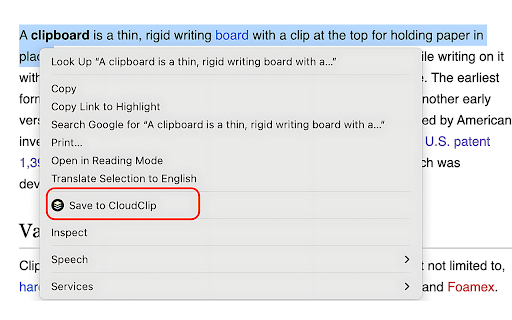
🚀 CloudClip – The Ultimate Clipboard History Manager for Chrome Boost your productivity with CloudClip, a powerful and user-friendly Chrome extension that helps you save, manage, and reuse multiple copied text snippets with ease. Whether you're a developer, writer, researcher, student, or multitasker, CloudClip keeps your clipboard content organized and accessible anytime. Copy once, reuse forever. CloudClip lets you effortlessly store your clipboard history, search saved content, export it, and paste instantly — all from a beautifully designed popup inside Chrome. CloudClip is 100% private and works offline. Your clipboard data never leaves your browser. Everything is securely stored using Chrome's local storage. Alternate Names: Clipboard Manager, Clipboard History Manager, Easy Copy Clips, Multi Copy Extension, Text Snippet Saver. If you've ever lost a copied link, code snippet, or note — this is your solution. 🔹 Key Features ✅ Keyboard Shortcut to copy any selected text to the clipboard Alt+Shift+C on Windows and Option-Shift-C on Mac. ✅ Multi-Copy Support: Automatically saves every piece of text you copy. ✅ Search & Filter: Quickly find the snippet you need. ✅ Click-to-Copy: One-click to re-copy saved items. ✅ Keyboard Navigation: Navigate your history without a mouse. ✅ Clear History: Remove individual or all clipboard entries. ✅ Export to CSV: Export your clipboard data (Premium feature). ✅ Dark/Light Mode: Choose a theme to match your mood. ✅ Donation Support: Like the tool? Help support it via PayPal. ✅ Offline & Private: No accounts. No tracking. No ads. 📌 Use Cases 🧑💻 Developers: Save code, logs, commands, and reuse easily. ✍️ Writers: Store drafts, quotes, and repeated phrases. 📊 Researchers: Collect and search references and notes. 🎓 Students: Copy notes, definitions, and web content while studying. 🤹 Productivity Fans: Automate your flow and avoid repetitive work. 🎨 User Experience CloudClip is designed to be minimal, clean, and fast. The popup UI acts as a lightweight clipboard dashboard, optimized for both light and dark themes. Built with modern tech for a smooth and intuitive experience. 🔐 Privacy You Can Trust CloudClip stores your data only on your local device. It doesn’t send your clipboard data to any server. There are no trackers, no logins, no external APIs. Your clipboard — your data. 🛠️ How It Works 1. Install CloudClip from the Chrome Web Store 2. Start copying text as you normally would 3. Click the CloudClip icon to view your history 4. Re-copy or delete saved items instantly 5. Optionally, export your data to CSV 💬 Feedback & Support We're constantly improving! If you have suggestions or encounter issues, use the feedback form or visit our support link. We’d love to hear from you and make CloudClip even better. 🔖 Tags #ClipboardManager #ClipboardHistory #ProductivityTool #TextSnippets #MultiCopy #ExportToCSV #DarkMode #OfflineTool #PrivacyFirst #CopyPaste #DeveloperTools
Technical
- Version
- 2.2.0
- Manifest
- V3
- Size
- 138KiB
- Min Chrome
- 88
- Languages
- 1
- Featured
- No
Metadata
- ID
- jhoblmloogmjhociofmbjpijnajcmnmc
- Developer ID
- u69f19f5e0bffae3ab77dff4848222061
- Developer Email
- [email protected]
- Created
- Aug 31, 2023
- Last Updated (Store)
- Jul 16, 2025
- Last Scraped
- Jun 9, 2026
- Website
- —
- Support URL
- —
- Privacy Policy
- —
Similar extensions
Alternatives to CloudClip – Multicopy Clipboard History Manager with Dark Mode & CSV Export, ranked by description similarity.

Smart Clipboard Manager
Automatically saves your copy-paste history. Quickly access, search, and reuse your last 50 copied items with a clean, modern UI.
—
★ 5.0

Smart Clipboard Manager
Tracks your clipboard history and lets you reuse copied text easily.
4
★ 5.0

Slash Mark - CopyKeep
Automatically saves copied text and shows live-updating history with date, time, copy & delete.
1

CopyVault: Clipboard History Manager
Best local clipboard manager to save, search, and pin your copy-paste history automatically.
—

Auto Copy Selected Text — Improved
Automatically copy selected text, highlight selections with hover color, keep copy history and easy controls.
28

Copiee - Clipboard Manager
Powerful clipboard manager with cloud sync, code detection, search, secret vault & many more features.
10

Clipboard Vault
Clipboard Vault: Track your copied text history.
—

Infinite Clipboard Manager
Save every copied text in Chrome with infinite clipboard history.
10
★ 5.0
Data sourced from the Chrome Web Store · last verified Jun 9, 2026.