
Keep Computer Awake (for a While)
Keep your computer running or screen on, and return to default state by a timer.
As of May 2026, Keep Computer Awake (for a While) has 10,000 users and a 4.25/5 rating from 12 reviews in the Workflow & Planning category.
Usersup 11.1 percent+11.1%
10.0K
10,000
Ratingno change0%
4.25
12 reviews
Reviewsno change0%
12
Version
1.0.7
Manifest V3
90-day change · In the last 90 days this extension gained 1.0K users.
History
1 snapshotsTracking since Apr 24, 2026.
View as table
| Date | Users | Rating | Reviews | Version |
|---|---|---|---|---|
| Apr 24, 2026 | 9.0K | 4.25 | 12 | 1.0.7 |
| Now | 10.0K | 4.25 | 12 | 1.0.7 |
Permissions & access
- Permissions
- poweralarmsbackgroundstorage
- Host access
- None declared
Screenshots
About
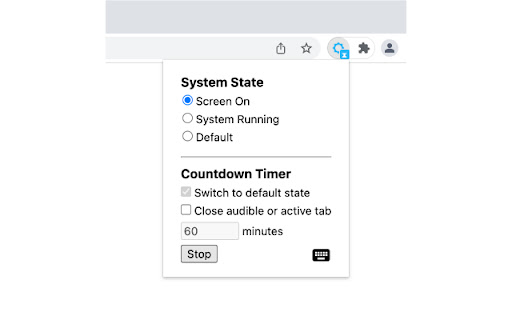
Similar to other "Keep Awake" extensions, the basic function of this extension is to override current system energy-saving setting, and prevent your computer from sleeping or turning off the screen. In addition, this extension provides a countdown timer that can switch to default state and (optionally) close the active tab. For example you can keep your computer running for a while, then let it go to sleep. It also supports keyboard shortcuts to change the state.

Click the extension icon, you can switch between three states:
● Keep screen on: The computer does not go to sleep, and the screen keeps on. For example, when you do a presentation.
● Keep system running: The computer does not go to sleep, but the screen can be turned off. For example, when you upload or download files, the screen can be turned off, but need to keep the system running.
● System default state: Cancel the above two states. Whether to go to sleep or turn off the screen depends on the energy-saving setting of your operating system.

This extension provides a countdown timer. You can use it:
1. Switch to default state. For example, when a program is being executed, it may take some time to complete. In this situation, you can set the state to keep system running, and switch to default state an hour later.
2. Set a timer to close the tab that is playing a podcast or video when you go to bed. This may help you fall asleep better.

Note: if you turn your computer to sleep manually (e.g. close the laptop lid), or quit the browser completely, this extension can't keep your computer running.
Technical
- Version
- 1.0.7
- Manifest
- V3
- Size
- 13.97KiB
- Min Chrome
- 88
- Languages
- 2
- Featured
- Yes
Metadata
- ID
- imbpigcghoambmanjekibelfjemnnool
- Developer ID
- ub9d0093c83f93801cb34eac94c7e5701
- Developer Email
- [email protected]
- Created
- Feb 5, 2020
- Last Updated (Store)
- Feb 22, 2023
- Last Scraped
- May 19, 2026
- Website
- guokai.dev
- Support URL
- —
- Privacy Policy
- https://guokai.dev/privacy/
Similar extensions
Alternatives to Keep Computer Awake (for a While), ranked by description similarity.
Keep Awake
Keep Awake: Prevent screen dimming & sleeping during tasks. Boost productivity effortlessly. A must-have Chrome Extension!
1.0K
★ 5.0

Power controler
Control when your computer goes sleep (turn off the monitor) or awaken. You can postpone your change in some minutes or hours.
—

Be awake
Extension that keeps your computer awake, by requesting the system not to sleep when activated using icon.
6.0K
★ 3.8

Stay Awake: Keep Your Computer Awake
Keep your system and display awake whenever you need it or during long downloads.
10.0K
★ 4.5

Keep Logged In
Keeps all tabs active to prevent timeouts and maintain login sessions
103

Softblocker
sets a timer when you go on unproductive websites
1

Tab Suspender
Automatically suspend inactive tabs to save memory
115
★ 5.0

Awake - Keep awake while downloading
Prevent your computer from going to sleep while downloads are in progress.
1.0K
★ 4.0
Data sourced from the Chrome Web Store · last verified May 19, 2026.