Keep Awake
Keep Awake: Prevent screen dimming & sleeping during tasks. Boost productivity effortlessly. A must-have Chrome Extension!
As of May 2026, Keep Awake has 1,000 users and a 5.00/5 rating from 3 reviews in the Workflow & Planning category.
Usersno change0%
1.0K
1,000
Ratingno change0%
5.00
3 reviews
Reviewsno change0%
3
Version
1.0.1
Manifest V3
Permissions & access
- Permissions
- storagepoweralarms
- Host access
- None declared
Screenshots
About
🚀 Boost Your Productivity with Keep Awake Chrome Extension

😴 Are you tired of your screen dimming or slipping into sleep mode?
💻 Enter Keep Awake, the ultimate solution to keep your screen alive and enhance productivity.

🌟 Keep Awake ensures your screen remains fully responsive, eliminating the need for constant interaction to prevent dimming or sleep mode.

🔝 Top-notch user experience awaits you:
➤ Enjoy a user-friendly interface for seamless navigation.
➤ Rest assured with absolute security and confidentiality of communications.
➤ Access all features quickly and efficiently for enhanced productivity.

🚀 Quick Start Tips
1. Click "Add to Chrome"
2. Confirm Installation
3. Wait for Installation
4. Activate Keep Awake
5. Start Enjoying Uninterrupted Productivity

🛠️ Key Features:
1️⃣ Dark/Light modes
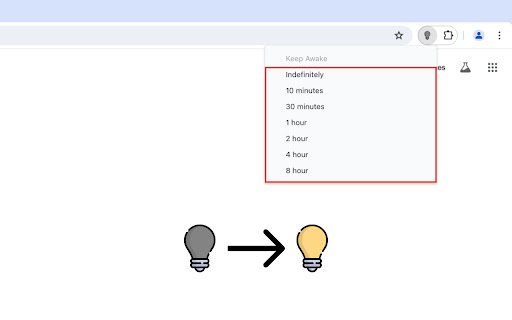
2️⃣ Indefinitely option
3️⃣ Timers to disable sleep mode

💎 Here's who can benefit from using Keep Awake:
🔹 Students: Whether you're studying for exams
🔹 Professionals: From professionals working on important presentations
🔹 Content Creators: If you're a content creator recording tutorials
🔹 Freelancers: Freelancers working on tight deadlines
🔹 Researchers: Conducting online research or analyzing data
🔹 Web Developers: Working on coding projects or testing websites
🔹 Anyone Seeking Productivity: Ultimately, anyone seeking to enhance their productivity

🛡️ Safety and Privacy:
🔹 Zero Data Collection: Keep Awake doesn't collect data, ensuring your information stays private.

🧐 FAQs about the extension

🤔 What is Keep Awake Chrome Extension?
💡 Keep Awake is a Chrome extension designed to prevent screen dimming.
💡 It ensures uninterrupted screen activity during tasks.

🔄 How does Keep Awake work?
💡 Once activated, Keep Awake runs in the background.
💡 It constantly monitors your screen activity, preventing it from dimming or entering sleep mode.

⚙️ Can I customize the settings of Keep Awake?
💡 Absolutely! Keep Awake offers customizable settings.
💡 You can adjust the duration to keep your screen alive and specify active websites.

🖥️ Does Wakeful Screen consume a lot of system resources?
💡 No, Wakeful Screen is designed to consume minimal system resources.
💡 It ensures smooth operation without slowing down your device or draining your battery unnecessarily.

⏰ How long can I disable sleep mode with Temporarily Disable Sleep Mode?
💡 With Temporarily Disable Sleep Mode, you can disable sleep mode indefinitely.
💡 It ensures uninterrupted screen activity for as long as you need it.

⏲️ Can I set timers to disable sleep mode for specific durations?
💡 Yes, Keep Awake allows you to set timers to automatically disable sleep mode for specific durations.
💡 It enables you to focus on your tasks without worrying about screen dimming or interruptions.

✨ Is Keep Awake easy to install and use?
💡 Absolutely! Keep Awake features an intuitive interface and user-friendly design.
💡 It makes it quick and easy to install and activate with just a few clicks.

📲 How can I get started with Screen Alive?
💡 To get started with Screen Alive, install the extension from the Chrome Web Store and activate it.
💡 Customize the settings to suit your preferences and enjoy uninterrupted screen activity and enhanced productivity!

💸 Can I use it for free?
💡 Yes, the extension is available as a free Chrome extension. Free Turn off sleep mode.

📥 How do I install?
💡 To install the Turn off sleep mode, go to the Chrome Web Store and select "Add to Chrome".
💡 It will be added to your browser, and you can start using it.

🌐 Experience a seamless, more efficient web surfing today. Try it now!
Technical
- Version
- 1.0.1
- Manifest
- V3
- Size
- 244KiB
- Min Chrome
- 88
- Languages
- 52
- Featured
- No
Metadata
- ID
- hjfibcmcdbeaikcglnhineogdmpdchio
- Developer ID
- u91f180e325315594cd3a9763123a7a69
- Developer Email
- [email protected]
- Created
- May 13, 2024
- Last Updated (Store)
- May 13, 2024
- Last Scraped
- May 21, 2026
- Website
- —
- Support URL
- —
Similar extensions
Alternatives to Keep Awake, ranked by description similarity.

Be awake
Extension that keeps your computer awake, by requesting the system not to sleep when activated using icon.
6.0K
★ 3.8

BreakSpace
Boost focus & well-being with smart break reminders — custom alerts, breaks, messages, and daily goals.
23
★ 5.0

Stay Awake: Keep Your Computer Awake
Keep your system and display awake whenever you need it or during long downloads.
10.0K
★ 4.5

Timer, Alarm ,Countdown and Stopwatch for Google Chrome™
A simple Timer, Alarm ,Countdown and Stopwatch for Google Chrome
21
Keep Computer Awake (for a While)
Keep your computer running or screen on, and return to default state by a timer.
10.0K
★ 4.3

Tab Suspender – Free Up RAM & Boost Browser Speed
Keep your browser fast with Tab Suspender! Suspend inactive tabs,free up memory,reduce lag,rename tabs, and manage data efficiently.
7.0K
★ 4.7

Screen Timer
A simple and powerful timer to track your focus time manually or automatically by website, with notifications.
65
★ 5.0

Keep Logged In
Keeps all tabs active to prevent timeouts and maintain login sessions
103
Data sourced from the Chrome Web Store · last verified May 21, 2026.