
Stay Awake: Keep Your Computer Awake
Keep your system and display awake whenever you need it or during long downloads.
As of May 2026, Stay Awake: Keep Your Computer Awake has 10,000 users and a 4.50/5 rating from 4 reviews in the Workflow & Planning category.
Usersup 11.1 percent+11.1%
10.0K
10,000
Ratingno change0%
4.50
4 reviews
Reviewsup 100.0 percent+100.0%
4
Version
1.2.4
Manifest V3
90-day change · In the last 90 days this extension gained 1.0K users.
History
3 snapshotsTracking since Apr 1, 2026.
View as table
| Date | Users | Rating | Reviews | Version |
|---|---|---|---|---|
| Apr 1, 2026 | 9.0K | 4.50 | 2 | 1.2.4 |
| May 1, 2026 | 10.0K | 4.50 | 2 | 1.2.4 |
| May 29, 2026 | 10.0K | 4.67 | 3 | 1.2.4 |
| Now | 10.0K | 4.50 | 4 | 1.2.4 |
Permissions & access
- Permissions
- poweridlestorageoffscreen
- Host access
- None declared
Screenshots

About
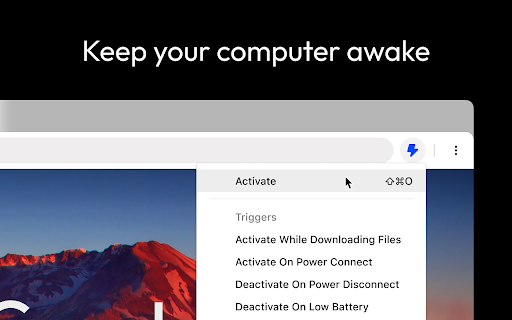
Introducing Stay Awake, the keep awake extension for Google Chrome™. Keep your system awake on demand whenever you want or let Stay Awake automatically activate during downloads.

FEATURES

- Keep Awake on Demand

Whenever you need your system to stay awake, simply activate the extension by clicking the extension icon and choosing "Activate" or using the keyboard shortcut Ctrl+Shift+O / Command+Shift+O at any time.

- Keep Awake During Downloads

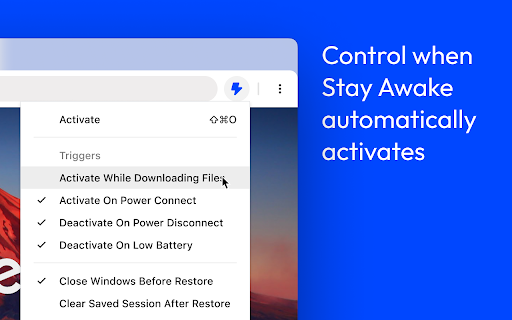
Tired of downloads being unexpectedly interrupted by your system going to sleep? Enable the "Activate while downloading files" option and Stay Awake will automatically activate while a download is is progress. Once all your downloads are complete, Stay Awake will deactivate itself, allowing your system to rest peacefully.

- Keyboard Support

Activate the extension by clicking the extension icon and choosing "Activate" or use the keyboard shortcut Ctrl+Shift+O / Command+Shift+O at any time. The arrow keys can be used to navigate the menu or keyboard shortcuts can be used to quickly access the menu items.

USAGE

Once installed, you can access the extension by clicking the extension icon in the toolbar.

- Click Activate or use the global shortcut Command+Shift+O to enable the extension.
- Manage preferences from the popup.
Technical
- Version
- 1.2.4
- Manifest
- V3
- Size
- 48.94KiB
- Min Chrome
- 109
- Languages
- 1
- Featured
- Yes
Metadata
- ID
- gofaiibillcpfajafckhoieamembimje
- Developer ID
- ub35186ba2fe065983d099b234cc90e37
- Developer Email
- [email protected]
- Created
- May 28, 2023
- Last Updated (Store)
- Aug 29, 2024
- Last Scraped
- May 29, 2026
- Website
- —
- Support URL
- —
- Privacy Policy
- —
Similar extensions
Alternatives to Stay Awake: Keep Your Computer Awake, ranked by description similarity.

Awake - Keep awake while downloading
Prevent your computer from going to sleep while downloads are in progress.
1.0K
★ 4.0

Be awake
Extension that keeps your computer awake, by requesting the system not to sleep when activated using icon.
6.0K
★ 3.8

Keep Awake
Keep Awake: Prevent screen dimming & sleeping during tasks. Boost productivity effortlessly. A must-have Chrome Extension!
1.0K
★ 5.0

Keep Computer Awake (for a While)
Keep your computer running or screen on, and return to default state by a timer.
10.0K
★ 4.3

Keep Awake
Override system power settings.
—
★ 4.2

WorkWise
Stay motivated and organized. Get time, quotes, and a task manager. Add, update, or delete messages anytime.
2

Drowzy - Tab Suspender & Memory Saver
Auto-suspend inactive tabs to save up to 80% RAM. Lightweight, private, no tracking. Tabs are never lost.
517
★ 5.0

LockedIn
Stay focused on tasks
54
★ 4.7
Data sourced from the Chrome Web Store · last verified May 29, 2026.