
OpenIn
Open links directly in OpenIn.
As of May 2026, OpenIn has 783 users and a 5.00/5 rating from 3 reviews in the Productivity category.
Usersup 8.9 percent+8.9%
783
783
Ratingno change0%
5.00
3 reviews
Reviewsno change0%
3
Version
4.3
Manifest V3
History
5 snapshotsTracking since Apr 1, 2026.
View as table
| Date | Users | Rating | Reviews | Version |
|---|---|---|---|---|
| Apr 1, 2026 | 719 | 5.00 | 3 | 4.3 |
| Apr 21, 2026 | 659 | 5.00 | 3 | 4.3 |
| May 6, 2026 | 832 | 5.00 | 3 | 4.3 |
| May 18, 2026 | 1.0K | 5.00 | 3 | 4.3 |
| May 31, 2026 | 832 | 5.00 | 3 | 4.3 |
| Now | 783 | 5.00 | 3 | 4.3 |
Permissions & access
- Permissions
- activeTabnativeMessagingcontextMenusstoragetabs
- Host access
- *://*/*
Screenshots
About
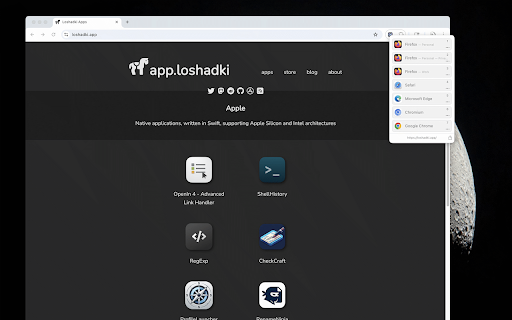
Open links in another browser or Profile using OpenIn (macOS only).

Requires OpenIn v4.3
(Available as a beta via Setapp, TestFlight, or direct download.)

What is OpenIn?
OpenIn is a macOS app that lets you choose which browser or application handles any link you click. It integrates with browser profiles, so you can redirect links to a specific profile, browser, or app based on your own rules and conditions.

Extension Features

- Toolbar icon
Quickly open the OpenIn App Selection dialog to send any link to another browser, profile, or application.

- Context-menu command
“Open in OpenIn” appears when you right-click a link, letting you forward it directly without leaving the page.

- Automatic link overrides
In the add-on settings, configure domains or link patterns so they’re sent to OpenIn automatically.
Technical
- Version
- 4.3
- Manifest
- V3
- Size
- 760KiB
- Min Chrome
- 88
- Languages
- 1
- Featured
- No
Metadata
- ID
- iinbnkcidamhlklkapebjknpfdelahel
- Developer ID
- u3247816a8311375cc5532ada92904f70
- Developer Email
- [email protected]
- Created
- Jul 17, 2025
- Last Updated (Store)
- Jul 17, 2025
- Last Scraped
- May 31, 2026
- Website
- loshadki.app
- Support URL
- https://loshadki.app/openin4/#support
- Privacy Policy
- https://loshadki.app/openin4/120-privacy-policy/
Similar extensions
Alternatives to OpenIn, ranked by description similarity.

OpenWith | Browser Chooser
Open links in the right browser every time. Companion extension for the OpenWith desktop browser chooser.
—

Open in IE™
Open links in IE (Internet Explorer)
10.0K
★ 2.8

Open In New Tab
Force all links on selected websites to open in new tabs. Simply click the extension icon and add any website to your whitelist.
431
★ 5.0

OpenLinks
Open or Copy multi links easily, just select it !
7

OpenMode
Open all links in new tabs. Control behavior per site.
1

Open in Brave™ Browser
Send the current website, link, or all open tabs to the Brave web browser
10.0K
★ 3.1

Open Multi Tabs
Paste a list of URLs and open them all at once. Save presets, set delays, open in new window or incognito.
14
★ 5.0

Deep Links, QR Codes and Short URLs: LinkTwin
Create app-opening deep links, QR codes and short links in one-click. Open YouTube, Amazon and 100+ apps directly in the app.
515
Data sourced from the Chrome Web Store · last verified May 31, 2026.