
Open Multi Tabs
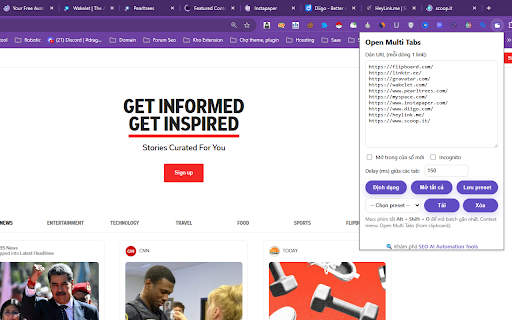
Paste a list of URLs and open them all at once. Save presets, set delays, open in new window or incognito.
As of June 2026, Open Multi Tabs has 14 users and a 5.00/5 rating from 1 reviews in the Productivity category.
Usersup 40.0 percent+40.0%
14
14
Ratingno change0%
5.00
1 reviews
Reviewsno change0%
1
Version
1.0.4
Manifest V3
History
5 snapshotsTracking since Apr 20, 2026.
View as table
| Date | Users | Rating | Reviews | Version |
|---|---|---|---|---|
| Apr 20, 2026 | 10 | 5.00 | 1 | 1.0.4 |
| May 5, 2026 | 11 | 5.00 | 1 | 1.0.4 |
| May 15, 2026 | 13 | 5.00 | 1 | 1.0.4 |
| May 28, 2026 | 11 | 5.00 | 1 | 1.0.4 |
| Jun 9, 2026 | 13 | 5.00 | 1 | 1.0.4 |
| Now | 14 | 5.00 | 1 | 1.0.4 |
Permissions & access
- Permissions
- storagetabscontextMenus
- Host access
- None declared
Screenshots
About
Open Multi Tabs is a simple yet powerful Chrome Extension that helps you open multiple links in one click.
Just paste your list of URLs (one per line) and choose your options:
- Open in current or new window
- Delay between opening tabs
- Incognito support (when enabled)
- Save & load presets for your favorite sets of links

The extension comes with 2 ready-made presets:
• Social Share (Facebook, LinkedIn, X, Pinterest, Quora, Mastodon, Ko-fi, Tumblr, Band, Glose, Ok.ru)
• Social Bookmark (Flipboard, Linktree, Gravatar, Wakelet, Pearltrees, Myspace, Instapaper, Diigo, Heylink, Scoop.it)

Features:
- Auto-format pasted text to clean URLs
- Context menu shortcut
- Keyboard shortcut (Alt + Shift + O)
- Secure, no external servers – all data stored locally or synced via Chrome storage

Useful for marketers, social media managers, SEO professionals, and anyone who frequently opens groups of links.
Technical
- Version
- 1.0.4
- Manifest
- V3
- Size
- 10.75KiB
- Min Chrome
- 88
- Languages
- 1
- Featured
- No
Metadata
- ID
- bijifnmkdgjfgpajhcklkpedgcmibegp
- Developer ID
- u905fbb64795b82c1d61aa40935fa1dbb
- Developer Email
- [email protected]
- Created
- Aug 20, 2025
- Last Updated (Store)
- Aug 20, 2025
- Last Scraped
- Jun 9, 2026
- Website
- https://duythin.digital/
- Support URL
- https://duythin.digital/gioi-thieu/
- Privacy Policy
- https://duythin.digital/privacy-policy/
Similar extensions
Alternatives to Open Multi Tabs, ranked by description similarity.

Open Multi URLs
Open multiple URLs at once. Paste URLs (one per line), set delay & target, then launch.
7

Open Multiple URLs
Paste multiple URLs and open them all in new tabs instantly.
9

Bulk Link Opener
Open multiple links in new tabs or windows with one click.
41

Bulk URL Opener
Quickly open multiple URLs with a single click. Perfect for daily routines, research, and workflow automation.
5
★ 5.0

URLs Manager
Open multiple URLs at once
89
★ 5.0

Bulk/Multiple URL Opener in 1 CLICK
Open multiple URLs at once with advanced options
133
★ 5.0

Bulk URL Opener
Open multiple URLs in batch with ease
11
★ 5.0

Open Multiple URLs
Efficiently open multiple URLs at once with this bulk URL opener extension for Chrome. Launch all links in new tabs quickly.
494
★ 5.0
Data sourced from the Chrome Web Store · last verified Jun 9, 2026.