
Photo Zoom
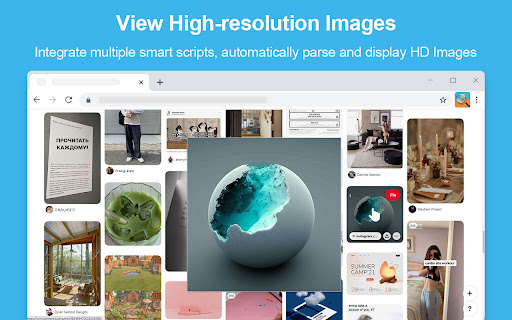
You don’t need click to see HD image, just put the mouse on it, you can zoom the image on any website
As of May 2026, Photo Zoom has 10,000 users and a 3.28/5 rating from 53 reviews in the Workflow & Planning category.
Usersno change0%
10.0K
10,000
Ratingdown 0.9 percent−0.9%
3.28
53 reviews
Reviewsup 1.9 percent+1.9%
53
Version
1.2.1
Manifest V3
History
1 snapshotsTracking since Apr 29, 2026.
View as table
| Date | Users | Rating | Reviews | Version |
|---|---|---|---|---|
| Apr 29, 2026 | 10.0K | 3.31 | 52 | 1.2.1 |
| Now | 10.0K | 3.28 | 53 | 1.2.1 |
Permissions & access
- Permissions
- downloadstabsstoragedeclarativeNetRequestunlimitedStorage
- Host access
- *://*/*
Screenshots

About
Photo Zoom is a browser extension that helps you quickly view the "full-size picture" corresponding to the thumbnails on the page. Just hover your mouse over the thumbnail to display the corresponding high-resolution image. Currently supported websites include Facebook, Instagram, Pinterest and many other websites, and the smart photo-view script will be continuously updated.

● Rich shortcut key operations:
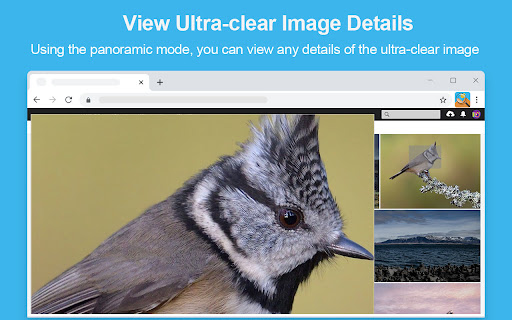
   Switch view mode: A (auto) / M (mini) / I (moderate) / P (panoramic)
   Switch to the last used view mode: V
   View high-resolution images in a new tab: Tab
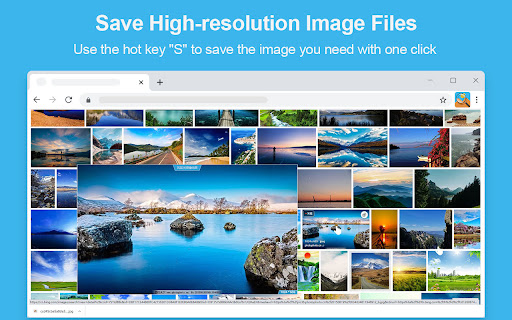
   Save high resolution pictures: S
   Copy high resolution picture address: C
   Close the picture preview window: Esc
   Rotate the picture counterclockwise: Shift + Ctrl + ←
   Rotate the picture clockwise: Shift + Ctrl + →
   Up / Right / Down / Left Scroll the picture ↑ / → / ↓ / ←:
   Scroll the picture up/down according to the visual height of the picture: PgUp / PgDown
   Scroll to the top / bottom of the picture: Home / End

● Personalized setting options:
   Open or close a website separately: Use the shortcut key “ALT+S” to close or open the current website.
   Control photo display mode: You can use Ctrl/Alt/Shift keys to coordinate the display of pictures when the mouse is moved over.
   Display original photo size: Set whether to display the high-definition image size in the photo preview window.
   Show photo title: Set whether to display the picture ruler title in the photo preview window.
   Special effect display: set the animation that appears in the photo preview window.

   All settings will be automatically saved, remember the last settings, no need to reset each time.

● Regarding photo loading speed:
  Photo Zoom will try to get the largest size of the original photo corresponding to the thumbnail. Therefore, when your network environment is poor or the size of the original photo is too large, the photo loading may be slow.

● About the smart script for view photo:
   This extension currently integrates smart scripts for view photo of multiple websites and will continuously update. If you encounter a website that cannot display large photo, you can contact us to provide smart support by leaving a message.
Technical
- Version
- 1.2.1
- Manifest
- V3
- Size
- 1.59MiB
- Min Chrome
- 88
- Languages
- 2
- Featured
- Yes
Metadata
- ID
- ihcmokloommhoalgdboldpnafcngaheo
- Developer ID
- uc8c18774b8f43f666c4d1c299c98f60f
- Developer Email
- [email protected]
- Created
- Jan 23, 2022
- Last Updated (Store)
- May 10, 2024
- Last Scraped
- May 25, 2026
- Website
- —
- Support URL
- —
Similar extensions
Alternatives to Photo Zoom, ranked by description similarity.

Image Zoom Tool
Image Zoom Tool can zoom any image in your browser. Hover image will see fullsize this image.
6.0K
★ 1.8

Image Zoom
Image Zoom – Simple, Fast, No-Nonsense Zooming
2.0K
★ 3.8

HoverZoom Vision
Zoom images and videos by hovering on Facebook, Amazon, and all sites by AIO.com.ai
14

ZOOM IMAGE for X(Twitter)
X(Twitter)に画像拡大機能を追加します
4.0K
★ 5.0

CaptureZoom Pro
Manipulate Screenshots With Just A Few Clicks!
2

Auto Image Saver: Bulk Downloader
Download HD images instantly. The fastest Auto Image Saver with bulk downloading, smart filtering, and keyword search.
27
★ 3.4

Picsee - collect and organize image
This extension makes easy to collect images or videos and save full-page screenshots from website
1.0K
★ 3.0

Image downloader - picture and photos saver
Find and download images from any web pages. Filter or select all at once to bulk download.
200.0K
★ 4.8
Data sourced from the Chrome Web Store · last verified May 25, 2026.