
CaptureZoom Pro
Manipulate Screenshots With Just A Few Clicks!
As of May 2026, CaptureZoom Pro has 2 users in the Workflow & Planning category.
Usersup 100.0 percent+100.0%
2
2
Ratingno change0%
—
— reviews
Reviewsno change0%
—
Version
1.0
Manifest V3
History
1 snapshotsTracking since Apr 26, 2026.
View as table
| Date | Users | Rating | Reviews | Version |
|---|---|---|---|---|
| Apr 26, 2026 | 1 | — | — | 1.0 |
| Now | 2 | — | — | 1.0 |
Permissions & access
- Permissions
- activeTabstorage
- Host access
- None declared
Screenshots
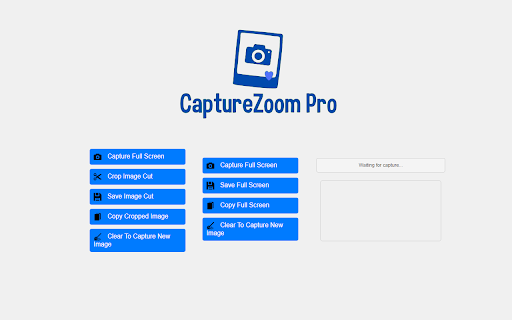
About
This revolutionary tool allows you to take screenshots directly from your browser with our powerful two-in-one crop, save and copy feature. Remember to respect copyright and avoid using protected content without permission.

💬Amazing Features of CaptureZoom Pro:

✓ Easy image captures.

✓ Crop to get exactly what you need.

✓ Save/Download, cropped or full screen captures, directly to your device.

✓ Copy and Paste into sites that support direct pasting into input boxes.

✓ No Login Required: No need for complicated passwords or logins.

✓ Intuitive and Secure: Enjoy an intuitive and secure interface for an unparalleled user experience.

✓ 24/7 Developer Support: Get help whenever you need it with our 24/7 support.

✓ Free version limitations: Free users face usage limitations, including a 10-second wait time between copying and pasting cropped images. Exceeding the copy limit opens a new tab directing you to our premium version page for unlimited copy and paste capabilities without waiting.

✓ Premium Version: Enjoy unlimited access to the functionality to copy and paste cropped screenshots, without limits or waiting times.

This Chrome extension can be installed for online use on Mac and Windows computers. Just add it to your browser – no additional software required.

This is an unofficial app independently developed and maintained.

© Copyright 2024
All rights reserved.
Technical
- Version
- 1.0
- Manifest
- V3
- Size
- 293KiB
- Min Chrome
- 88
- Languages
- 1
- Featured
- No
Metadata
- ID
- fjbkghhdcmlkkgepdkgdcgdccikdgcec
- Developer ID
- u6f0a7be844d18fb604b43742b9ee162d
- Developer Email
- [email protected]
- Created
- May 24, 2024
- Last Updated (Store)
- May 24, 2024
- Last Scraped
- May 23, 2026
Similar extensions
Alternatives to CaptureZoom Pro, ranked by description similarity.

Free Snipping Tool
Professional snipping tool with full page, selection, and scrolling capture capabilities
40.0K
★ 3.9

Recorder & Screenshot | Sitespedia - Screen Video Recorder & Screenshot
Take screenshots entirely or partially of websites, annotate them, and manage them in a centralized place.
6

Screenshot (Capture Page) Tool - WebCapturePro
Capture, edit, and customize webpage screenshots to your liking. Adjust proportions and add watermarks—all for free!
83
★ 5.0

Simple Screen Capture: Full Page Screenshot
Simple Screen Capture is a handy Chrome Extension that allows you to effortlessly capture full page screenshots with just a click.
5.0K
★ 4.3

SnipFlow - Smart Screenshot Assistant
Capture screenshots and get instant AI-powered answers. Perfect for homework help and quick problem solving.
1

Screenshot and screen video recording - Screeny
The #1 screen recorder and screenshot tool! Full capture and video recording of your screen.
80.0K
★ 4.7

CaptureNShare: Capture, Record, Edit & Share
Transforms your screen into a canvas—effortlessly record, edit, and share high-quality screenshots and videos like a pro!
38
★ 4.9

Screenety - Screen Recorder & Annotation Tool
Screenshot tool
154
★ 5.0
Data sourced from the Chrome Web Store · last verified May 23, 2026.