
Tab Nodes Tree - Vertical Tree Style Tabs in Side Panel
Effortlessly navigate and organize your tabs with an intuitive tree-style view
As of June 2026, Tab Nodes Tree - Vertical Tree Style Tabs in Side Panel has 10,000 users and a 4.59/5 rating from 83 reviews in the Functionality & UI category.
Usersno change0%
10.0K
10,000
Ratingdown 0.4 percent−0.4%
4.59
83 reviews
Reviewsup 23.9 percent+23.9%
83
Version
1.7.2
Manifest V3
90-day change · In the last 90 days this extension 2 version updates, changed permissions.
History
9 snapshotsTracking since Apr 20, 2026.
View as table
| Date | Users | Rating | Reviews | Version |
|---|---|---|---|---|
| Apr 20, 2026 | 10.0K | 4.61 | 67 | 1.6.3 |
| May 5, 2026 | 10.0K | 4.61 | 67 | 1.6.3 |
| May 9, 2026 | 10.0K | 4.61 | 70 | 1.7.0 |
| May 16, 2026 | 10.0K | 4.59 | 71 | 1.7.0 |
| May 21, 2026 | 10.0K | 4.57 | 72 | 1.7.2 |
| May 30, 2026 | 10.0K | 4.56 | 75 | 1.7.2 |
| Jun 2, 2026 | 20.0K | 4.58 | 79 | 1.7.2 |
| Jun 10, 2026 | 20.0K | 4.58 | 81 | 1.7.2 |
| Jun 13, 2026 | 20.0K | 4.59 | 82 | 1.7.2 |
| Now | 10.0K | 4.59 | 83 | 1.7.2 |
Changelog
- May 16, 2026permissions
tabs, sidePanel, tabGroups, storage, commands, alarms
tabs, sidePanel, tabGroups, storage, commands, alarms, webNavigation
- May 5, 2026description
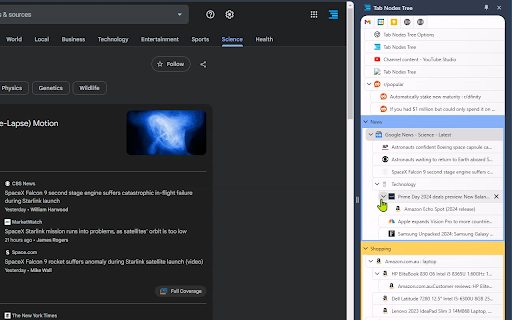
Web browsing often involves opening multiple child pages from a single website. Traditional horizontal tab rows fail to effectively display these parent-child relationships. Tab Nodes Tree solves this problem with its vertical, tree-structured layout, allowing you to instantly grasp the hierarchy of your open pages at a glance. With drag-and-drop functionality, you can effortlessly rearrange and restructure your tab hierarchy as needed.

Moreover, horizontal tabs frequently truncate page titles due to limited space, making it challenging to locate specific open tabs. With Tab Nodes Tree, you can see full page titles, significantly enhancing your ability to navigate between tabs.

This extension is particularly beneficial for power users who regularly work with 50 or more open tabs. It's also ideal for those with widescreen displays, as it makes efficient use of extra horizontal space that often goes unused.

Experience a more organized and intuitive way to manage your tabs with Tab Nodes Tree!

Features:
⭐ Light/Dark theme, or follow the System setting.
⭐ Native Chrome Tab Bar Feature Parity: Move, Reload, Duplicate, Pin, Mute, Group, Move to Another Window.
⭐ Multi-Tab Node Selection Actions: Move, Reload, Duplicate, Pin, Mute, Group, Move to Another Window.
⭐ Two-Way Sync with Chrome's Native Tab Row.
⭐ Effortlessly Build a Tab Nodes Tree Structure with Drag and Drop.
⭐ Collapse and Expand Node Trees.
⭐ A Range of Node Tree Settings.
⭐ "Create a new tab at the same level" shortcut: (Windows: Alt+A, Mac: Ctrl+Shift+A).
⭐ "Create a new tab as a child" shortcut: (Windows: Alt+S, Mac: Ctrl+Command+A).
🌟 (Pro) Quick Navigation Panel: Helps you rapidly jump between Groups and Branch Tab Nodes without getting lost in a sea of tabs. Default shortcut: (Windows: Alt+Q, Mac: Ctrl+Q).
🌟 (Pro) Customize Tab Node Tree Theme.
🌟 (Pro) Unread, discarded style settings including text styles: bold, italic, underline, line through. adjustable opacity for border, background, text, icon. Available for dark, light and customized themes.
🌟 (Pro) Tree Structure Branch Tab Node - Superior to Native Grouping, grouping tabs with a tree structure.
🌟 (Pro) Advanced Node Tree Settings.
🌟 (Pro) "Add to Branch" shortcut: (Windows: Alt+B, Mac: Ctrl+Command+B).
⭐ And more to come!

Revolutionize your tab management experience. Download Tab Nodes Tree today!
Web browsing often involves opening multiple child pages from a single website. Traditional horizontal tab rows fail to effectively display these parent-child relationships. Tab Nodes Tree solves this problem with its vertical, tree-structured layout, allowing you to instantly grasp the hierarchy of your open pages at a glance. With drag-and-drop functionality, you can effortlessly rearrange and restructure your tab hierarchy as needed.

Moreover, horizontal tabs frequently truncate page titles due to limited space, making it challenging to locate specific open tabs. With Tab Nodes Tree, you can see full page titles, significantly enhancing your ability to navigate between tabs.

This extension is particularly beneficial for power users who regularly work with 50 or more open tabs. It's also ideal for those with widescreen displays, as it makes efficient use of extra horizontal space that often goes unused.

Experience a more organized and intuitive way to manage your tabs with Tab Nodes Tree!

Features:
⭐ Light/Dark theme, or follow the System setting.
⭐ Native Chrome Tab Bar Feature Parity: Move, Reload, Duplicate, Pin, Mute, Group, Move to Another Window.
⭐ Multi-Tab Node Selection Actions: Move, Reload, Duplicate, Pin, Mute, Group, Move to Another Window.
⭐ Two-Way Sync with Chrome's Native Tab Row.
⭐ Effortlessly Build a Tab Nodes Tree Structure with Drag and Drop.
⭐ Collapse and Expand Node Trees.
⭐ A Range of Node Tree Settings.
⭐ "Create a new tab at the same level" shortcut: (Windows: Alt+A, Mac: Ctrl+Shift+A).
⭐ "Create a new tab as a child" shortcut: (Windows: Alt+S, Mac: Ctrl+Command+A).
🌟 (Pro) Quick Navigation Panel: Helps you rapidly jump between Groups and Branch Tab Nodes without getting lost in a sea of tabs. Default shortcut: (Windows: Alt+Q, Mac: Ctrl+Q).
🌟 (Pro) Search Tab Nodes: Quickly find any open tab by title. Supports regular expression search and keyboard shortcut
  navigation through results.
🌟 (Pro) Customize Tab Node Tree Theme.
🌟 (Pro) Unread, discarded style settings including text styles: bold, italic, underline, line through. adjustable opacity for border, background, text, icon. Available for dark, light and customized themes.
🌟 (Pro) Tree Structure Branch Tab Node - Superior to Native Grouping, grouping tabs with a tree structure.
🌟 (Pro) Advanced Node Tree Settings.
🌟 (Pro) "Add to Branch" shortcut: (Windows: Alt+B, Mac: Ctrl+Command+B).
⭐ And more to come!

Revolutionize your tab management experience. Download Tab Nodes Tree today!
Permissions & access
- Permissions
- tabssidePaneltabGroupsstoragecommandsalarmswebNavigation
- Host access
- None declared
Screenshots


About
Web browsing often involves opening multiple child pages from a single website. Traditional horizontal tab rows fail to effectively display these parent-child relationships. Tab Nodes Tree solves this problem with its vertical, tree-structured layout, allowing you to instantly grasp the hierarchy of your open pages at a glance. With drag-and-drop functionality, you can effortlessly rearrange and restructure your tab hierarchy as needed.

Moreover, horizontal tabs frequently truncate page titles due to limited space, making it challenging to locate specific open tabs. With Tab Nodes Tree, you can see full page titles, significantly enhancing your ability to navigate between tabs.

This extension is particularly beneficial for power users who regularly work with 50 or more open tabs. It's also ideal for those with widescreen displays, as it makes efficient use of extra horizontal space that often goes unused.

Experience a more organized and intuitive way to manage your tabs with Tab Nodes Tree!

Features:
⭐ Light/Dark theme, or follow the System setting.
⭐ Native Chrome Tab Bar Feature Parity: Move, Reload, Duplicate, Pin, Mute, Group, Move to Another Window.
⭐ Multi-Tab Node Selection Actions: Move, Reload, Duplicate, Pin, Mute, Group, Move to Another Window.
⭐ Two-Way Sync with Chrome's Native Tab Row.
⭐ Effortlessly Build a Tab Nodes Tree Structure with Drag and Drop.
⭐ Collapse and Expand Node Trees.
⭐ A Range of Node Tree Settings.
⭐ "Create a new tab at the same level" shortcut: (Windows: Alt+A, Mac: Ctrl+Shift+A).
⭐ "Create a new tab as a child" shortcut: (Windows: Alt+S, Mac: Ctrl+Command+A).
🌟 (Pro) Quick Navigation Panel: Helps you rapidly jump between Groups and Branch Tab Nodes without getting lost in a sea of tabs. Default shortcut: (Windows: Alt+Q, Mac: Ctrl+Q).
🌟 (Pro) Search Tab Nodes: Quickly find any open tab by title. Supports regular expression search and keyboard shortcut
  navigation through results.
🌟 (Pro) Customize Tab Node Tree Theme.
🌟 (Pro) Unread, discarded style settings including text styles: bold, italic, underline, line through. adjustable opacity for border, background, text, icon. Available for dark, light and customized themes.
🌟 (Pro) Tree Structure Branch Tab Node - Superior to Native Grouping, grouping tabs with a tree structure.
🌟 (Pro) Advanced Node Tree Settings.
🌟 (Pro) "Add to Branch" shortcut: (Windows: Alt+B, Mac: Ctrl+Command+B).
⭐ And more to come!

Revolutionize your tab management experience. Download Tab Nodes Tree today!
Technical
- Version
- 1.7.2
- Manifest
- V3
- Size
- 2.43MiB
- Min Chrome
- 88
- Languages
- 1
- Featured
- Yes
Metadata
- ID
- iglmibjneogoognfbjpmionndflakpeh
- Developer ID
- u35c60b6274af6a835ec65e729a03ef09
- Developer Email
- [email protected]
- Created
- Jul 18, 2024
- Last Updated (Store)
- May 16, 2026
- Last Scraped
- Jun 13, 2026
- Website
- tab-nodes-tree.app
- Support URL
- https://www.tab-nodes-tree.app/qna
- Privacy Policy
- —
Similar extensions
Alternatives to Tab Nodes Tree - Vertical Tree Style Tabs in Side Panel, ranked by description similarity.

Tabs in Vertical
Displays all open tabs in a vertical sidebar for better readability
96
★ 5.0

TK Tree Style Tab Outliner
TKTSTO is an outliner with tree-style tabs, bookmarks, and notes all in one
116
★ 5.0

Vertical Tabs - Tab Manager
Best vertical tabs extension. Sidebar, Vertical Tabs, Tab Manager, Tab groups
1.0K
★ 4.5

TabsTree
A tab management sidebar with tree structure and advanced features.
25
★ 5.0

Tab Manager in Side Panel
Compatible with built-in and adds more easy-to-use features, lives in side panel
1.0K
★ 4.5

Tab Canopy
Lost in a sea of browser tabs? Organize them like you think.
Tab Canopy brings tree-based organization to your browser tabs.…
17

vertab
Display open tabs in a vertical sidebar
9
Vertical Tabs
Vertical tab manager in side panel
70.0K
★ 4.1
Data sourced from the Chrome Web Store · last verified Jun 13, 2026.