
NoGS VPN Checker
Chrome Extension that ensures you are connected to a VPN before going to blocked sites.
As of May 2026, NoGS VPN Checker has 39 users in the Productivity category.
Usersdown 22.0 percent−22.0%
39
39
Ratingno change0%
—
— reviews
Reviewsno change0%
—
Version
1.3.3
Manifest V3
History
2 snapshotsTracking since Apr 28, 2026.
View as table
| Date | Users | Rating | Reviews | Version |
|---|---|---|---|---|
| Apr 28, 2026 | 50 | — | — | 1.3.3 |
| May 25, 2026 | 36 | — | — | 1.3.3 |
| Now | 39 | — | — | 1.3.3 |
Permissions & access
- Permissions
- storagetabs
- Host access
- None declared
Screenshots
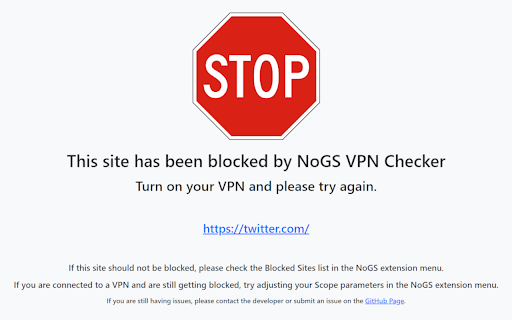

About
Chrome Extension that ensures you are connected to a VPN before going to blocked sites. Never forget to turn on your VPN again! The extension will block any sites listed until you are connecting to a VPN.

Some use case examples include ensuring VPN connection for...
- Watching a streaming site away from home (ensure you use a VPN)
- Before accessing a banking app or other sensitive information (for security)
- Ensuring that ISP or organization doesn't track you going to certain sites

How to use
------------------------------
1. Install extension
2. Ensure you are not connected to a VPN for the initial setup and open the extension by clicking in the icon in the extension menu.
3. Your "home" IP address will be automatically set to your current IP, but feel free to input whatever IP you want if you have a particular use in mind. Additionally, you can set it to your current IP by click "Use Current IP".
4. Add sites to be blocked in the list.
5. Set your scope and check frequency settings as desired or just leave them as default. More information about those settings can be found in the documentation below.
6. Click "Enable" to enable the extension. You can disable at anytime by switching it to "Disabled"
7. Click save to save your changes and you're good to go!

Documentation
------------------------------
For more information about all the features, please see the documentation on the GitHub page.
https://github.com/robinfire110/NoGS#documentation

Source Code
------------------------------
https://github.com/robinfire110/NoGS

Issues
------------------------------
https://github.com/robinfire110/NoGS/issues

Credits
------------------------------
Developer - Andy Villasmil (robinfire110)
APIs - freeipapi.com
Made with - HTML, CSS, JavaScript, Bootstrap
Base Website Block Code - https://dev.to/penge/learn-the-most-useful-chrome-apis-by-creating-block-site-chrome-extension-2de8

Thanks!
Technical
- Version
- 1.3.3
- Manifest
- V3
- Size
- 298KiB
- Min Chrome
- 88
- Languages
- 1
- Featured
- No
Metadata
- ID
- ifncliboocknoeldbbmpofmjaahaechg
- Developer ID
- ue67976ca0117cf044b16b0e4112c9ee5
- Developer Email
- [email protected]
- Created
- Jan 2, 2024
- Last Updated (Store)
- Jan 23, 2024
- Last Scraped
- May 25, 2026
- Website
- —
- Support URL
- https://github.com/robinfire110/NoGS/issues
- Privacy Policy
- https://github.com/robinfire110/NoGS
Similar extensions
Alternatives to NoGS VPN Checker, ranked by description similarity.

Lock In
Allows user to set a timer and block websites while timer is going so they can better focus.
15
★ 5.0

Browsec VPN - Free VPN for Chrome
Browsec VPN is a Chrome VPN extension that protects your IP from Internet threats and lets you browse privately for free.
8.0M
★ 4.5
Google Site Blocker
Prevents certain sites from appearing in Google search results. Simple, fast, and easy-to-use site filtering extension.
991
★ 3.4

Simple Website Blocker
Block distracting websites with scheduling and password protection.
9

Block Websites on Chrome
Use Block Websites on Chrome - Website Blocker & Focus Timer: Block sites, stay focused with a pomodoro timer and productivity tools
50.0K
★ 4.4

StableProxy
StableProxy
428
★ 4.9

Site Block Checker
Check if popular websites and the current tab's website are accessible or blocked.
84
★ 5.0
VPN for Discord
Secure your online activity with VPN for Discord. VPN offers safe browsing and access to blocked content!
10.0K
★ 2.7
Data sourced from the Chrome Web Store · last verified May 25, 2026.