
Lock In
Allows user to set a timer and block websites while timer is going so they can better focus.
As of May 2026, Lock In has 15 users and a 5.00/5 rating from 2 reviews in the Productivity category.
Usersup 25.0 percent+25.0%
15
15
Ratingno change0%
5.00
2 reviews
Reviewsup 100.0 percent+100.0%
2
Version
1.1.0
Manifest V3
History
2 snapshotsTracking since Apr 29, 2026.
View as table
| Date | Users | Rating | Reviews | Version |
|---|---|---|---|---|
| Apr 29, 2026 | 12 | 5.00 | 1 | 1.1.0 |
| May 26, 2026 | 15 | 5.00 | 1 | 1.1.0 |
| Now | 15 | 5.00 | 2 | 1.1.0 |
Permissions & access
- Permissions
- scriptingtabsstorage
- Host access
- *://*/*
Screenshots


About
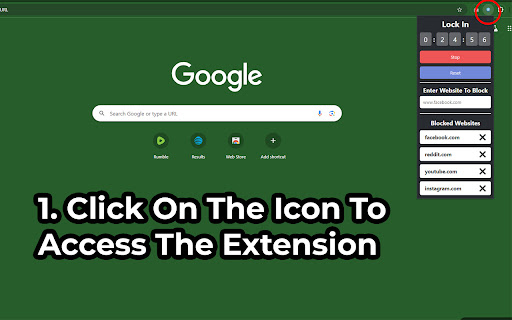
A timer extension that allows user to easily block websites while their timer/focus mode is running.
When the timer is up, or when you stop or reset the timer, just refresh the page or open a new tab with the site that was previously blocked and you'll be able to see it again.

To use the extension, pin it to your extension toolbar and click on it's icon.

Have any issues? Want to add new features? Checkout the GitHub here - https://github.com/ghughes13/csl-lock-in

===============
===Changelog===
===============

===1.1.0===
-Improved popup design
-Extension now stores blocked sites in chrome's local storage to persist blocked site list across sessions

===1.0.0===
-Created basic working version of the extension
Technical
- Version
- 1.1.0
- Manifest
- V3
- Size
- 633KiB
- Min Chrome
- 88
- Languages
- 1
- Featured
- No
Metadata
- ID
- bphphhafmipppeiaddijbcnkhfpijnjp
- Developer ID
- u697312086627c39dcd7681475ceb4a7c
- Developer Email
- [email protected]
- Created
- Oct 2, 2024
- Last Updated (Store)
- Oct 11, 2024
- Last Scraped
- May 26, 2026
- Website
- —
- Support URL
- —
Similar extensions
Alternatives to Lock In, ranked by description similarity.

Simple Website Blocker
Block distracting websites with scheduling and password protection.
9

Defense against Distractions
Allows you to block websites based on the text that appears on their pages.
41

Website Blocker - Block sites and focus mode
Easy way to block websites and stay focused. Block sites, use focus mode, block by category, and use pomodoro timer.
416
★ 5.0

URL Blocker & Focus Mode
A powerful URL blocker with Focus Mode, synchronization, and password protection.
2

Blockie | Block Websites & Be Productive
manifest.json description
7

Block Site
Block website with a single click
37

Site Blocker
Block distracting websites with temporary and permanent unblock options.
—

Site Blacklist
Block or unblock specific domains with a single click.
210
★ 3.0
Data sourced from the Chrome Web Store · last verified May 26, 2026.