Restored — previously removed on May 19, 2026 and now available again.

Block Websites on Chrome
Use Block Websites on Chrome - Website Blocker & Focus Timer: Block sites, stay focused with a pomodoro timer and productivity tools
As of June 2026, Block Websites on Chrome has 50,000 users and a 4.43/5 rating from 102 reviews in the Productivity category.
Usersdown 16.7 percent−16.7%
50.0K
50,000
Ratingup 7.3 percent+7.3%
4.43
102 reviews
Reviewsup 50.0 percent+50.0%
102
Version
2.4.5
Manifest V3
90-day change · In the last 90 days this extension lost 10.0K users, 3 version updates, changed permissions.
History
20 snapshotsTracking since Apr 1, 2026.
View as table
| Date | Users | Rating | Reviews | Version |
|---|---|---|---|---|
| Apr 1, 2026 | 60.0K | 4.13 | 68 | 1.26 |
| Apr 16, 2026 | 60.0K | 4.11 | 70 | 1.26 |
| Apr 20, 2026 | 60.0K | 4.11 | 70 | 1.30 |
| Apr 23, 2026 | 60.0K | 4.13 | 71 | 1.30 |
| May 2, 2026 | 70.0K | 4.13 | 71 | 1.30 |
| May 5, 2026 | 70.0K | 4.13 | 71 | 1.32 |
| May 8, 2026 | 60.0K | 4.11 | 70 | 1.33 |
| May 11, 2026 | 60.0K | 4.15 | 73 | 2.4.1 |
| May 13, 2026 | 60.0K | 4.18 | 76 | 2.4.1 |
| May 15, 2026 | 60.0K | 4.22 | 80 | 2.4.1 |
| May 17, 2026 | 60.0K | 4.24 | 82 | 2.4.1 |
| May 21, 2026 | 60.0K | 4.25 | 83 | 2.4.2 |
| May 23, 2026 | 60.0K | 4.27 | 85 | 2.4.2 |
| May 26, 2026 | 60.0K | 4.27 | 85 | 2.4.4 |
| May 29, 2026 | 60.0K | 4.30 | 89 | 2.4.4 |
| Jun 1, 2026 | 60.0K | 4.33 | 92 | 2.4.4 |
| Jun 4, 2026 | 60.0K | 4.33 | 93 | 2.4.4 |
| Jun 6, 2026 | 60.0K | 4.36 | 97 | 2.4.4 |
| Jun 16, 2026 | 60.0K | 4.37 | 99 | 2.4.4 |
| Jun 25, 2026 | 60.0K | 4.45 | 99 | 2.4.4 |
| Now | 50.0K | 4.43 | 102 | 2.4.5 |
Changelog
- Jun 25, 2026name
Block Websites on Chrome - Website Blocker & Focus Timer
Block Websites on Chrome
- May 23, 2026description
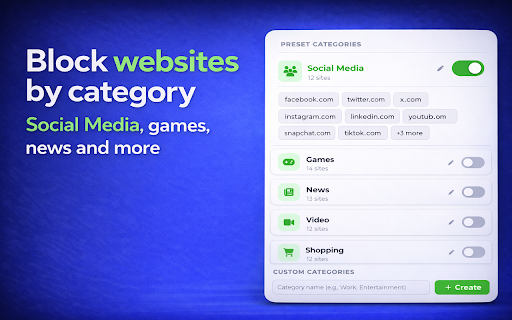
Tired of distractions? Get full control over your browsing with a website blocker, a Pomodoro focus timer, schedule rules, password protection, tasks, and a clean light/dark interface — all in one extension. How to block websites on Chrome: install the extension, click the icon on any page, press the green button. Done. No setup, no confusing menus. ⭐ KEY FEATURES 🚫 Site Blocker Full control over what gets blocked: • Block any domain (e.g. YouTube, Facebook, Reddit) • Block specific URLs with wildcards (e.g. youtube.com/shorts/*) • Block pages by keywords — automatically catches any page containing words you choose • One-click block/unblock from the popup • Toggle any entry on or off instantly without deleting it 📂 Categories Stop wasting time on whole groups of distracting pages: 1️⃣ Social Media — Facebook, Instagram, TikTok, X and more 2️⃣ Games — 14 popular gaming domains, blocked with one toggle 3️⃣ News — stop the endless scrolling 4️⃣ Video — streaming platforms covered 5️⃣ Shopping — remove temptations You can also create custom categories with your own list of domains. ⏰ Schedule — Smart Time Management Set time-based rules for your browsing: ➤ Block sites from 9 AM to 6 PM on weekdays ➤ Choose specific days of the week ➤ Add multiple time intervals per day ➤ Quick presets: Workday, Evening, Always Stay focused during work hours and relax after. 🎯 Focus Timer (Pomodoro) A complete Pomodoro timer built right into your browser: ▸ Focus and Break sessions with cycle tracking ▸ Block specific domains only during focus sessions ▸ Track your streaks and completed cycles ▸ Presets: Pomodoro 25/5, Short 15/3, Long 50/10 Start a session, stay focused, take a break — straight from the popup. No separate Pomodoro app needed. 🔒 Password Protection Prevent bypassing in a moment of weakness: - Set a password (minimum 8 characters) - Recovery code in case you forget - Great for parental controls - Keeps your blocklist safe from edits ✅ Tasks — Built-in To-Do List Combine blocking with productivity: - Create tasks with categories: Personal, Work, Daily - Add up to 3 custom categories - Track completed tasks alongside focus sessions - Filter by All, Active, or Completed 📊 Statistics & Progress See how the extension actually helps you: - Pages blocked today and this week - Top blocked domains - Focus sessions completed and total focus minutes - Tasks completed - Share your progress with one tap 🌙 Light & Dark Theme A clean, readable interface in both light and dark mode. Switch any time from the popup or settings — easy on the eyes during late-night focus sessions. 💡 WHO IS THIS FOR • 📈 Professionals — eliminate distractions during work, use the focus timer to stay productive • 👨👩👧 Parents — password-protect the list and manage access by category for your kids • 🎓 Students — use the Pomodoro timer to study without distractions; block YouTube and social media • 🏠 Remote workers — use Schedule to limit access during work hours • 🧘 Anyone wanting better time management ❓ FAQ Q: How do I block a website on Chrome? A: Install the extension, click its icon on any page, press the green button. The domain is added instantly. Q: Can I block whole categories like social media or games? A: Yes. Open Settings → Categories and toggle on Social Media, Games, News, Video, or Shopping. You can also create your own custom categories. Q: Can I block sites only during certain hours? A: Yes. Use Schedule to set days and time ranges (e.g. weekdays 9–18). You can add multiple intervals per day. Q: Does it have a Pomodoro timer? A: Yes — a full Pomodoro timer with customizable Focus and Break durations and ready-made presets. Q: Can I set a password so I can't disable the blocker? A: Yes. Open Settings → Password Protection. A recovery code is generated in case you forget the password. Q: Is there a dark theme? A: Yes — both light and dark themes are available, and you can switch between them at any time. 🔑 PERMISSIONS This extension requests only what's needed to block sites and run the focus timer: • Storage — saves your blocklist, schedule, focus settings, and statistics on your device • Tabs & activeTab — redirects a tab to the "blocked" page when you visit a restricted site, and reads the current page URL when you click the popup • webNavigation — detects navigation to blocked URLs before the page loads • Alarms — drives the Pomodoro timer and Schedule • Host access (all websites) — required to recognize and block any domain or URL pattern you add 🔒 PRIVACY • Your blocklist, browsing history, passwords, and personal data NEVER leave your device • No accounts, no sign-up, no tracking of which sites you visit • Anonymous, aggregated usage events (e.g. "focus session started") help us improve the extension — no URLs, no personal identifiers, no IP addresses • Full details: https://websiteblocker.pro/privacy-policy/ Block distractions, stay focused, get more done. Take control of your browsing today.
Tired of distractions? This is the most powerful website blocker and focus timer you need. Whether you want to manage your browsing, use the focus moder, or improve your daily routine with productivity tools, this extension does it all in one clean package. If you ever asked yourself how to block websites on chrome, the answer is simple. Install this blocksite chrome extension, click the icon, and press the green button. Done. No complicated setup, no confusing menus. ⭐ KEY FEATURES 🚫 Complete Site Blocker This website blocker gives you full control over blocking websites on chrome: • Remove access to any domain (e.g. YouTube, Facebook, Reddit) • Restrict specific URLs with wildcards (e.g. youtube.com/shorts/*) • Filter by keywords - automatically catches pages containing specific words • One-click control from the popup • Toggle any entry on or off instantly How do you block websites on chrome? Just open the popup, see the current page, and hit the green button. That is how to block a website on chrome in under 3 seconds. 📂 Categories Stop wasting time on entire groups of distracting pages: 1️⃣ Social Media - Facebook, Instagram, TikTok, X and more 2️⃣ Games - 14 popular gaming domains restricted with one toggle 3️⃣ News - stop the endless scrolling 4️⃣ Video - streaming platforms covered 5️⃣ Shopping - remove temptations You can also create custom categories with any domains you want. The best blocksite chrome tool for organized management. ⏰ Schedule - Smart Time Management Set time-based rules for your browsing: ➤ Restrict sites from 9 AM to 6 PM on weekdays ➤ Choose specific days of the week ➤ Add multiple time intervals ➤ Use quick presets: Workday, Evening, Always Stay focused during work hours and relax after. Smart time management built into your site blocker. 🎯 Focus Timer This is not just a website blocker. It is a full pomodoro timer app inside your browser: ▸ Built-in pomodoro timer with Focus and Break sessions ▸ Restrict specific domains only during focus sessions ▸ Track your streaks and completed cycles ▸ Presets: Pomodoro technique 25/5, Short 15/3, Long 50/10 The pomodoro timer online works directly from the popup. Start a session, stay focused, take a break. No separate pomodoro timer app needed. 🔒 Password Protection Prevent bypassing in a moment of weakness: - Set a password (minimum 8 characters) - Recovery code for reset - Great for parental controls - Keeps your restricted list safe from changes ✅ Tasks - Built-in To-Do List Combine restrictions with productivity tools: - Create tasks with categories: Personal, Work, Daily - Add up to 3 custom categories - Track completed tasks alongside focus sessions - Filter by All, Active, or Completed 📊 Statistics & Progress Tracking See how your site blocker helps you stay focused: - Restricted pages today and this week - Top restricted domains - Focus sessions completed and total focus minutes - Tasks completed - Share your progress 🔧 HOW TO BLOCK A WEBSITE ON CHROME 1️⃣ Install the extension and pin it to your toolbar 2️⃣ Click the icon on any page you want to restrict 3️⃣ Press the button - the domain is now added to your list 4️⃣ Open Settings for Schedule, Categories, Focus Timer and more That is the fastest way of blocking websites on chrome. Block sites on chrome in seconds, not minutes. 💡 WHO IS THIS FOR • 📈 Professionals - eliminate distractions during work. Use the focus timer to stay productive • 👨👩👧 Parents - password-protect the list and manage access by category for your children • 🎓 Students - use the pomodoro timer to study without distractions. Block YouTube and social media • 🏠 Remote workers - use Schedule to restrict access during work hours • 🧘 Anyone who wants better time management and needs to stay focused ❓ FAQ Q: How to block websites on chrome? A: Install the extension, click the icon on any page, press the green button. Done. Q: How do you block websites on chrome by category? A: Open Settings, go to Categories, toggle on Social Media, Games, News, Video or Shopping. Create custom categories too. Q: Can I block a website on chrome only during certain hours? A: Yes. Use Schedule to set days and time ranges. Q: Does it have a pomodoro timer? A: Yes. Full pomodoro timer app with customizable sessions. Supports the pomodoro technique with presets. Q: Can I block YouTube? A: Absolutely. One click or add it to a category. Use the focus timer to restrict it only during focus sessions. Q: Can I set a password? A: Yes. Go to Settings and enable Password Protection. 🔑 PERMISSIONS This blocksite chrome extension requires minimal permissions: • Access to page content - to redirect restricted domains • Storage - to save your settings and lists • We do NOT collect or sell your personal data Block website distractions, stay focused, boost productivity. The only website blocker and focus timer you need. Block site access now and take control of your browsing.
- May 23, 2026short_description
A Chrome website blocker with categories, schedules, a Pomodoro focus timer, password protection, and dark theme.
Use Block Websites on Chrome - Website Blocker & Focus Timer: Block sites, stay focused with a pomodoro timer and productivity tools
- May 8, 2026description
Tired of distractions? This is the most powerful website blocker and focus timer you need. Whether you want to manage your browsing, use the focus moder, or improve your daily routine with productivity tools, this extension does it all in one clean package. If you ever asked yourself how to block websites on chrome, the answer is simple. Install this blocksite chrome extension, click the icon, and press the green button. Done. No complicated setup, no confusing menus. ⭐ KEY FEATURES 🚫 Complete Site Blocker This website blocker gives you full control over blocking websites on chrome: • Remove access to any domain (e.g. YouTube, Facebook, Reddit) • Restrict specific URLs with wildcards (e.g. youtube.com/shorts/*) • Filter by keywords - automatically catches pages containing specific words • One-click control from the popup • Toggle any entry on or off instantly How do you block websites on chrome? Just open the popup, see the current page, and hit the green button. That is how to block a website on chrome in under 3 seconds. 📂 Categories Stop wasting time on entire groups of distracting pages: 1️⃣ Social Media - Facebook, Instagram, TikTok, X and more 2️⃣ Games - 14 popular gaming domains restricted with one toggle 3️⃣ News - stop the endless scrolling 4️⃣ Video - streaming platforms covered 5️⃣ Shopping - remove temptations You can also create custom categories with any domains you want. The best blocksite chrome tool for organized management. ⏰ Schedule - Smart Time Management Set time-based rules for your browsing: ➤ Restrict sites from 9 AM to 6 PM on weekdays ➤ Choose specific days of the week ➤ Add multiple time intervals ➤ Use quick presets: Workday, Evening, Always Stay focused during work hours and relax after. Smart time management built into your site blocker. 🎯 Focus Timer This is not just a website blocker. It is a full pomodoro timer app inside your browser: ▸ Built-in pomodoro timer with Focus and Break sessions ▸ Restrict specific domains only during focus sessions ▸ Track your streaks and completed cycles ▸ Presets: Pomodoro technique 25/5, Short 15/3, Long 50/10 The pomodoro timer online works directly from the popup. Start a session, stay focused, take a break. No separate pomodoro timer app needed. 🔒 Password Protection Prevent bypassing in a moment of weakness: - Set a password (minimum 8 characters) - Recovery code for reset - Great for parental controls - Keeps your restricted list safe from changes ✅ Tasks - Built-in To-Do List Combine restrictions with productivity tools: - Create tasks with categories: Personal, Work, Daily - Add up to 3 custom categories - Track completed tasks alongside focus sessions - Filter by All, Active, or Completed 📊 Statistics & Progress Tracking See how your site blocker helps you stay focused: - Restricted pages today and this week - Top restricted domains - Focus sessions completed and total focus minutes - Tasks completed - Share your progress 🔧 HOW TO BLOCK A WEBSITE ON CHROME 1️⃣ Install the extension and pin it to your toolbar 2️⃣ Click the icon on any page you want to restrict 3️⃣ Press the button - the domain is now added to your list 4️⃣ Open Settings for Schedule, Categories, Focus Timer and more That is the fastest way of blocking websites on chrome. Block sites on chrome in seconds, not minutes. 💡 WHO IS THIS FOR • 📈 Professionals - eliminate distractions during work. Use the focus timer to stay productive • 👨👩👧 Parents - password-protect the list and manage access by category for your children • 🎓 Students - use the pomodoro timer to study without distractions. Block YouTube and social media • 🏠 Remote workers - use Schedule to restrict access during work hours • 🧘 Anyone who wants better time management and needs to stay focused ❓ FAQ Q: How to block websites on chrome? A: Install the extension, click the icon on any page, press the green button. Done. Q: How do you block websites on chrome by category? A: Open Settings, go to Categories, toggle on Social Media, Games, News, Video or Shopping. Create custom categories too. Q: Can I block a website on chrome only during certain hours? A: Yes. Use Schedule to set days and time ranges. Q: Does it have a pomodoro timer? A: Yes. Full pomodoro timer app with customizable sessions. Supports the pomodoro technique with presets. Q: Can I block YouTube? A: Absolutely. One click or add it to a category. Use the focus timer to restrict it only during focus sessions. Q: Can I set a password? A: Yes. Go to Settings and enable Password Protection. 🔑 PERMISSIONS This blocksite chrome extension requires minimal permissions: • Access to page content - to redirect restricted domains • Storage - to save your settings and lists • We do NOT collect or sell your personal data Block website distractions, stay focused, boost productivity. The only website blocker and focus timer you need. Block site access now and take control of your browsing.
Tired of distractions? Get full control over your browsing with a website blocker, a Pomodoro focus timer, schedule rules, password protection, tasks, and a clean light/dark interface — all in one extension. How to block websites on Chrome: install the extension, click the icon on any page, press the green button. Done. No setup, no confusing menus. ⭐ KEY FEATURES 🚫 Site Blocker Full control over what gets blocked: • Block any domain (e.g. YouTube, Facebook, Reddit) • Block specific URLs with wildcards (e.g. youtube.com/shorts/*) • Block pages by keywords — automatically catches any page containing words you choose • One-click block/unblock from the popup • Toggle any entry on or off instantly without deleting it 📂 Categories Stop wasting time on whole groups of distracting pages: 1️⃣ Social Media — Facebook, Instagram, TikTok, X and more 2️⃣ Games — 14 popular gaming domains, blocked with one toggle 3️⃣ News — stop the endless scrolling 4️⃣ Video — streaming platforms covered 5️⃣ Shopping — remove temptations You can also create custom categories with your own list of domains. ⏰ Schedule — Smart Time Management Set time-based rules for your browsing: ➤ Block sites from 9 AM to 6 PM on weekdays ➤ Choose specific days of the week ➤ Add multiple time intervals per day ➤ Quick presets: Workday, Evening, Always Stay focused during work hours and relax after. 🎯 Focus Timer (Pomodoro) A complete Pomodoro timer built right into your browser: ▸ Focus and Break sessions with cycle tracking ▸ Block specific domains only during focus sessions ▸ Track your streaks and completed cycles ▸ Presets: Pomodoro 25/5, Short 15/3, Long 50/10 Start a session, stay focused, take a break — straight from the popup. No separate Pomodoro app needed. 🔒 Password Protection Prevent bypassing in a moment of weakness: - Set a password (minimum 8 characters) - Recovery code in case you forget - Great for parental controls - Keeps your blocklist safe from edits ✅ Tasks — Built-in To-Do List Combine blocking with productivity: - Create tasks with categories: Personal, Work, Daily - Add up to 3 custom categories - Track completed tasks alongside focus sessions - Filter by All, Active, or Completed 📊 Statistics & Progress See how the extension actually helps you: - Pages blocked today and this week - Top blocked domains - Focus sessions completed and total focus minutes - Tasks completed - Share your progress with one tap 🌙 Light & Dark Theme A clean, readable interface in both light and dark mode. Switch any time from the popup or settings — easy on the eyes during late-night focus sessions. 💡 WHO IS THIS FOR • 📈 Professionals — eliminate distractions during work, use the focus timer to stay productive • 👨👩👧 Parents — password-protect the list and manage access by category for your kids • 🎓 Students — use the Pomodoro timer to study without distractions; block YouTube and social media • 🏠 Remote workers — use Schedule to limit access during work hours • 🧘 Anyone wanting better time management ❓ FAQ Q: How do I block a website on Chrome? A: Install the extension, click its icon on any page, press the green button. The domain is added instantly. Q: Can I block whole categories like social media or games? A: Yes. Open Settings → Categories and toggle on Social Media, Games, News, Video, or Shopping. You can also create your own custom categories. Q: Can I block sites only during certain hours? A: Yes. Use Schedule to set days and time ranges (e.g. weekdays 9–18). You can add multiple intervals per day. Q: Does it have a Pomodoro timer? A: Yes — a full Pomodoro timer with customizable Focus and Break durations and ready-made presets. Q: Can I set a password so I can't disable the blocker? A: Yes. Open Settings → Password Protection. A recovery code is generated in case you forget the password. Q: Is there a dark theme? A: Yes — both light and dark themes are available, and you can switch between them at any time. 🔑 PERMISSIONS This extension requests only what's needed to block sites and run the focus timer: • Storage — saves your blocklist, schedule, focus settings, and statistics on your device • Tabs & activeTab — redirects a tab to the "blocked" page when you visit a restricted site, and reads the current page URL when you click the popup • webNavigation — detects navigation to blocked URLs before the page loads • Alarms — drives the Pomodoro timer and Schedule • Host access (all websites) — required to recognize and block any domain or URL pattern you add 🔒 PRIVACY • Your blocklist, browsing history, passwords, and personal data NEVER leave your device • No accounts, no sign-up, no tracking of which sites you visit • Anonymous, aggregated usage events (e.g. "focus session started") help us improve the extension — no URLs, no personal identifiers, no IP addresses • Full details: https://websiteblocker.pro/privacy-policy/ Block distractions, stay focused, get more done. Take control of your browsing today.
- May 8, 2026short_description
Use Block Websites on Chrome - Website Blocker & Focus Timer: Block sites, stay focused with a pomodoro timer and productivity tools
A Chrome website blocker with categories, schedules, a Pomodoro focus timer, password protection, and dark theme.
- May 5, 2026description
🌐 Ultimate Guide to Blocking Websites on Chrome with Our Extension Tired of distractions and looking for a reliable way. With our blocksite chrome extension, you'll realize how to block certain websites on chrome. Our tool is the perfect solution, giving you the power and keep your online experience secure. Here's a comprehensive guide to getting the most out of our tool! You can easily boost productivity and minimize distractions by using our tool to block websites on chrome extension. Why You Need Our Tool 💠Distraction-Free Browsing: Stay focused using the best tool 💠Parental Controls: Ensure a safe browsing environment for your children. 💠Enhanced Security: Protect against harmful or malicious. How to Block Websites on Google Chrome 1️⃣ Install the Extension: Simply add our Chrome add-on 2️⃣ Select Sites :Click on the extension icon. 3️⃣ Enter the URLs: Use keywords or URL patterns. Features of Our Site Blocker - Easily restrict certain websites. - Easily allow certain sites. Lists of Methods 1. URL: Restrict site on Chrome. 2. Blocking a Website on Chrome: Click on the extension icon and add the website URL to the blacklist. How to unblock blocked websites on chrome 💡 Access Extension Settings: Click on the extension icon. 💡 Adjust or Remove Restrictions: 🔹Uncheck it or remove it entirely. 🔹Adjust the schedule to unblock a blocked website on Google Chrome. How to Block Sites ➤ Install Our Extension: Add our extension. ➤ Add Websites to the Blacklist: ➤ Click on the extension icon and click the button for website blocking How to restrict websites on chrome ◆ Open the Extension Settings: Click on the extension icon. ◆ Add or Remove Sites. ◆ Remove URLs to unblock. Advanced Tips * Social Media. * Facebook, Twitter, Instagram - ban them all with our extension. * Stay focused by ban gaming distractions like Fortnite, Roblox, and others. * Limit your exposure to distracting or sensationalized news. FAQs Q1: How to block websites on Google Chrome? A1: Install our tool, then add URLs directly to your blacklist. Q2: How to unblock a blocked website on Google Chrome? A2: Access the extension settings, adjust the restrictions. Q3: How to restrict site on Chrome without ban completely? A3: Use the whitelist feature to selectively allow sites while maintaining overall restrictions. Benefits of blocking sites in chrome 📈Productivity Boost: Reduce distractions and increase productivity. 🛡️Security & Privacy: Malicious websites, ads, and tracking cookies. 👨👩👧 Parental Control: Ensure a safer internet for children by blocking inappropriate content. Comprehensive Blocking Solutions >The ultimate tool to block access to a website. You can enhance your productivity by using an extension to block websites on Chrome during work hours > Chrome Blocking Sites: Restrict certain categories like gaming, social media, and news. > Tool for Schools & Offices: Limit access to specific websites in shared environments. > Block site chrome extension: Manage your browsing on any device effortlessly. How to block website on chrome effectively ① Open the Extension: ② Click the site icon in your toolbar. Block sites on Chrome, simply just using button. ③ Remove URLs to unblock. Unblock sites on Chrome, simply just using button too. Troubleshooting & Support ❓Extension Not Working? ❗️ Ensure the extension is enabled in browser. ❗️ Restart browser after installation ❓How to Block Site in Chrome Effectively: ❗️ Regularly review and update your blocked websites list. Conclusion This extension empowers users to create a personalized digital environment by allowing them to block distracting websites, thereby enhancing focus and productivity Take control of your browsing experience today. Install our extension to filter content, increase productivity, and protect your online journey with a website blocker! Stay focused, stay productive, and browse safely with the best tool to block a website on chrome. Get Started Today and Say Goodbye to Distractions!Tired of distractions? This is the most powerful website blocker and focus timer you need. Whether you want to manage your browsing, use the focus moder, or improve your daily routine with productivity tools, this extension does it all in one clean package. If you ever asked yourself how to block websites on chrome, the answer is simple. Install this blocksite chrome extension, click the icon, and press the green button. Done. No complicated setup, no confusing menus. ⭐ KEY FEATURES 🚫 Complete Site Blocker This website blocker gives you full control over blocking websites on chrome: • Remove access to any domain (e.g. YouTube, Facebook, Reddit) • Restrict specific URLs with wildcards (e.g. youtube.com/shorts/*) • Filter by keywords - automatically catches pages containing specific words • One-click control from the popup • Toggle any entry on or off instantly How do you block websites on chrome? Just open the popup, see the current page, and hit the green button. That is how to block a website on chrome in under 3 seconds. 📂 Categories Stop wasting time on entire groups of distracting pages: 1️⃣ Social Media - Facebook, Instagram, TikTok, X and more 2️⃣ Games - 14 popular gaming domains restricted with one toggle 3️⃣ News - stop the endless scrolling 4️⃣ Video - streaming platforms covered 5️⃣ Shopping - remove temptations You can also create custom categories with any domains you want. The best blocksite chrome tool for organized management. ⏰ Schedule - Smart Time Management Set time-based rules for your browsing: ➤ Restrict sites from 9 AM to 6 PM on weekdays ➤ Choose specific days of the week ➤ Add multiple time intervals ➤ Use quick presets: Workday, Evening, Always Stay focused during work hours and relax after. Smart time management built into your site blocker. 🎯 Focus Timer This is not just a website blocker. It is a full pomodoro timer app inside your browser: ▸ Built-in pomodoro timer with Focus and Break sessions ▸ Restrict specific domains only during focus sessions ▸ Track your streaks and completed cycles ▸ Presets: Pomodoro technique 25/5, Short 15/3, Long 50/10 The pomodoro timer online works directly from the popup. Start a session, stay focused, take a break. No separate pomodoro timer app needed. 🔒 Password Protection Prevent bypassing in a moment of weakness: - Set a password (minimum 8 characters) - Recovery code for reset - Great for parental controls - Keeps your restricted list safe from changes ✅ Tasks - Built-in To-Do List Combine restrictions with productivity tools: - Create tasks with categories: Personal, Work, Daily - Add up to 3 custom categories - Track completed tasks alongside focus sessions - Filter by All, Active, or Completed 📊 Statistics & Progress Tracking See how your site blocker helps you stay focused: - Restricted pages today and this week - Top restricted domains - Focus sessions completed and total focus minutes - Tasks completed - Share your progress 🔧 HOW TO BLOCK A WEBSITE ON CHROME 1️⃣ Install the extension and pin it to your toolbar 2️⃣ Click the icon on any page you want to restrict 3️⃣ Press the button - the domain is now added to your list 4️⃣ Open Settings for Schedule, Categories, Focus Timer and more That is the fastest way of blocking websites on chrome. Block sites on chrome in seconds, not minutes. 💡 WHO IS THIS FOR • 📈 Professionals - eliminate distractions during work. Use the focus timer to stay productive • 👨👩👧 Parents - password-protect the list and manage access by category for your children • 🎓 Students - use the pomodoro timer to study without distractions. Block YouTube and social media • 🏠 Remote workers - use Schedule to restrict access during work hours • 🧘 Anyone who wants better time management and needs to stay focused ❓ FAQ Q: How to block websites on chrome? A: Install the extension, click the icon on any page, press the green button. Done. Q: How do you block websites on chrome by category? A: Open Settings, go to Categories, toggle on Social Media, Games, News, Video or Shopping. Create custom categories too. Q: Can I block a website on chrome only during certain hours? A: Yes. Use Schedule to set days and time ranges. Q: Does it have a pomodoro timer? A: Yes. Full pomodoro timer app with customizable sessions. Supports the pomodoro technique with presets. Q: Can I block YouTube? A: Absolutely. One click or add it to a category. Use the focus timer to restrict it only during focus sessions. Q: Can I set a password? A: Yes. Go to Settings and enable Password Protection. 🔑 PERMISSIONS This blocksite chrome extension requires minimal permissions: • Access to page content - to redirect restricted domains • Storage - to save your settings and lists • We do NOT collect or sell your personal data Block website distractions, stay focused, boost productivity. The only website blocker and focus timer you need. Block site access now and take control of your browsing.
- May 5, 2026short_description
Use Block Websites on Chrome: Easily block sites and restrict website on chrome. Stay focused and boost productivity
Use Block Websites on Chrome - Website Blocker & Focus Timer: Block sites, stay focused with a pomodoro timer and productivity tools
- May 5, 2026name
Block Websites on Chrome
Block Websites on Chrome - Website Blocker & Focus Timer
- May 5, 2026permissions
storage, tabs, activeTab, webNavigation, alarms, declarativeNetRequestWithHostAccess
storage, tabs, activeTab, webNavigation, alarms
Permissions & access
- Permissions
- storagetabsactiveTabwebNavigationalarms
- Host access
- http://*/*, https://*/*
Screenshots


About
Tired of distractions? This is the most powerful website blocker and focus timer you need. Whether you want to manage your browsing, use the focus moder, or improve your daily routine with productivity tools, this extension does it all in one clean package. If you ever asked yourself how to block websites on chrome, the answer is simple. Install this blocksite chrome extension, click the icon, and press the green button. Done. No complicated setup, no confusing menus. ⭐ KEY FEATURES 🚫 Complete Site Blocker This website blocker gives you full control over blocking websites on chrome: • Remove access to any domain (e.g. YouTube, Facebook, Reddit) • Restrict specific URLs with wildcards (e.g. youtube.com/shorts/*) • Filter by keywords - automatically catches pages containing specific words • One-click control from the popup • Toggle any entry on or off instantly How do you block websites on chrome? Just open the popup, see the current page, and hit the green button. That is how to block a website on chrome in under 3 seconds. 📂 Categories Stop wasting time on entire groups of distracting pages: 1️⃣ Social Media - Facebook, Instagram, TikTok, X and more 2️⃣ Games - 14 popular gaming domains restricted with one toggle 3️⃣ News - stop the endless scrolling 4️⃣ Video - streaming platforms covered 5️⃣ Shopping - remove temptations You can also create custom categories with any domains you want. The best blocksite chrome tool for organized management. ⏰ Schedule - Smart Time Management Set time-based rules for your browsing: ➤ Restrict sites from 9 AM to 6 PM on weekdays ➤ Choose specific days of the week ➤ Add multiple time intervals ➤ Use quick presets: Workday, Evening, Always Stay focused during work hours and relax after. Smart time management built into your site blocker. 🎯 Focus Timer This is not just a website blocker. It is a full pomodoro timer app inside your browser: ▸ Built-in pomodoro timer with Focus and Break sessions ▸ Restrict specific domains only during focus sessions ▸ Track your streaks and completed cycles ▸ Presets: Pomodoro technique 25/5, Short 15/3, Long 50/10 The pomodoro timer online works directly from the popup. Start a session, stay focused, take a break. No separate pomodoro timer app needed. 🔒 Password Protection Prevent bypassing in a moment of weakness: - Set a password (minimum 8 characters) - Recovery code for reset - Great for parental controls - Keeps your restricted list safe from changes ✅ Tasks - Built-in To-Do List Combine restrictions with productivity tools: - Create tasks with categories: Personal, Work, Daily - Add up to 3 custom categories - Track completed tasks alongside focus sessions - Filter by All, Active, or Completed 📊 Statistics & Progress Tracking See how your site blocker helps you stay focused: - Restricted pages today and this week - Top restricted domains - Focus sessions completed and total focus minutes - Tasks completed - Share your progress 🔧 HOW TO BLOCK A WEBSITE ON CHROME 1️⃣ Install the extension and pin it to your toolbar 2️⃣ Click the icon on any page you want to restrict 3️⃣ Press the button - the domain is now added to your list 4️⃣ Open Settings for Schedule, Categories, Focus Timer and more That is the fastest way of blocking websites on chrome. Block sites on chrome in seconds, not minutes. 💡 WHO IS THIS FOR • 📈 Professionals - eliminate distractions during work. Use the focus timer to stay productive • 👨👩👧 Parents - password-protect the list and manage access by category for your children • 🎓 Students - use the pomodoro timer to study without distractions. Block YouTube and social media • 🏠 Remote workers - use Schedule to restrict access during work hours • 🧘 Anyone who wants better time management and needs to stay focused ❓ FAQ Q: How to block websites on chrome? A: Install the extension, click the icon on any page, press the green button. Done. Q: How do you block websites on chrome by category? A: Open Settings, go to Categories, toggle on Social Media, Games, News, Video or Shopping. Create custom categories too. Q: Can I block a website on chrome only during certain hours? A: Yes. Use Schedule to set days and time ranges. Q: Does it have a pomodoro timer? A: Yes. Full pomodoro timer app with customizable sessions. Supports the pomodoro technique with presets. Q: Can I block YouTube? A: Absolutely. One click or add it to a category. Use the focus timer to restrict it only during focus sessions. Q: Can I set a password? A: Yes. Go to Settings and enable Password Protection. 🔑 PERMISSIONS This blocksite chrome extension requires minimal permissions: • Access to page content - to redirect restricted domains • Storage - to save your settings and lists • We do NOT collect or sell your personal data Block website distractions, stay focused, boost productivity. The only website blocker and focus timer you need. Block site access now and take control of your browsing.
Technical
- Version
- 2.4.5
- Manifest
- V3
- Size
- 286KiB
- Min Chrome
- 88
- Languages
- 52
- Featured
- Yes
Metadata
- ID
- jdkmmjkcmjjhfegmbmaijcnlgkfnfcpm
- Developer ID
- u494dd7cd7dd068e8fb93f084c71e75d3
- Developer Email
- [email protected]
- Created
- May 24, 2024
- Last Updated (Store)
- Jun 21, 2026
- Last Scraped
- Jun 25, 2026
- Website
- websiteblocker.pro
- Support URL
- —
- Privacy Policy
- https://websiteblocker.pro/privacy-policy
Similar extensions
Alternatives to Block Websites on Chrome, ranked by description similarity.

Block Websites on Chrome
Boost productivity with Block Websites on Chrome - easily block certain distracting websites
4.0K
★ 4.5

Website Blocker Extension
Use Website Blocker Extension to stay focused: block site distractions, blacklist sites with a website blocker Chrome extension.
449
★ 5.0

Site Blocker
Site Blocker - a browser extension to block websites, manage schedules, and limit distracting sites for productivity and focus.
130
★ 5.0

Website Blocker – Parental Control
Block distracting websites, manage screen time, boost productivity, and protect children with parental controls.
35

BlockSite Block Websites & Stay Focused
Stay focused and boost productivity: Custom blocklist, Scheduled site blocking, and Password protection.
1.0M
★ 4.5

Block Site
Block website with a single click
37

Website Blocker - Block sites and focus mode
Easy way to block websites and stay focused. Block sites, use focus mode, block by category, and use pomodoro timer.
416
★ 5.0

Blockie | Block Websites & Be Productive
manifest.json description
7
Data sourced from the Chrome Web Store · last verified Jun 25, 2026.