ClaroRead Chrome
Speaks aloud text in web pages
As of June 2026, ClaroRead Chrome has 70,000 users and a 3.29/5 rating from 62 reviews in the Accessibility category.
Usersno change0%
70.0K
70,000
Ratingno change0%
3.29
62 reviews
Reviewsno change0%
62
Version
35.6.2
Manifest V3
90-day change · In the last 90 days this extension 1 version update.
History
12 snapshotsTracking since Apr 3, 2026.
View as table
| Date | Users | Rating | Reviews | Version |
|---|---|---|---|---|
| Apr 3, 2026 | — | 3.29 | 62 | 35.5.18 |
| Apr 5, 2026 | 100.0K | 3.29 | 62 | 35.5.18 |
| Apr 18, 2026 | — | 3.29 | 62 | 35.5.18 |
| Apr 26, 2026 | 100.0K | 3.29 | 62 | 35.5.18 |
| May 1, 2026 | — | 3.29 | 62 | 35.5.18 |
| May 11, 2026 | 100.0K | 3.29 | 62 | 35.5.18 |
| May 14, 2026 | — | 3.29 | 62 | 35.5.18 |
| May 27, 2026 | 100.0K | 3.29 | 62 | 35.5.18 |
| Jun 8, 2026 | 100.0K | 3.29 | 62 | 35.6.2 |
| Jun 10, 2026 | — | 3.29 | 62 | 35.6.2 |
| Jun 14, 2026 | 100.0K | 3.29 | 62 | 35.6.2 |
| Jun 20, 2026 | 90.0K | 3.29 | 62 | 35.6.2 |
| Now | 70.0K | 3.29 | 62 | 35.6.2 |
Permissions & access
- Permissions
- identityidentity.emailtabsttsstoragecontextMenusnativeMessagingdownloadsclipboardWriteclipboardReadmanagementscriptingactiveTabalarms
- Host access
- <all_urls>
Screenshots


About
Free extension with a few Premium features, see below.

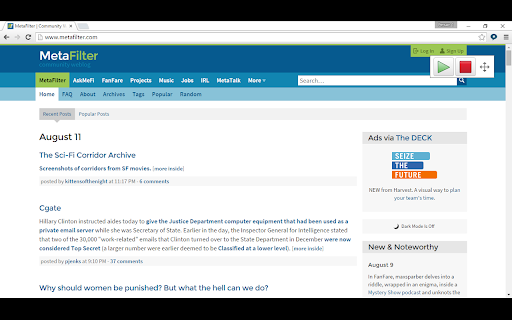
Speak any text on a website by selecting it, point with the mouse to hear text and links and captions, or click Play to hear sentences read out with highlighting to let you keep track of where you are.

Read Google Docs documents back to you so you can proof your work and fix any errors.

Speak accessible PDFs opened in Google Chrome with highlighting by clicking the Play button.

Hear letters, words or sentences spoken back as you type. Simply type in to web pages and hear what you type as you type it. For letters, hear the letter names or sounds spoken back to you, whichever helps you understand better.

Turn on a coloured overlay so pages are tinted to the colour you find easiest to read - no more glaring black on white text.

Change the speed of the spoken voice, slower for comprehension, faster for efficiency.

Activate word prediction to help you with writing and composition - find that elusive word you want. Now includes subject-specific prediction dictionaries and larger base dictionaries!

Read the contents of Google Docs extensions aloud so your support tools speak.

PREMIUM FEATURES!

Upgrade to a Premium subscription and also gain:

● Scan from Screen, so you can select inaccessible images like Google Books and hear them read aloud.

● Speech Recognition. Enter text in to documents and text areas of web pages through dictation.

● Prediction in Google Docs, Microsoft Office 365 Word Online and other editable text areas.

● Spelling and Homophone checking in Google Docs, Microsoft Office 365 Word Online and other editable text areas.

● Capture. Highlight and capture text on webpages.

● Save to audio. Select text and click the save to audio button to generate a sound file for the selected text.

● Extras. Choose between ClaroIdeas web, Claro ePub Reader web or Speaking Calculator web.

● More online text-to-speech voices.

From the developers of ClaroRead for Mac and Windows and the ClaroSpeak and ClaroPDF Apps.
Technical
- Version
- 35.6.2
- Manifest
- V3
- Size
- 105MiB
- Min Chrome
- 88
- Languages
- 6
- Featured
- Yes
Metadata
- ID
- ifgehbglgmidafhhdcopacejknmcmhcd
- Developer ID
- u05b925de092fc5b98049179bf1caed42
- Developer Email
- [email protected]
- Created
- Aug 12, 2015
- Last Updated (Store)
- May 25, 2026
- Last Scraped
- Jun 20, 2026
- Website
- —
Similar extensions
Alternatives to ClaroRead Chrome, ranked by description similarity.

Read Text Out Loud
A Chrome extension to read text out loud with options to paste content and download audio files
5
Spellex Write-Assist for Chrome
Spellex for Chrome is a complete assistive technology literacy toolbar to help improve reading, writing, and speech comprehension.
369
★ 3.7

Read&Write for Google Chrome™
Boost reading and writing confidence across all types of content and devices, in class, at work, and at home.
9.0M
★ 3.4

Read Aloud: Read webpage using text-to-speech
Use text-to-speech to read aloud the entire webpage or a selected part. TTS engine is fully customizable. Support PC voice packages.
3.0K
★ 1.5

Voice Out: Text to Speech Voice Reader
Use text to speech to read any webpage, Google Doc, PDF, or book with natural sounding voices.
40.0K
★ 4.2
Talkie: text-to-speech (TTS)
Fast & easy text-to-speech. Read aloud from websites, PDF, email. Privacy-aware, open source code.
50.0K
★ 3.6

Speak the Selection — [ Read Aloud free using ElevenLabs ,hume, Google TTS]
Speak the Selection lets you highlight any text on the web and hear it read aloud with HD AI voices from ElevenLabs, Hume for free
560
★ 4.1

GPT Reader/Transcriber: Free AI Text to Speech/Speech to Text (TTS/STT)
Free AI text to speech (tts) & speech to text (stt) with ChatGPT. Listen to natural voices or transcribe audio instantly.
30.0K
★ 4.6
Data sourced from the Chrome Web Store · last verified Jun 20, 2026.