
Read Aloud: Read webpage using text-to-speech
Use text-to-speech to read aloud the entire webpage or a selected part. TTS engine is fully customizable. Support PC voice packages.
As of May 2026, Read Aloud: Read webpage using text-to-speech has 3,000 users and a 1.50/5 rating from 10 reviews in the Accessibility category.
Usersno change0%
3.0K
3,000
Ratingno change0%
1.50
10 reviews
Reviewsno change0%
10
Version
1.3.4
Manifest V3
Permissions & access
- Permissions
- storagettstabs
- Host access
- None declared
Screenshots
About
Introducing Read Aloud, the ultimate Chrome extension designed to revolutionize your reading experience. Whether you're browsing articles, studying documents, or simply exploring the web, Read Aloud empowers you with seamless text-to-speech functionality, transforming written content into immersive audio experiences.

Main features:
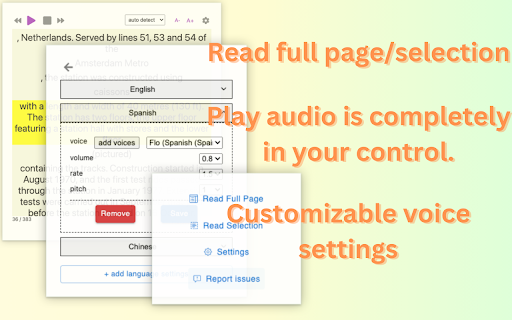
1. Effortless Reading: Simply activate Read Aloud to have webpages read aloud to you in clear, natural-sounding voices. Whether you're multitasking or prefer auditory learning, Read Aloud ensures you never miss out on valuable content.

2. Selective Reading: Choose specific sections of text to be read aloud, providing tailored accessibility and control over your listening experience. Highlight the portion you want to hear, and let Read Aloud take care of the rest.

3. Language Detection: Say goodbye to language barriers. Read Aloud automatically detects the language of the webpage content, ensuring accurate pronunciation and seamless transitions between multilingual texts.

4. Customizable Voices: Personalize your listening experience by configuring voice settings for multiple languages. Choose from a diverse range of voices, accents, and speech rates to suit your preferences and enhance comprehension.

5. Intuitive Controls: Take full command of your audio playback with intuitive controls that allow you to pause, rewind, or skip to the next section effortlessly. Stay in control of your listening pace and easily navigate through content with ease.

6. Accessibility-Focused: With accessibility in mind, Read Aloud empowers users with visual impairments or learning disabilities to access online content more conveniently. Break down barriers to information and enjoy a more inclusive browsing experience.

7. Seamless Integration: Seamlessly integrated into your Chrome browser, Read Aloud blends into your browsing routine effortlessly. Experience the convenience of instant text-to-speech functionality without interrupting your workflow.

Unlock the power of auditory learning and accessibility with Read Aloud - your go-to Chrome extension for immersive, customizable reading experiences. Whether you're enhancing productivity, overcoming language barriers, or simply enjoying hands-free browsing, Read Aloud is your indispensable companion on the web. Try it today and embark on a journey of effortless exploration and comprehension.

Any problem, contact us at [email protected]
Technical
- Version
- 1.3.4
- Manifest
- V3
- Size
- 189KiB
- Min Chrome
- 88
- Languages
- 10
- Featured
- No
Metadata
- ID
- nipboejoampbggkgkdjbogkacmmegcmm
- Developer ID
- ubb9b2abee3897773a493f1ef7089f3c0
- Developer Email
- [email protected]
- Created
- Mar 10, 2024
- Last Updated (Store)
- Mar 10, 2024
- Last Scraped
- May 27, 2026
- Website
- —
- Support URL
- —
- Privacy Policy
- —
Similar extensions
Alternatives to Read Aloud: Read webpage using text-to-speech, ranked by description similarity.

Read Aloud
Select text and read it aloud using premium voices.
130

Read Text Out Loud
A Chrome extension to read text out loud with options to paste content and download audio files
5

Read Aloud V2
Read Aloud: The fastest way to convert selected text from any website into spoken words, No limitations!
195
★ 3.5

ReadMe - Text to Speech
Convert selected webpage text to audio and listen seamlessly.
506

✅ Read Aloud – Text-to-Speech & Word Highlighting
Turn selected website text into audio narration with live word highlighting, making it easy to follow and focus.
—
★ 1.0

Read Aloud: A Text to Speech Voice Reader
Read aloud the current web-page article with one click, using text to speech (TTS). Supports 40+ languages.
4.0M
★ 4.1

ReadIt Web Text Reader
Select text on any webpage and listen instantly. Free, private, and works offline.
14
★ 5.0

Text to Speech Reader
Use Text to Speech Reader app for seamless listening. Perfect for reading text aloud and enhancing accessibility with TTS Reader.
1.0K
★ 3.5
Data sourced from the Chrome Web Store · last verified May 27, 2026.