
Jotter
A fast in-tab scratchpad.
As of May 2026, Jotter has 301 users and a 5.00/5 rating from 3 reviews in the Workflow & Planning category.
Usersdown 4.4 percent−4.4%
301
301
Ratingno change0%
5.00
3 reviews
Reviewsno change0%
3
Version
0.0.27
Manifest V3
History
3 snapshotsTracking since Apr 1, 2026.
View as table
| Date | Users | Rating | Reviews | Version |
|---|---|---|---|---|
| Apr 1, 2026 | 315 | 5.00 | 3 | 0.0.27 |
| Apr 30, 2026 | 322 | 5.00 | 3 | 0.0.27 |
| May 27, 2026 | 312 | 5.00 | 3 | 0.0.27 |
| Now | 301 | 5.00 | 3 | 0.0.27 |
Permissions & access
- Permissions
- storageactiveTabscriptingnotificationsidentity
- Host access
- None declared
Screenshots


About
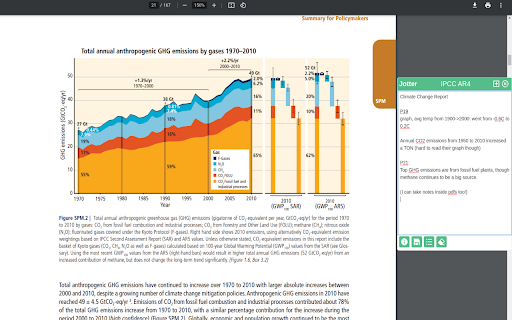
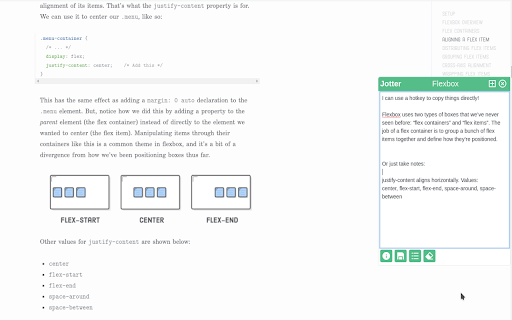
Jotter is a keyboard-activated* scratchpad. It lets you take notes while you're thinking. I find  app-switching distracting. I made this to record thoughts in the moment, and process and commit them to a heavier-duty notes app afterwards.

It's useful for:

- Doing research across 5 different tabs.
- Taking minutes on video calls
- Reading industry reports and papers
- Copying important parts of how-to's (like, getting HTTPS set up for your domain)

Some useful features:
- A quick-copy shortcut to paste highlighted text directly in your editor. Works with pdfs too.
- Each note keeps a bibliography so you can refer to your sources later.
- You can tag, stash, and retrieve notes.
- It integrates with Google Drive and Notion, so you can export your notes after you're done.

* Toggle it with the "Open Jotter" keyboard shortcut, which defaults to "Ctrl/Cmd+Shift+Space".

If you've found a bug, or have suggestions, ping me: ([email protected]).
Technical
- Version
- 0.0.27
- Manifest
- V3
- Size
- 1.27MiB
- Min Chrome
- 88
- Languages
- 1
- Featured
- Yes
Metadata
- ID
- icdbglcdnjonofjpcfpcgpjjchokgnjl
- Developer ID
- u2f927e181fb9a0b8b353f0fabac47338
- Developer Email
- [email protected]
- Created
- Nov 25, 2021
- Last Updated (Store)
- May 6, 2022
- Last Scraped
- May 27, 2026
- Website
- —
- Support URL
- —
- Privacy Policy
- —
Similar extensions
Alternatives to Jotter, ranked by description similarity.
Jotter
Jot down multiple notes with a simple notepad.
305
★ 4.4

Jotters - Chrome Notes
Jot your note in the browser in one click. Just open a new tab or click the extension button!
8
★ 5.0

Jot - Todo List
Your minimalist to-do list for the web. Jot down tasks in a click and clear your mind between tabs.
9
★ 5.0

JotPad: Your Side Panel Notepad
A simple and elegant Markdown note-taking app that lives in your browser's side panel.
80
★ 4.3

Tater Jots
A chrome extension used to take notes on videos
75
★ 5.0

Web-Jotter
Save tab sessions and jot highlights; your personal web of notes and tabs.
5
★ 5.0
Jot - Browser Notes
Take & save notes on webpages.
150
★ 5.0

Jotty
A simple password protected note-taking extension right in your Chrome browser.
5
Data sourced from the Chrome Web Store · last verified May 27, 2026.