
MConverter - File Converter: AVIF, JXL, WebP
Save AVIF, WebP as JPG or PNG. Convert images, video, audio from webpages. Create animated GIF from video. Compress PDF files.
As of June 2026, MConverter - File Converter: AVIF, JXL, WebP has 20,000 users and a 4.05/5 rating from 109 reviews in the Productivity category.
Usersno change0%
20.0K
20,000
Ratingup 0.2 percent+0.2%
4.05
109 reviews
Reviewsup 0.9 percent+0.9%
109
Version
1.0.6
Manifest V3
History
6 snapshotsTracking since Apr 5, 2026.
View as table
| Date | Users | Rating | Reviews | Version |
|---|---|---|---|---|
| Apr 5, 2026 | 20.0K | 4.04 | 108 | 1.0.6 |
| Apr 16, 2026 | 20.0K | 4.05 | 109 | 1.0.6 |
| May 18, 2026 | 20.0K | 4.05 | 109 | 1.0.6 |
| May 23, 2026 | 20.0K | 4.04 | 108 | 1.0.6 |
| Jun 2, 2026 | 20.0K | 4.05 | 109 | 1.0.6 |
| Jun 10, 2026 | 20.0K | 4.04 | 108 | 1.0.6 |
| Now | 20.0K | 4.05 | 109 | 1.0.6 |
Permissions & access
- Permissions
- contextMenusactiveTaboffscreenscripting
- Host access
- https://mconverter.eu/
Screenshots


About
Extension features:
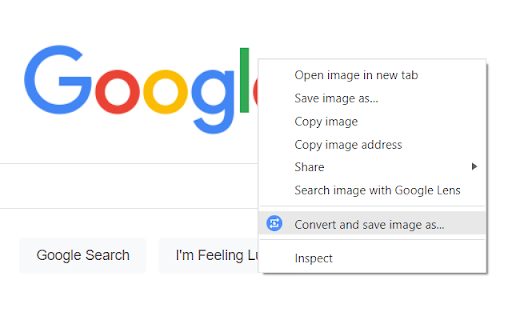
➡Right-click on most images, videos, and audio players to extract their displayed files and convert them. For example, you can right-click on WebP images and save as JPG by quickly converting them.*
➡Click the toolbar icon to see all "from" and "to" formats
➡Start typing "Convert ..." or "Convert to ..." in the address bar and you will see a list of file formats as suggestions. Click or hit Enter on any of them to quickly convert that type of files.

MConverter web app features:
✓ Convert in bulk files between most video, audio, image, e-book, office & archive formats
✓ Batch convert large files up to 10 GB**
✓ Drag and drop folders, in addition to files
✓ Use Ctrl+V to paste files from the clipboard, folders too
✓ Select files from Google Drive, Microsoft OneDrive, and Dropbox
✓ Directly choose files to convert from other apps - integrates with your device's Share menu, if installed as a PWA
✓ Save converted files to any custom folder - use the SAVE TO... button
✓ Easy to use
✓ Small app size - as MConverter is an optimized web app (PWA)
✓ All popular file formats are supported
✓ New formats are also available: AVIF, JPEG XL and WebP images
✓ Compress PDF files in bulk so that they take up less storage. Pick between basic, strong, and extreme compression: up to 90% reduction in size, depending on your file
✓ Free up space by converting images to more efficient formats like WebP, AVIF, JPEG XL (JXL)
✓ Open 7ZIP, RAR archives more easily by converting them to ZIP
✓ Convert Office files, no matter if they were created with Microsoft or LibreOffice
✓ PDF support: convert images to PDF (JPEG to PDF, PNG to PDF), but also export Word documents, Excel spreadsheets, and PowerPoint presentations to PDF
✓ Export PDF to editable Word document: if the original PDF file had text data, then you will be able to edit the converted DOC or DOCX file
✓ Export PDF to image: PDF to JPG, PDF to TIFF, and more
✓ Can convert TSV and CSV to XLSX (Excel spreadsheet)
✓ Extract music from video by converting MP4 to MP3, AVI to MP3, FLV to MP3 etc.
✓ High quality audio formats supported: FLAC, WAV and WMA; To free up space, convert to MP3 or AAC
✓ Create GIF animations from videos: up to 1 minute long GIFs
✓ Optimize GIF animations to have a smaller file size: convert GIF to MP4 video
✓ In addition to static images, MConverter also supports making animated WebP files, as well as converting WebP animations to a video format or GIF
✓ Open iPhone photos: convert HEIC to JPG, HEIC to PNG, HEIC to WebP and more
✓ Extract image frames from videos: MP4 to JPG, MP4 to PNG, AVI to PNG etc.
✓ Convert to more compatible formats: WebP to PNG, WebP to JPEG, WebM to MP4, DOCX to DOC and others
✓ Convert Minecraft game files: mcaddon, mcpack, mcworld, and mctemplate
✓ Subtitles (closed captions) converter: SRT, SMI (SAMI), SUB (MicroDVD), VTT (WebVTT)
✓ .tini to zip file converter: convert ChromeOS Crostini Linux container backups to other archive formats
✓ View .drawio diagrams: convert .drawio to PDF, PNG images
✓ Comic book converter: CBR, CBZ to PDF
✓ Raw image formats from professional cameras: convert ARW/DNG/CR3 to JPEG, PSD and more
✓ Convert Jupyter Notebooks (IPYNB)
✓ Recognize and open unknown file types: If you have a file with a missing or corrupted filename extension, MConverter will analyze the file, try to guess its real format and offer to convert it to other formats you can already use on your device. Ideal for files which trigger the "How do you want to open this file? Look for an app in the Microsoft Store." popup dialog on Windows.

✓ Supported formats:
To see all supported file formats, please open the extension from the toolbar.


* The MConverter extension cannot download videos from YouTube, because it is against the Terms of Use of YouTube. We cannot do anything about this.
** MConverter Plus, Pro & Max can convert files over 100 MB and in batches of up to 1000 files at once. The paid plans of the file converter remove all ads, have no daily conversion limit, and allow you to keep the original file names.


MConverter is sometimes misspelled by people as MConvertor or file convertor.
Technical
- Version
- 1.0.6
- Manifest
- V3
- Size
- 61.4KiB
- Min Chrome
- 88
- Languages
- 55
- Featured
- Yes
Metadata
- ID
- hpjdhhlocahjkhhmcdfbggiegokpljgf
- Developer ID
- u92ea0ef33647d824791b2144f16f5f06
- Developer Email
- [email protected]
- Created
- Oct 6, 2021
- Last Updated (Store)
- Feb 21, 2026
- Last Scraped
- Jun 10, 2026
- Website
- mconverter.eu
- Support URL
- https://mconverter.eu/#legal
- Privacy Policy
- https://mconverter.eu/
Similar extensions
Alternatives to MConverter - File Converter: AVIF, JXL, WebP, ranked by description similarity.

All Video Converter
Convert video and audio files right from your browser without any uploading
32

Easy File Converter
Convert files easily in your browser! Supports Images, CSV, JSON, XML, YAML, Excel, Markdown & HTML. Secure, local file processing.
52
★ 3.0

MP3 Converter
Convert sound fast with mp3 converter. Easily video to mp3, convert mp4 to mp3, and change your audio format right in Chrome.
541

MiConvert - File Converter
Quick access to MiConvert.com's file conversion tools. Convert images, videos, audio, PDFs, documents, and archives online.
15

Image Converter
Try different file formats with Image Converter. The smart picture converter tool for formats like JPG to PNG, JPG to WEBP and more.
—
★ 5.0

File Converter
Convert files between different formats - fast, free, and secure
16

WEBM to MP4 converter: WebCodecs and FFmpeg support
🎬 Convert WEBM to MP4 instantly and securely. No server uploads, unlimited file conversions, works locally in your browser.
4.0K
★ 4.3

Converto.cloud: View | Edit | Convert | Sign PDF Tools
Your Free All-in-One PDF Converter Tool
80
Data sourced from the Chrome Web Store · last verified Jun 10, 2026.