
Converto.cloud: View | Edit | Convert | Sign PDF Tools
Your Free All-in-One PDF Converter Tool
As of May 2026, Converto.cloud: View | Edit | Convert | Sign PDF Tools has 80 users in the Productivity category.
Usersup 2.6 percent+2.6%
80
80
Ratingno change0%
—
— reviews
Reviewsno change0%
—
Version
1.0
Manifest V3
History
3 snapshotsTracking since Apr 1, 2026.
View as table
| Date | Users | Rating | Reviews | Version |
|---|---|---|---|---|
| Apr 1, 2026 | 78 | — | — | 1.0 |
| Apr 30, 2026 | 83 | — | — | 1.0 |
| May 27, 2026 | 84 | — | — | 1.0 |
| Now | 80 | — | — | 1.0 |
Permissions & access
- Permissions
- None declared
- Host access
- None declared
Screenshots
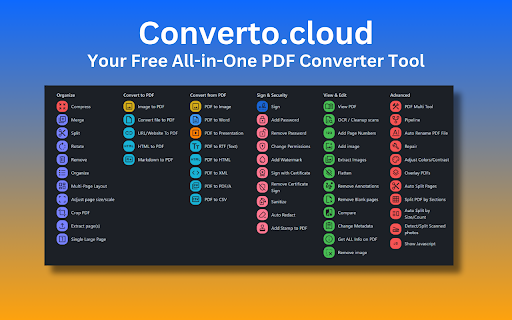


About
Converto: Your Free All-in-One PDF & File Converter for Chrome

Stop juggling multiple tools! Converto is your one-stop shop for all your PDF and file conversion needs.  **Completely free to use**, our Chrome extension offers a massive toolbox to transform your files with ease.

Here's what you get:

✅Effortless File Management:
    * View, annotate, and add text or images directly within PDFs. (View PDF)
    * Merge, rotate, rearrange, and remove pages with ease. (PDF Multi Tool)
    * Organize documents by removing or rearranging pages in any order. (Organize)
    * Extract all images from a PDF and save them as a zip file. (Extract Images)

✅Seamless Conversion Options:
    * Convert nearly any file (DOCX, PNG, XLS, PPT, TXT, etc.) to PDF. (Convert file to PDF)
    * Transform images (PNG, JPEG, GIF) into PDFs. (Image to PDF)
    * Create PDFs from websites and URLs. (URL/Website To PDF)
    * Convert HTML, Markdown, and even scanned photos into PDFs. (HTML to PDF, Markdown to PDF, Detect/Split Scanned photos)

✅Advanced PDF Editing:
    * Compress PDFs to reduce their file size. (Compress)
    * Change or remove metadata associated with your PDF. (Change Metadata)
    * Add or remove page numbers throughout your document. (Add Page Numbers)
    * Adjust the contrast, saturation, and brightness of your PDF. (Adjust Colors/Contrast)
    * Crop PDFs to reduce size while maintaining text clarity. (Crop PDF)
    * Split PDFs into multiple documents or by sections. (Split, Split PDF by Sections)
    * Repair corrupt or broken PDFs. (Repair)
    * Remove unwanted pages, blank pages, and annotations. (Remove, Remove Blank pages, Remove Annotations)
    * Add custom watermarks and text/image stamps for branding. (Add Watermark, Add Stamp to PDF)

✅Enhanced Security Features:
    * Encrypt your PDF documents with a password. (Add Password)
    * Remove password protection when needed. (Remove Password)
    * Sign PDFs with your signature, text, or image. (Sign)
    * Change document permissions and add redactions (blackouts) for sensitive information. (Change Permissions, Auto Redact)

✅Advanced Functionality:
    * Create a single large page by merging all PDF pages. (Single Large Page)
    * Automatically rename PDF files based on detected headers. (Auto Rename PDF File)
    * Automatically split scanned PDFs using QR codes. (Auto Split Pages)
    * Analyze and view any Javascript embedded within a PDF. (Show Javascript)
    * Compare two PDFs and see the differences side-by-side. (Compare)
    * Extract specific pages from a PDF document. (Extract page(s))
    * Overlay multiple PDFs on top of each other. (Overlay PDFs)
    * Convert PDFs to various formats like Word, Presentations, Text (RTF), HTML, XML, and CSV. (PDF to Word, PDF to Presentation, PDF to RTF (Text), PDF to HTML, PDF to XML, PDF to CSV)
    * Clean up scanned documents by detecting and re-adding text as searchable content. (OCR / Cleanup scans)
    * Gain detailed information about your PDF, including metadata and structure. (Get ALL Info on PDF)
    * Sanitize PDFs by removing scripts and unwanted elements. (Sanitize)
    * (For advanced users) Run multiple actions on PDFs by defining pipeline scripts. (Pipeline)

No hidden fees, no limitations. Just powerful conversion features at your fingertips.  Install Converto today!
Technical
- Version
- 1.0
- Manifest
- V3
- Size
- 17.16KiB
- Min Chrome
- 88
- Languages
- 1
- Featured
- No
Metadata
- ID
- ibjobjabeijpoblglpdokljkhcbaeocb
- Developer ID
- ud80314de58869d3925dd1aa6785167c3
- Developer Email
- [email protected]
- Created
- Oct 3, 2024
- Last Updated (Store)
- Oct 3, 2024
- Last Scraped
- May 27, 2026
- Website
- —
- Support URL
- https://converto.cloud/terms.html
- Privacy Policy
- https://converto.cloud/terms.html
Similar extensions
Alternatives to Converto.cloud: View | Edit | Convert | Sign PDF Tools, ranked by description similarity.

Convertify - All-in-One PDF & File Converter
All-in-one PDF toolkit. Merge, split, compress, and convert PDF, Word, JPG & more. Private, fast, and free to use.
10

Document Converter
Use the Document Converter app to convert a Word document to a PDF file or the other way round — convert a PDF to a Word document.
40

Free PDF Editor & Reader — Compress, Merge, Convert PDFs · PDFly
Edit PDF, convert PDF to Word, merge, split & compress PDF files. Free PDF editor, reader, e-sign & AI tools — all in one.
2.0K
★ 4.2

Image ↔ PDF Converter – Free Offline Tool (JPG, PNG, PDF)
Convert images to PDF, PDF to images, and between image formats - all offline!
218
★ 5.0

SmallPDF Free Chrome Extension
With SmallPDF Free you can easily manage PDFs and images from your browser.
2.0K
★ 3.7

Convert webpage to PDF
Let Convert webpage to PDF simplify your workflow! Our tool converts webpages, saves them as PDFs, and keeps their original look.
30.0K
★ 4.8

Combine PDF – Fast & Easy Tool
Quickly merge multiple PDF files into one: fast, secure, and keeps original quality without limits.
110
★ 5.0

Fast PDF to JPG Converter
Securely convert PDF pages to JPG images or extract text instantly. Runs 100% offline.
13
Data sourced from the Chrome Web Store · last verified May 27, 2026.