
Easy File Converter
Convert files easily in your browser! Supports Images, CSV, JSON, XML, YAML, Excel, Markdown & HTML. Secure, local file processing.
As of June 2026, Easy File Converter has 52 users and a 3.00/5 rating from 1 reviews in the Productivity category.
Usersup 18.2 percent+18.2%
52
52
Ratingno change0%
3.00
1 reviews
Reviewsno change0%
1
Version
0.1.0
Manifest V3
History
3 snapshotsTracking since Apr 1, 2026.
View as table
| Date | Users | Rating | Reviews | Version |
|---|---|---|---|---|
| Apr 1, 2026 | 44 | 3.00 | 1 | 0.1.0 |
| May 11, 2026 | 50 | 3.00 | 1 | 0.1.0 |
| Jun 6, 2026 | 51 | 3.00 | 1 | 0.1.0 |
| Now | 52 | 3.00 | 1 | 0.1.0 |
Permissions & access
- Permissions
- sidePaneldownloads
- Host access
- None declared
Screenshots
About
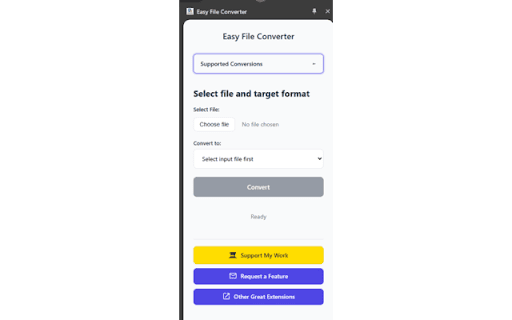
Stop juggling multiple online tools and bulky software! Introducing Ultimate File Converter, your lightweight, powerful, and convenient Chrome extension for seamless file format conversion.

Whether you're a developer needing to switch between data formats, a designer optimizing images, a data analyst wrangling spreadsheets, or a content creator converting markup, this extension streamlines your workflow. Convert essential file types quickly and efficiently without ever leaving your browser window.

Why Choose Easy File Converter?

Versatile Format Support: Handle a wide range of common file types for images, data interchange, spreadsheets, and web content.

Simple & Intuitive: Easy-to-use interface. Select your file, choose the output format, and convert with just a few clicks.

Convenient: No need to navigate away to separate websites. Convert files directly within your Chrome environment.

Fast & Efficient: Designed for quick conversions to save you valuable time.

Privacy Focused:  Conversions are processed locally in your browser, ensuring your files don't leave your machine.

Supported Conversions:
We support converting from the following input formats to the specified output formats:

Images:
From: JPG, JPEG, PNG, WEBP, SVG
To: PNG, JPG, WEBP

CSV (.csv):
To: JSON, Excel (.xlsx)

JSON (.json):
To: CSV, XML, YAML (.yaml)

XML (.xml):
To: JSON, CSV, YAML (.yaml)

YAML (.yaml, .yml):
To: JSON

Excel (.xlsx, .xls, .ods):
To: CSV

Markdown (.md, .markdown):
To: HTML

HTML (.html, .htm):
To: Markdown (.md)

How to Use:

Click the Easy File Converter icon in your Chrome toolbar.
Select or drag-and-drop your input file onto the extension window.
Choose your desired output format from the available options.
Click the "Convert" button.
Your converted file will be automatically downloaded!
Get Started:

Install Easy File Converter today and simplify your file conversion tasks! Boost your productivity and keep your workflow contained within your browser.
Technical
- Version
- 0.1.0
- Manifest
- V3
- Size
- 4.11MiB
- Min Chrome
- 88
- Languages
- 1
- Featured
- No
Metadata
- ID
- defnkafnejkadhfgjajacjjjlccplijk
- Developer ID
- u77d225a6f4a23aa047d920c8f6f41439
- Developer Email
- [email protected]
- Created
- Apr 5, 2025
- Last Updated (Store)
- Apr 5, 2025
- Last Scraped
- Jun 6, 2026
- Website
- —
- Support URL
- —
- Privacy Policy
- —
Similar extensions
Alternatives to Easy File Converter, ranked by description similarity.

File Converter
Convert files between different formats - fast, free, and secure
16

Ultimate Image Converter
Effortless Image Conversion, Right in Your Browser!
1

Master Converter
Resize images, convert filess offline, JSON to CSV and CSV to JSON directly in your browser.
6

Image converter/Convert JPG to PNG
Activate this extension that Convert any image that Supports JPG, PNG formats.
259

Convertio
Convert files online from one format into another.
200

Image Converter
Try different file formats with Image Converter. The smart picture converter tool for formats like JPG to PNG, JPG to WEBP and more.
—
★ 5.0
Convert CSV to JSON
Convert CSV & text files to JSON easily with our Chrome Extension.
597
★ 5.0

PDF to PPT converter
Effortlessly convert ppt to pdf and pdf to ppt with our quick converter. Simplify your presentations now!
340
Data sourced from the Chrome Web Store · last verified Jun 6, 2026.