
Split View: Open Left Pane Links in Right Pane
When using Chrome's native Split View, clicking a link in the left pane opens it in the right pane.
As of June 2026, Split View: Open Left Pane Links in Right Pane has 163 users and a 5.00/5 rating from 4 reviews in the Functionality & UI category.
Usersup 120.3 percent+120.3%
163
163
Ratingno change0%
5.00
4 reviews
Reviewsup 100.0 percent+100.0%
4
Version
1.0.0
Manifest V3
History
7 snapshotsTracking since Apr 7, 2026.
View as table
| Date | Users | Rating | Reviews | Version |
|---|---|---|---|---|
| Apr 7, 2026 | 74 | 5.00 | 2 | 1.0.0 |
| Apr 22, 2026 | 75 | 5.00 | 2 | 1.0.0 |
| May 2, 2026 | 85 | 5.00 | 3 | 1.0.0 |
| May 10, 2026 | 91 | 5.00 | 3 | 1.0.0 |
| May 18, 2026 | 103 | 5.00 | 3 | 1.0.0 |
| May 27, 2026 | 124 | 5.00 | 3 | 1.0.0 |
| Jun 5, 2026 | 138 | 5.00 | 3 | 1.0.0 |
| Now | 163 | 5.00 | 4 | 1.0.0 |
Permissions & access
- Permissions
- tabs
- Host access
- <all_urls>
Screenshots

About
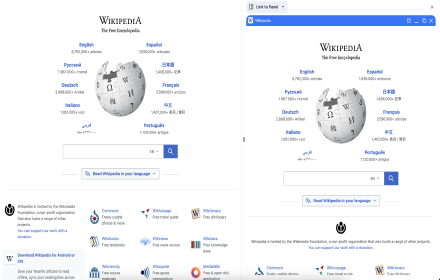
This extension enhances Chrome’s native Split View feature.

When two tabs are displayed side-by-side using Split View, left-clicking a link in the left pane opens the destination in the right pane instead of replacing the left pane page.

Example use would be with a google search in the left pane, you could browse through the results by left clicking and making them open in the right pane.

• Works only with Chrome’s built-in Split View
• Does nothing when Split View is not active
• Middle-click and modifier clicks behave normally
• No data collection
Technical
- Version
- 1.0.0
- Manifest
- V3
- Size
- 4.64KiB
- Min Chrome
- 88
- Languages
- 1
- Featured
- No
Metadata
- ID
- homfdecehccfkjlbjihjnpfbcjedmipo
- Developer ID
- u2fd6e7219ab8b37adc56bb4c1ffb2c7e
- Developer Email
- [email protected]
- Created
- Dec 22, 2025
- Last Updated (Store)
- Dec 22, 2025
- Last Scraped
- Jun 5, 2026
- Website
- —
- Support URL
- —
- Privacy Policy
- —
Similar extensions
Alternatives to Split View: Open Left Pane Links in Right Pane, ranked by description similarity.

Right Click Opens Link in a Background Tab
Right clicking a link opens the link in a new background tab.
3.0K
★ 4.1

Middle Click Close Tab
Closes the tab when middle-clicking on an empty space
35

Pure Side Tabs
Safely view and manage your open tabs and tab groups in a sidebar. Fully open-source, with zero dependencies and no data collection.
6

Open Link In Another Window
Open a link in a selected Chrome window from the link context menu or with Shift+click.
93
★ 4.0
Link to Panel by NNT
Open any link on Side Panel
48
★ 5.0

Lefty
Closes all tabs to the left of the current tab. Use the toolbar button or keyboard shortcut.
2

Split
Split the current tab's content into two independent, side-by-side scrollable views of the same page.
45
★ 5.0

Search Selection
Right-click selected text to search it on your preferred search engine, in a new tab.
15
Data sourced from the Chrome Web Store · last verified Jun 5, 2026.