
Input Ninja
Action flows to create Trello cards, Notion pages, GitHub & Jira Issues, use ChatGPT, templates, notes, todos etc with one key press
As of June 2026, Input Ninja has 31 users and a 5.00/5 rating from 4 reviews in the Workflow & Planning category.
Usersdown 6.1 percent−6.1%
31
31
Ratingno change0%
5.00
4 reviews
Reviewsno change0%
4
Version
0.99.58
Manifest V3
History
11 snapshotsTracking since Apr 4, 2026.
View as table
| Date | Users | Rating | Reviews | Version |
|---|---|---|---|---|
| Apr 4, 2026 | 33 | 5.00 | 4 | 0.99.58 |
| Apr 17, 2026 | 29 | 5.00 | 4 | 0.99.58 |
| Apr 23, 2026 | 27 | 5.00 | 4 | 0.99.58 |
| Apr 28, 2026 | 29 | 5.00 | 4 | 0.99.58 |
| May 8, 2026 | 30 | 5.00 | 4 | 0.99.58 |
| May 11, 2026 | 31 | 5.00 | 4 | 0.99.58 |
| May 15, 2026 | 33 | 5.00 | 4 | 0.99.58 |
| May 19, 2026 | 31 | 5.00 | 4 | 0.99.58 |
| May 24, 2026 | 32 | 5.00 | 4 | 0.99.58 |
| May 29, 2026 | 31 | 5.00 | 4 | 0.99.58 |
| Jun 6, 2026 | 29 | 5.00 | 4 | 0.99.58 |
| Now | 31 | 5.00 | 4 | 0.99.58 |
Permissions & access
- Permissions
- contextMenusstoragescriptingsidePanelactiveTabmanagementoffscreen
- Host access
- <all_urls>
Screenshots
About
Input Ninja allows you to create action flows that automate your routine operations such as creating Trello card, Notion pages and recrords, GitHub or Jira issue, using ChatGPT etc... and combining all of this in a different orders.

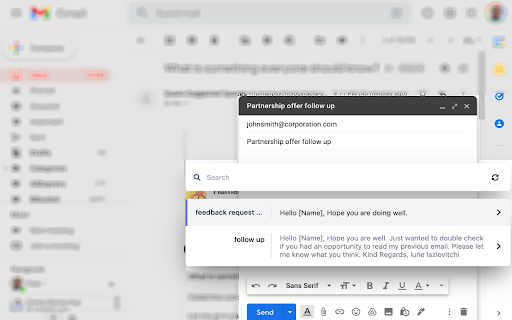
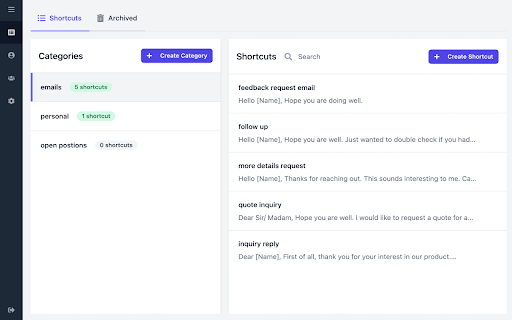
You can also quickly search through your notes, templates or todos at any moment on any web page.
You can then choose to simply view or paste the note directly into the place your cursor caret is at the current moment, which is extremely useful when you deal with emails or messaging on LinkedIn or other social platforms.

You can also add a new note quickly right on spot by going to Context Menu -> Input Ninja -> Add New Note.

Features:

*Action Flows*

For example:
You can make it so that on a press of a button you will create a Trello card in specific board assigned for a specific team member with a screenshot attached.


* Templates *

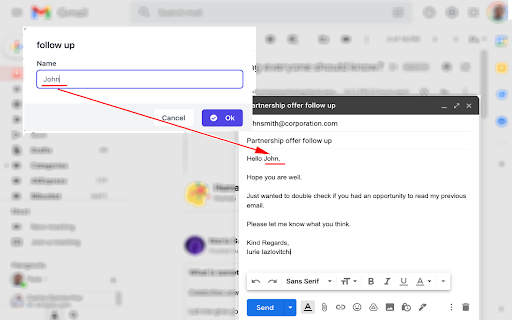
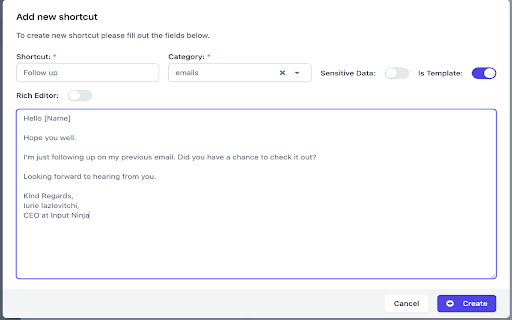
If you want to make your note to act like a template, just use a place holders with an identifier within square brackets. For example:

--

Hello [Name],

Please let me know if you are interested in a position of [Position Name] in our company.

--

In case of templates, when you select it in the search box, you will be prompted to fill the place holder fields with values which will be later put in place of place holders and paste into the field that is currently focused. For social media platforms like LinkedIn, the values for First Name and Last Name will be automatically filled where possible.


* Sensitive data *

You can mark your note as Sensitive in the settings, which will show * instead its content in the search box. This is useful for saving passwords, personal information etc... .

* Share your notes within your team *

If you are working in a team you can choose to have shared notes or templates, which makes it very convenient to have a central knowledge base accessible by every team member.


Use Cases :

1. Sales.
If you are working in Sales you are dealing with a lot of repetitive emailing containing product pitches, feature descriptions, customer onboarding info and so on. By putting all of your templates and notes into Input Ninja you will be able to have them at your fingerprints and access instantly at any moment. Which will drastically improve your productivity and decrease the annoyance of dealing with constant searching and  context switching.

2. Recruiting.
You can use Input Ninja to save your open positions info, as well as frequently used answers for the candidates engagement. This will allow you to have all these information at hand any moment. And by extension save a lot of time which you can use to reach out to even more candidates.

3. Personal Day to Day use.
If you found yourself searching through your notes frequently to find some data needed when you are working in the browser, Input Ninja can be a huge time saver for you. You can use it to quickly access your payment information to fill-in when ordering online. Or just quickly view/edit your todo list for the day. You can also find it convenient to have a possibility to quickly add a note from a selection on the web page.


Input Ninja gets you to the next productivity level.
Technical
- Version
- 0.99.58
- Manifest
- V3
- Size
- 3.78MiB
- Min Chrome
- 88
- Languages
- 1
- Featured
- Yes
Metadata
- ID
- hkjpcgmahjcboogncjlmdfhleccolghf
- Developer ID
- u5be75c2a55224db1d7b3c4ba8348e5eb
- Developer Email
- [email protected]
- Created
- Jan 19, 2022
- Last Updated (Store)
- Feb 23, 2026
- Last Scraped
- Jun 6, 2026
- Website
- inputninja.com
- Support URL
- —
- Privacy Policy
- https://inputninja.com/privacy
Similar extensions
Alternatives to Input Ninja, ranked by description similarity.

Sticky Snippets · Note-it Aside · Customer Service, Sales & IT Support
Save snippets, reuse replies — one click from any tab. For customer service, sales, and IT support teams.
5.0K
★ 4.9

TemplateIn - Templates for the web
Access your templates anywhere on the web.
5
★ 5.0

Note Ninja
This extension allows you to save highlighted text and selected images to Google Docs or Microsoft Word.
220
★ 5.0

NotoPilot
Quick notes for every webpage – organized, smart, and always where you left them!
1
★ 5.0

Knapsack
An AI side panel securely connected to your data
42
★ 5.0

Quick Paste Templates
Save, organize, and paste reusable text templates with one click
99
★ 5.0

Promptly
AI-powered note-taking and task-listing Chrome extension
52
★ 5.0

Heads Up Notes
Sticky notes that appear on any web page in response to your text searches.
11
Data sourced from the Chrome Web Store · last verified Jun 6, 2026.