
Sticky Snippets · Note-it Aside · Customer Service, Sales & IT Support
Save snippets, reuse replies — one click from any tab. For customer service, sales, and IT support teams.
As of June 2026, Sticky Snippets · Note-it Aside · Customer Service, Sales & IT Support has 5,000 users and a 4.91/5 rating from 328 reviews in the Workflow & Planning category.
Usersno change0%
5.0K
5,000
Ratingno change0%
4.91
328 reviews
Reviewsup 1.9 percent+1.9%
328
Version
1.6.0
Manifest V3
90-day change · In the last 90 days this extension 2 version updates.
History
8 snapshotsTracking since Apr 5, 2026.
View as table
| Date | Users | Rating | Reviews | Version |
|---|---|---|---|---|
| Apr 5, 2026 | 5.0K | 4.91 | 322 | 1.5.0 |
| Apr 16, 2026 | 5.0K | 4.91 | 323 | 1.5.0 |
| Apr 26, 2026 | 5.0K | 4.91 | 324 | 1.5.1 |
| May 2, 2026 | 5.0K | 4.91 | 325 | 1.5.1 |
| May 7, 2026 | 5.0K | 4.91 | 325 | 1.6.0 |
| May 11, 2026 | 5.0K | 4.91 | 327 | 1.6.0 |
| Jun 2, 2026 | 5.0K | 4.91 | 328 | 1.6.0 |
| Jun 22, 2026 | 5.0K | 4.91 | 329 | 1.6.0 |
| Now | 5.0K | 4.91 | 328 | 1.6.0 |
Changelog
- May 2, 2026description
Note-it Aside is a Chrome extension for sticky notes, text snippets, reusable templates, tasks, page capture, and page summaries in the browser side panel. It is built for people who work in web apps all day and need fast access to the text they save and reuse most.

Use it to save quick replies, internal notes, checklists, troubleshooting steps, product copy, selected text, and other frequently pasted text. Instead of switching between tabs, documents, and chats, open the side panel and keep your notes beside the page you are already working on.

When you explicitly use note capture or summary features, the extension can read selected text or readable page content from the current page so you can save it to notes or generate a summary. No sign-up is required, and your data stays local by default unless you choose an optional feature such as cloud backup, folder sharing, or Instant Transmit.

Best for

- Customer support and customer service teams
- IT support and operations teams
- Sales and business development teams
- E-commerce admins and back-office workflows
- Anyone who repeats the same text in browser-based tools

Key features

- One-click copy from the Chrome side panel
- Folders to organize notes and templates by workflow
- Notes and tasks in one place
- Note styling with colors, font size, and bold text
- Drag-and-drop sorting for notes and folders
- Save selected text from any webpage with the context menu
- Capture readable page content into notes from the current tab
- Generate AI page summaries on supported Chrome versions and compatible pages
- Cloud backup to Google Drive or Dropbox
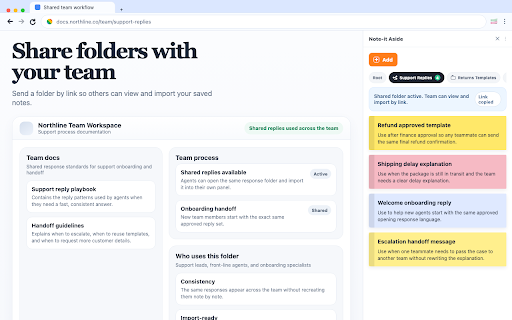
- Read-only folder sharing by link, with import into Note-it Aside
- Import and export backup files
- Instant Transmit to mobile with a QR code
- Interface available in 50+ languages
- No account required; local-first storage by default

Why people use Note-it Aside

Regular note apps are built for long-form writing. Note-it Aside is built for fast browser work: reusable replies, text snippets, reference notes, and lightweight task tracking beside the page you are already on.

What's new in v1.5.0

- Cloud Backup: back up notes and folders to Google Drive or Dropbox and restore them when needed.
- Share Folders: create a read-only web link for a folder, then update shared content when notes change.
- Instant Transmit: send text between your extension and mobile device with a QR code session.
- Better page workflows: save selected text, capture readable page content, and summarize pages from the current tab.
Note-it Aside is a Chrome side panel extension for sticky notes, text snippets, canned responses, reusable templates, tasks, page capture, and page summaries. It is built for people who work in web apps all day and need fast access to the text they save and reuse most. Use it to save quick replies, internal notes, checklists, troubleshooting steps, product copy, selected text, and other frequently pasted text. Instead of switching between tabs, documents, and chats, open the side panel and keep your notes beside the page you are already working on. When you explicitly use note capture or summary features, the extension can read selected text or readable page content from the current page so you can save it to notes or generate a summary. No sign-up is required, and your data stays local by default unless you choose an optional feature such as cloud backup, folder sharing, or Instant Transmit. Best for - Customer support and customer service teams - IT support and operations teams - Sales and business development teams - E-commerce admins and back-office workflows - Anyone who repeats the same text in browser-based tools Key features - One-click copy from the Chrome side panel - Folders to organize notes and templates by workflow - Notes, templates, and tasks in one place - Reusable text templates with inline placeholders, dropdown choices, date and time tokens, and linked variables from other notes in the same folder - Note styling with colors, font size, and bold text - Drag-and-drop sorting for notes and folders - Save selected text from any webpage with the context menu - Insert saved notes, snippets, and templates from the browser right-click menu - Capture readable page content into notes from the current tab - Generate AI page summaries on supported Chrome versions and compatible pages - Cloud backup to Google Drive or Dropbox - Read-only folder sharing by link, with import into Note-it Aside - Import and export backup files - Instant Transmit to mobile with a QR code - Interface available in 50+ languages - No account required; local-first storage by default Why people use Note-it Aside Regular note apps are built for long-form writing. Note-it Aside is built for fast browser work: reusable replies, text snippets, reference notes, and lightweight task tracking beside the page you are already on. What's new in v1.6.0 - Templates: a new note type for reusable parameterized text. Type a body with {name} style placeholders and fill them in inline, right under the textarea. No dialogs, no mode switch. - Placeholder choices: use {name:dear customer} for a text field with a default, or {level:pleasure|honor|responsibility} for a dropdown. {date} and {time} resolve automatically. - Linked variables: any plain note in the same folder with a title becomes a named variable inside your templates. Edit the source note once and every template that references it updates instantly. - Live preview and one-click copy: the rendered output updates as you change field values, and the existing copy button copies the filled-in text. - Share templates with folders: templates travel with folder sharing and render the exact same inline fields on the public web link. - Template gallery: browse free ready-to-use templates at https://noteitaside.com/templates. - Templates are included at no cost. - May 2, 2026short_description
Save, organize, and instantly copy work text snippets in your browser. Built for customer/IT support, sales, and e-commerce admin.
Save snippets, reuse replies — one click from any tab. For customer service, sales, and IT support teams.
- May 2, 2026name
Note-it Aside: Text Snippets for Sales & Customer Support
Sticky Snippets · Note-it Aside · Customer Service, Sales & IT Support
Permissions & access
- Permissions
- activeTabscriptingcontextMenusstoragesidePanelunlimitedStorageidentity
- Host access
- None declared
Screenshots



About
Note-it Aside is a Chrome side panel extension for sticky notes, text snippets, canned responses, reusable templates, tasks, page capture, and page summaries. It is built for people who work in web apps all day and need fast access to the text they save and reuse most.

Use it to save quick replies, internal notes, checklists, troubleshooting steps, product copy, selected text, and other frequently pasted text. Instead of switching between tabs, documents, and chats, open the side panel and keep your notes beside the page you are already working on.

When you explicitly use note capture or summary features, the extension can read selected text or readable page content from the current page so you can save it to notes or generate a summary. No sign-up is required, and your data stays local by default unless you choose an optional feature such as cloud backup, folder sharing, or Instant Transmit.

Best for

- Customer support and customer service teams
- IT support and operations teams
- Sales and business development teams
- E-commerce admins and back-office workflows
- Anyone who repeats the same text in browser-based tools

Key features

- One-click copy from the Chrome side panel
- Folders to organize notes and templates by workflow
- Notes, templates, and tasks in one place
- Reusable text templates with inline placeholders, dropdown choices, date and time tokens, and linked variables from other notes in the same folder
- Note styling with colors, font size, and bold text
- Drag-and-drop sorting for notes and folders
- Save selected text from any webpage with the context menu
- Insert saved notes, snippets, and templates from the browser right-click menu
- Capture readable page content into notes from the current tab
- Generate AI page summaries on supported Chrome versions and compatible pages
- Cloud backup to Google Drive or Dropbox
- Read-only folder sharing by link, with import into Note-it Aside
- Import and export backup files
- Instant Transmit to mobile with a QR code
- Interface available in 50+ languages
- No account required; local-first storage by default

Why people use Note-it Aside

Regular note apps are built for long-form writing. Note-it Aside is built for fast browser work: reusable replies, text snippets, reference notes, and lightweight task tracking beside the page you are already on.

What's new in v1.6.0

- Templates: a new note type for reusable parameterized text. Type a body with {name} style placeholders and fill them in inline, right under the textarea. No dialogs, no mode switch.
- Placeholder choices: use {name:dear customer} for a text field with a default, or {level:pleasure|honor|responsibility} for a dropdown. {date} and {time} resolve automatically.
- Linked variables: any plain note in the same folder with a title becomes a named variable inside your templates. Edit the source note once and every template that references it updates instantly.
- Live preview and one-click copy: the rendered output updates as you change field values, and the existing copy button copies the filled-in text.
- Share templates with folders: templates travel with folder sharing and render the exact same inline fields on the public web link.
- Template gallery: browse free ready-to-use templates at https://noteitaside.com/templates.
- Templates are included at no cost.
Technical
- Version
- 1.6.0
- Manifest
- V3
- Size
- 2.08MiB
- Min Chrome
- 88
- Languages
- 51
- Featured
- Yes
Metadata
- ID
- dphbcebnfdinmcjnmhhglojgfhegmngc
- Developer ID
- u6a3d64722daa34ed4ef0a93798122841
- Developer Email
- [email protected]
- Created
- Jan 27, 2025
- Last Updated (Store)
- Apr 30, 2026
- Last Scraped
- Jun 22, 2026
- Website
- noteitaside.com
- Support URL
- —
Similar extensions
Alternatives to Sticky Snippets · Note-it Aside · Customer Service, Sales & IT Support, ranked by description similarity.

SideNotes - Effortless Note-Taking Within Your Browser
Take in-browser, in-tab notes without the hassle of switching between tabs and windows
22
★ 5.0

NoteBar
A premium, minimalist side panel for notes and tasks. Capture ideas, organize to-dos, and customize themes with ease.
44
★ 5.0

Notes Online
The in-page notepad for taking notes online directly on any web page. No login, autosave, 1-click install, and full privacy
5.0K
★ 4.3

WebNotes – Sticky Notes for Any Website
Add sticky notes to any website. Create web page notes and annotations directly in your browser.
6

NoteTracker
A beautiful and intuitive NoteTracker with a rich text editor, cool features, insert tables, create multiple note tabs, & autosave.
15
★ 5.0

SpotNote
Take quick notes and manage todos while browsing
19
★ 5.0

Reply Keeper
Save & instantly paste your frequently used text templates. Perfect for customer support, social media, email productivity, & more.
246
★ 4.9

Notepad - Simple Notes
A simple, elegant note-taking app with local storage and dark mode support
7
Data sourced from the Chrome Web Store · last verified Jun 22, 2026.