
Unbxd Analytics Validator
Validate Unbxd Analytics events and show errors and warnings
As of June 2026, Unbxd Analytics Validator has 265 users and a 5.00/5 rating from 5 reviews in the Developer Tools category.
Usersup 0.8 percent+0.8%
265
265
Ratingno change0%
5.00
5 reviews
Reviewsno change0%
5
Version
2.1.2
Manifest V3
History
3 snapshotsTracking since Apr 1, 2026.
View as table
| Date | Users | Rating | Reviews | Version |
|---|---|---|---|---|
| Apr 1, 2026 | 263 | 5.00 | 5 | 2.1.2 |
| May 3, 2026 | 269 | 5.00 | 5 | 2.1.2 |
| Jun 1, 2026 | 256 | 5.00 | 5 | 2.1.2 |
| Now | 265 | 5.00 | 5 | 2.1.2 |
Permissions & access
- Permissions
- None declared
- Host access
- None declared
Screenshots


About
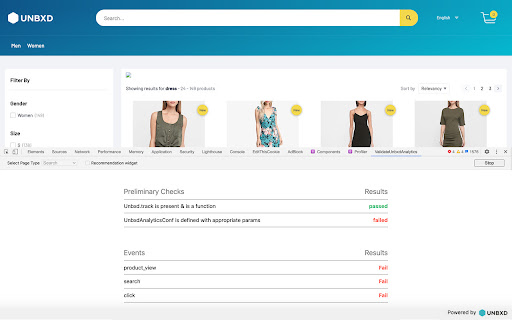
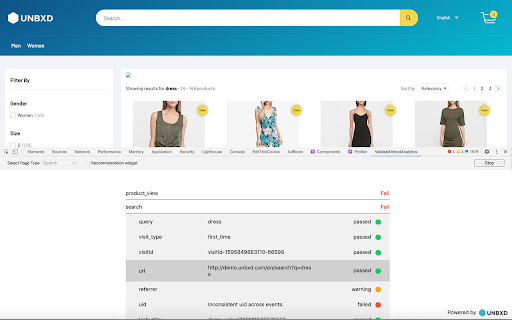
This extension can be used to validate Unbxd Analytics on an eCommerce website using Unbxd for on-site search. The extension provides you with clear success, warning & error messages in case of missed events or improper parameters in the events sent to Unbxd. This helps you validate the Unbxd Search/Browse/Recs Analytics in a quick & efficient manner.

Install the extension. Click Start Testing button on your eCommerce page integrated with Unbxd Site Search. Validate that you are able to pass all the events successfully to Unbxd with the right set of parameters.

What does it validate?
------------------------------------
We have currently classified analytics issues broadly into following 2 categories:
1. To detect which version of Analytics SDK is loading on the site, Check for UnbxdSiteName and print it, Check if Analytics Tracking is disabled & if `Unbxd.track` method is available on the window.

2. Are relevant events fired correctly:
- Are all events required for a particular page type fired (search or browse page along with recommendation widgets)
- Are the events having all the required mandatory parameters (for example, "pid" must be sent for a click event)
- Are there any other additional parameters that can be sent in each event to improve analytics -> these are shown as warning items

Once all the events are detected, the validator plugin then generates a CSV report, which can be downloaded to be shared across the team.

How to install & use the extension
---------------------------------------------------------
1. Install the extension from the this page by clicking on "Add to Chrome" button
2. Go to any Unbxd customer website & open the developer tools. Refresh the page.
3. Click on the "ValidateUnbxdAnalytics" tab in the developer toolbar.
4. Select your page type (either Search or Category Page) & check the "Recommendation widget" checkbox if you want to test Recommendation events as well.
5. Click on "Start Testing"
6. Go to the site, perform all the usual activities that a user does on an eCommerce site like, search for something, click a product from the search results, add that product into the cart, place an order etc.  All of these activities would generate Unbxd Analytics tracking events. These will be shown in the extension's UI.
7. Once you are done with performing all actions to generate events, click on the "Stop" button. This will generate a report which highlights successful events as well as any missing mandatory or good to have events.
8. You can also download a CSV report of the same by clicking on the "Download CSV" button

Release History
--------------------------
VERSION 2.1.2 - RELEASE DATE JULY 16, 2024
ChangeLog:
[Add] Validation of the revamped 'facets' event under analytics v2
[Add] Validation of a new 'sort' event


VERSION 2.1.1 - RELEASE DATE JUNE 27, 2024
ChangeLog:
[Add] Enable validation of product_Impression event for v2

VERSION 2.1.0 - RELEASE DATE JUNE 04, 2024
Our Analytics Tracking just got a major boost!
We’ve bid farewell to the old tracking method and embraced the efficiency of navigator.sendBeacon.

ChangeLog:
[Add] Check 'misc' payload data for all the events, validate special AS types passed into the 'misc' object.
[Add] Check for the window variable 'UnbxdSiteName' and print it.
[Add] Check if analytics tracking is disabled
[Add] Check special AS types like FIELD_TYPE_SUGGESTION & TRENDING_QUERIES in the 'misc' data
[Modified] field_name & field_value made optional if the AS docType is IN_FIELD
[Modified] Check for pid & src_query for AS docType POPULAR_PRODUCTS_FILTERED
[Removed] Removed validation on the event 'DwellTime', as it is not being used.
[Removed] Removed 'warning' msg from the summary of analytics validation report.


VERSION 2.0.0 - RELEASE DATE MAY 18, 2023

We have come up with a newer version of Analytics SDK, where new events are added and existing event's payloads are modified.

Hence the release of v2.0.0 version of validator plugin will accommodate all the new behaviours along with maintaining the backward compatibility to track and validate existing events.

ChangeLog:

[Add] Auto detect v1 & v2 Analytics SDK, based on the http request call present in network tab.
[Add] Added a new event 'pageView' and validate their payloads.
[Add] New logo, both for dark mode and lite mode & added favicon.
[Add] Added 'Error message' column which shows descriptive error messages for payloads.
[Add] Added a differentiator text 'recs' for click event to differentiate between recs click vs search/category product click.
[Add] Added validations for recs click event, both v1 and v2 recs product.
[Add] Validation for autosuggest payloads
[Add] Added missing payloads like 'path', 'identifier' & 'pr'.
[Add] V1 vs V2 segregation of flow & show summary accordingly after validation is stopped.
[Modified] Remove warning status for event, an event is either passed or failed.
[Modified] Change some mandatory payloads to optional.
[Modified] order event validation base on payload data for analytics v1
[Fixed] Handle export CSV for null & undefined values.
[Removed] validating attribution.


VERSION 0.0.3
- [Feature] Support Dark Mode.
- [Fix] Add error, warning and dropdown icons.
- [Fix] Show Warning Msg if some other page is accessed instead of the PageType selected from Dropdown.
- [Fix] Track recs widget only if the checkbox is checked.

VERSION 0.0.2 (FIRST PUBLIC RELEASE) RELEASE DATE JULY 28, 2020
Technical
- Version
- 2.1.2
- Manifest
- V3
- Size
- 947KiB
- Min Chrome
- 88
- Languages
- 1
- Featured
- No
Metadata
- ID
- hifgomfddachdehjgpadkfamkjhehjcd
- Developer ID
- u8b673882dad587396acbee120a982817
- Developer Email
- [email protected]
- Created
- Jul 24, 2020
- Last Updated (Store)
- Jul 17, 2024
- Last Scraped
- Jun 1, 2026
- Website
- —
- Support URL
- —
- Privacy Policy
- —
Similar extensions
Alternatives to Unbxd Analytics Validator, ranked by description similarity.

Zen Analytics Pixel Tracker
Debug 20+ analytics(Google Tag Manager dataLayer, Google analytics, FB, TW, TT+). Inspect events, capture sessions & export
776
★ 5.0

Commerce Cloud Recommendation Validator
This is a tool to help with preliminary validation of Salesforce Commerce Cloud Einstein integration
6.0K
★ 4.9

Universal Adobe Debugger
Adobe Analytics, AEP & Launch debugger. Inspect Web SDK, XDM & tracking calls directly in Chrome DevTools.
979
★ 5.0

Adobe WebSDK Tracker
WebSDK beacon tracker with CSV export (identical functionality to original, only export format updated).
51
TagHound - Analytics/GTM/Pixel Debugger
Debug Google Analytics, Google Tag Manager dataLayer, Google Ads, Facebook Ads & +18 ad platforms pixels: Twitter, TikTok and more
50.0K
★ 4.8

Analytics Data QA
Analytics Data QA: Data Validation, Made Easy and Fast!
16
★ 5.0

Bloomreach Engagement Inspector
Your friendly companion for monitoring and debugging Bloomreach analytics
44
★ 5.0

Adobe Debugger and Validator
Streamlines Adobe Analytics (AA) implementation debugging and validation, leveraging the power of Google's Gemini AI.
22
★ 5.0
Data sourced from the Chrome Web Store · last verified Jun 1, 2026.