
Analytics Data QA
Analytics Data QA: Data Validation, Made Easy and Fast!
As of June 2026, Analytics Data QA has 16 users and a 5.00/5 rating from 2 reviews in the Developer Tools category.
Usersno change0%
16
16
Ratingno change0%
5.00
2 reviews
Reviewsno change0%
2
Version
1.0.3
Manifest V3
History
2 snapshotsTracking since Apr 17, 2026.
View as table
| Date | Users | Rating | Reviews | Version |
|---|---|---|---|---|
| Apr 17, 2026 | 16 | 5.00 | 2 | 1.0.3 |
| May 2, 2026 | 20 | 5.00 | 2 | 1.0.3 |
| Now | 16 | 5.00 | 2 | 1.0.3 |
Permissions & access
- Permissions
- storagewebRequestwebNavigationactiveTabtabCaptureoffscreennotifications
- Host access
- <all_urls>
Screenshots


About
Analytics Data QA is a Chrome extension that automatically verifies whether the data collected by analytics tools like GA4 and Amplitude accurately matches your log definitions.

Say goodbye to the hassle of manually checking countless events one by one. Analytics Data QA offers developers, planners, data analysts, and all users a unique and valuable way to validate data quickly and easily.

Key Features
Automatic Log Definition Comparison: The extension automatically checks if the actual events happening on your website match your log definitions and shows you the results at a glance.

Event Details at Your Fingertips: Instantly view detailed descriptions for each event, helping you clearly understand the data's meaning.

Automated Page Screenshots and Organization: It automatically takes a screenshot when you navigate to a new page and organizes events by page for systematic management.

Recording Functionality: Record how events are generated to visually understand data flow and easily diagnose issues.

How to Use
With Analytics Data QA, data validation becomes much easier and more accurate. Just follow these simple steps:

Install the Extension: First, search for "Analytics Data QA" in the Chrome Web Store and install it.

Open Developer Tools: On the webpage you want to validate, press F12 on your keyboard or go to "View > Developer > Developer Tools" to open the developer console.

Activate the Extension: In the developer tools menu, click the "AQA" tab to activate the extension.

Log In and Start a Project: Log in on the extension's login screen, then click the "Start Project" button.

Upload Log Definitions: Upload the log definition file needed for validation.

Trigger Events on Your Site: Now, on the site you want to validate, directly trigger events like button clicks or page navigation.

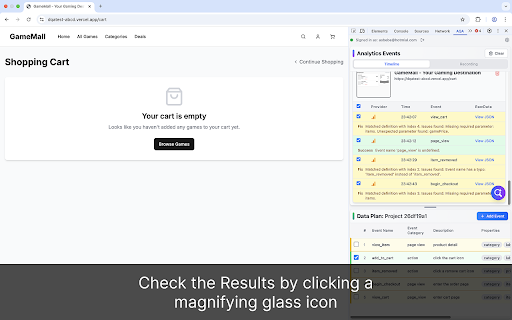
Check the Results: Click the verification icon in the extension to easily see if the actual events match your log definitions. If there's a mismatch, it will immediately show you the details of what's different.

Experience data QA like never before! If you have any suggestions for modifications or additions, feel free to let us know!
Technical
- Version
- 1.0.3
- Manifest
- V3
- Size
- 418KiB
- Min Chrome
- 116
- Languages
- 2
- Featured
- No
Metadata
- ID
- icopicdkpapbeojapnaplmffgjjhgnjo
- Developer ID
- u84246caaf4b193e30f4d25c98f1b847d
- Developer Email
- [email protected]
- Created
- Oct 4, 2025
- Last Updated (Store)
- Oct 5, 2025
- Last Scraped
- Jun 5, 2026
- Website
- analyticsdataqa.com
- Support URL
- —
- Privacy Policy
- https://analyticsdataqa.com/privacy
Similar extensions
Alternatives to Analytics Data QA, ranked by description similarity.

GA4 Network Inspector
Inspect GA4 network events, including event names, event parameters, ecommerce parameters, and consent rules.
94

Digital Data Layer
A Chrome extension that appears in developer tools to listen to custom events and display them.
6

GA4 DataLayer Simulator
A Chrome extension to simulate GA4 dataLayer pushes with built-in fake pushes according to the GA4 dataLayer schema.
12

TAGLAB - Analytics & Datalayer Console Viewer
Inspect & QA analytics tags, marketing tags, conversion pixels, and data layer variables for data auditing and tag monitoring.
1.0K
★ 5.0

Analytics Auditor
Professional QA & Debugging tool for digital analytics. Real-time validation, smart alerts and multi-tab support.
40
★ 5.0

AH Debugger
Debug analytics and marketing pixels in real time with AH Debugger.
156
★ 5.0

Google Analytics 4 (GA4) - Audit, Track, Debug, Reports, Alerts & Insights
Measuremate is your all-in-one GA4, GTM & BigQuery expert - audit, track tags/pixels, validate, export data & get instant insights.
234
★ 5.0

Data Layer Validator
Validate Google dataLayer, Adobe Data Layer, Adobe Web SDK and AppMeasurement events directly in your browser.
29
★ 5.0
Data sourced from the Chrome Web Store · last verified Jun 5, 2026.