TagHound - Analytics/GTM/Pixel Debugger
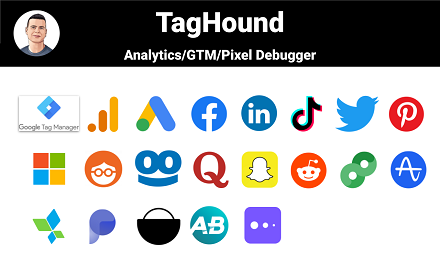
Debug Google Analytics, Google Tag Manager dataLayer, Google Ads, Facebook Ads & +18 ad platforms pixels: Twitter, TikTok and more
As of May 2026, TagHound - Analytics/GTM/Pixel Debugger has 50,000 users and a 4.80/5 rating from 109 reviews in the Developer Tools category.
Usersdown 16.7 percent−16.7%
50.0K
50,000
Ratingup 0.2 percent+0.2%
4.80
109 reviews
Reviewsup 5.8 percent+5.8%
109
Version
1.3.4
Manifest V3
90-day change · In the last 90 days this extension lost 10.0K users.
History
2 snapshotsTracking since Apr 29, 2026.
View as table
| Date | Users | Rating | Reviews | Version |
|---|---|---|---|---|
| Apr 29, 2026 | 60.0K | 4.79 | 103 | 1.3.4 |
| May 26, 2026 | 50.0K | 4.79 | 105 | 1.3.4 |
| Now | 50.0K | 4.80 | 109 | 1.3.4 |
Permissions & access
- Permissions
- webRequestactiveTabstoragescriptingalarmstabsunlimitedStorage
- Host access
- <all_urls>
Screenshots


About
==TagHound: Analytics/GTM/Pixel Debugger==

TagHound Analytics/GTM/Pixel Debugger by Assaf Trafikant helps you validate your analytics tools implementation as well as ad platforms pixels and Google Tag Manager dataLayer events - all in one tool. It works all the time for all the supported platforms at once.

In total, TagHound Analytics/GTM/Pixel Debugger supports 22 analytics and ad platforms, including Google Analytics 4 (and older versions) & Google Tag Manager (events and dataLayer viewer), to give you a holistic tracking and pixel analysis experience.

Just navigate to any page, open your DevTools panel (F12), or click the extension icon (less information) and it will show you all your pixels and events, with a never-seen-before error validation (over 1200 validation rules). Just click the event to see all the data in a clear format, grouped by attributes.

TagHound Analytics/GTM/Pixel Debugger allows you to group events by type, performance and attributes. You can RECORD your debugging activity while navigating through any website and even export the results.

TagHound Analytics/GTM/Pixel Debugger his all-in-one tool, giving you a clear high-level overview as well as detailed data harmonization between all platforms .

Three ways to see and debug the events
=================================
🟩 Clicking the extension icon
🟩 Using DevTools
🟩 On-screen toast messages

TagHound Analytics debugger & Ad platforms pixel helper features
======================================================
🟥 Read all supported pixels at once
🟥 Clear view of each pixel parameters, grouped into categories with over 1200 validation rules
🟥 Filter pixels by type
🟥 Record activity across page and export the results
🟥 Group tags by type/ad platforms
🟥 Sort tags by execution time, platforms, etc.
🟥 Exclude domains from being tracked by the extension to optimize performance

Google Tag Manager features
========================
🟨 dataLayer viewer
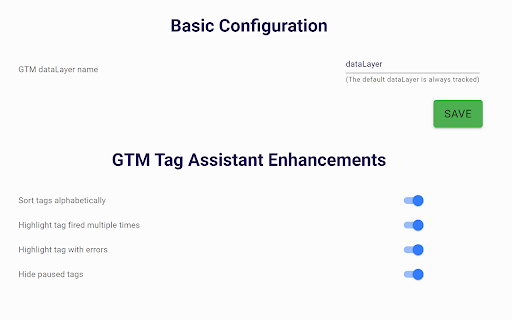
🟨 You can change the dataLayer name (the default dataLayer will always be tracked)
🟨 In the "Options" screen (the gear icon) you can add enhancements to Google Tag Manager Assistant (see pictures above):
🟪 Sort tags alphabetically
🟪 Highlight tags fired multiple times
🟪 Highlight tags with errors
🟪 Hide paused tags

Release notes
============
1.3.4 - Temporary removal of custom endpoints
1.3.2,1.3.3 - Minor bug fix
1.3.1 - Updating GA4 debugger, minor UI changes
1.3.0 - Supporting S2S custom endpoints
1.2.6 - Fixing Google Tag Assistant enhancements
1.2.5 - Update to GA4 debugger (new EU endpoints), design adjustments
1.2.2 - Update to GA4 debugger (privacy sandbox fine-tuning)
1.2.1 - Added Sleep-mode
1.2.0 - Adding on-screen debugging with toasts messages! Some refactoring for performance.
1.1.4 (1/4/2024) - Name change, performance optimization
1.1.3 - Adding Floodlight. Updating Facebook Ads pixel, improving performance and filters.
1.1.2 - Removal of self-hosted pixels tracking
1.1.1 - Bringing back GTM toggle to save browser memory.
1.1.0 - Improving GTM dataLayer parsing.
1.0.9 - Adding Google consent for Google-based tags
1.0.8 - Adding GTM toggle for less impact on browser memory. Turns OFF after 2 minutes of idle and redesign Settings page
1.0.7 -  Updating Microsoft UET & LinkedIn ads tracking. Removing Google Optimize.
1.0.6 - Ability to change GTM dataLayer name, adding enhancements to GTM Tag Assistant
1.0.5 - Improving GA4 debugging
1.0.3 - Improving Facebook Pixel debugging
1.0.2 - Improving TikTok, LinkedIn & Taboola pixel tracking
1.0.1 - Removing redundant code and typo fix
0.9.3 - Google Ads conversion tracking improvement
0.9.1 - Google Analytics 4 debugger upgrade + code optimization
0.9.0 - Performance version. Decreasing the extension weight by 70%.
0.8.8 - Now supports Amplitude + improving Google Tag Manager performance.
0.8.7 - Adding Plausible Analytics, Umami Analytics & AB Tasty
0.8.6 - Fixing display bug for some users
0.8.5 - Improving GTM dataLayer viewer
0.8.4 - Improving Google Tag Manager events parsing
0.8.3 - Improving LinkedIn pixel tracking and Google Analytics 4 ecommerce validations
0.8.2 - Supporting the new TikTok custom events
0.8.1 - Upgrade Google Analytics debugging
0.8.0 - Update Google Analytics 4 CDN
0.7.9 - Updating Facebook pixel
0.7.8 - Upgrade Google Analytics debugging
0.7.7 - Removed cookie module
0.7.5 - Fixed: Some websites bloat GTM dataLayer with faulty values which caused the extension to break
0.7.4 - Adjusting TikTok standard events
0.7.3 - Major performance improvement, adding GTM JSON viewer
0.7.1 - Adding more events to Google Tag Manager dataLayer tracking
0.7.0 - Adding Google Tag Manager tracking
0.6.9 - Bing Ads changed to Microsoft Ads + minor bug fixes
0.6.8 - Adding MixPanel
0.6.5 - Adjusting to Facebook new pixel
0.6.1 - Faster recording
0.6.0 - Supports Snap Ads pixel, TikTok & Reddit pixel upgrade
0.5.9 - Adding Errors view in extension popup
0.5.2 - Fixing LinkedIn account ID identification
0.5.2 - Update TikTok pixel
0.5.0 - Adding Google Ads Conversion tracking
0.4.4 - Adding Google Ads Remarketing tracking and Bing Ads
0.4.2 - Adding AppsFlyer & TikTok tracking, update Twitter pixel
0.4.1 - Adding Pinterest pixel
0.4.0 - Adding Facebook & Quora & Google Optimize pixel tracking, Adding the ability to record activity
0.3.9 - Adding Taboola, Outbrain, LinkedIn and Google Analytics tracking
0.3.5 - Adding Twitter & Reddit pixel tracking
0.0.1 - Initial version
Technical
- Version
- 1.3.4
- Manifest
- V3
- Size
- 2.02MiB
- Min Chrome
- 88
- Languages
- 1
- Featured
- Yes
Metadata
- ID
- canpneabbfipaelecfibpmmjbdkiaolf
- Developer ID
- u7065c15d33a5596b1f0f6c98939ea158
- Developer Email
- [email protected]
- Created
- Apr 17, 2021
- Last Updated (Store)
- Dec 27, 2024
- Last Scraped
- May 26, 2026
- Website
- https://trafikant.pro/
- Privacy Policy
- https://trafikant.pro/privacy-policy/
Similar extensions
Alternatives to TagHound - Analytics/GTM/Pixel Debugger, ranked by description similarity.

Zen Analytics Pixel Tracker
Debug 20+ analytics(Google Tag Manager dataLayer, Google analytics, FB, TW, TT+). Inspect events, capture sessions & export
776
★ 5.0

Pixel Auditor: Tag, PII & Consent Mode Inspector
Inspect every tracking pixel firing on a page: tag IDs, event payloads, consent-mode signals, cookies, and PII leaks.
64
★ 5.0

Insighter Debugger - GTM, GA4, Meta Pixel, Google Ads & TikTok
Debug GTM, GA4, Google Ads, Meta & TikTok pixels. DataLayer viewer, consent mode checker, cookie manager + 200+ tech detection.
1.0K
★ 5.0

TAGLAB - Analytics & Datalayer Console Viewer
Inspect & QA analytics tags, marketing tags, conversion pixels, and data layer variables for data auditing and tag monitoring.
1.0K
★ 5.0
Analytics Debugger
Your Single Source of Truth (SSOT) for debugging analytics implementations
100.0K
★ 4.6

SEO & Pixel Tracker
Track Google Analytics, Facebook Pixel, TikTok Pixel, and Google Ads tags instantly.
64
★ 5.0

Pixel Checker Pro
Detects marketing and analytics pixels on web pages.
176

Event Tracker
Debug GTM, GA4, Meta Pixel, and TikTok events in real-time. Inspect network requests and dataLayer pushes.
76
★ 5.0
Data sourced from the Chrome Web Store · last verified May 26, 2026.