
Browse with Onion
Easily browse desired websites with tor (onion) proxy!
As of June 2026, Browse with Onion has 3,000 users and a 2.69/5 rating from 13 reviews in the Productivity category.
Usersup 50.0 percent+50.0%
3.0K
3,000
Ratingno change0%
2.69
13 reviews
Reviewsno change0%
13
Version
0.1.4
Manifest V3
90-day change · In the last 90 days this extension gained 1.0K users.
History
3 snapshotsTracking since Apr 21, 2026.
View as table
| Date | Users | Rating | Reviews | Version |
|---|---|---|---|---|
| Apr 21, 2026 | 2.0K | 2.69 | 13 | 0.1.4 |
| May 6, 2026 | 2.0K | 2.69 | 13 | 0.1.4 |
| Jun 1, 2026 | 2.0K | 2.69 | 13 | 0.1.4 |
| Now | 3.0K | 2.69 | 13 | 0.1.4 |
Permissions & access
- Permissions
- proxystoragenotifications
- Host access
- *://check.torproject.org/*
Screenshots
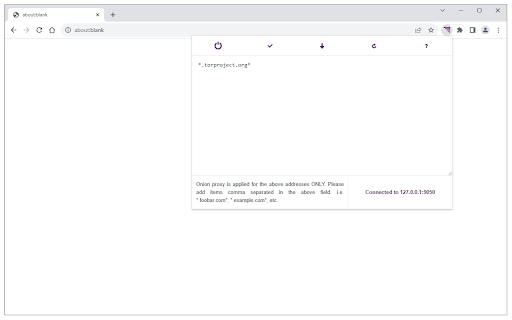
About
Browse with Onion is a lite extension that let you easily browse a certain website(s) (not the whole browser) with tor network.

Before using the addon please make sure your computer (PC or MAC) is connected to TOR. A separate patch is prepared, to help users connect to the TOR network. To get the patch, please visit this GitHub repo (https://github.com/jeremy-jr-benthum/onion-browser-button/releases) and download (mac.zip) or (win.zip) file depending on your operating system. Then follow the instructions on the repo (https://github.com/jeremy-jr-benthum/onion-browser-button) in order to connect to TOR network.

Note 1: With this extension ONLY added domains will pass through TOR network and all other domains/websites will remain intact from TOR proxy.

Note 2: Before using the add-on you need to add desired domains which you want to pass through TOR proxy. To do so, please open toolbar popup and add desired domains comma separated in the designated area. For example, if you want to browse - torproject.org - with tor network, please add - *.torproject.org* - in the input area (note to add * at the beginning and end). All changes are auto-saved to the memory. Also please note that, items need to be comma separated and without space in the popup (*.torproject.org*,*.example.com*,...). As mentioned above, ONLY these domains will pass through the TOR network and all other websites will remain intact from TOR proxy.

If you have a feature request, or found a bug to report, please fill out the bug report form on the addon's homepage (http://mybrowseraddon.com/browse-in-tor.html)
Technical
- Version
- 0.1.4
- Manifest
- V3
- Size
- 42.68KiB
- Min Chrome
- 88
- Languages
- 1
- Featured
- No
Metadata
- ID
- hfddekpiekhlkkgeaobcdkeonpkinipo
- Developer ID
- u04a1722491dced799186d7c552449816
- Developer Email
- [email protected]
- Created
- Apr 23, 2018
- Last Updated (Store)
- Sep 18, 2025
- Last Scraped
- Jun 1, 2026
- Website
- —
Similar extensions
Alternatives to Browse with Onion, ranked by description similarity.

Onion Browser Button
Easily browse the internet using TOR proxy with just one click!
20.0K
★ 3.4
Block Site
Easily block websites of your choice!
100.0K
★ 3.9

ProSoftTools Browser Extension
Enhanced browsing experience for www.prosofttools.com
1

No-Script Suite Lite
Blocks scripts (and more) on untrusted websites.
10.0K
★ 3.5

Automatic Link Appender
Easily download files from simple download links with a single middle click.
2

Torry
Torry - Search Anonymously with Tor
977
★ 3.9

Proxy Switcher
Easily switch between multiple proxies via toolbar popup.
40.0K
★ 3.8

Incognito URL Opener
Automatically opens specified URLs in incognito mode.
584
★ 4.3
Data sourced from the Chrome Web Store · last verified Jun 1, 2026.