
No-Script Suite Lite
Blocks scripts (and more) on untrusted websites.
As of June 2026, No-Script Suite Lite has 10,000 users and a 3.54/5 rating from 182 reviews in the Productivity category.
Usersno change0%
10.0K
10,000
Ratingdown 0.3 percent−0.3%
3.54
182 reviews
Reviewsdown 0.5 percent−0.5%
182
Version
0.3.9
Manifest V3
History
2 snapshotsTracking since Apr 19, 2026.
View as table
| Date | Users | Rating | Reviews | Version |
|---|---|---|---|---|
| Apr 19, 2026 | 10.0K | 3.55 | 183 | 0.3.9 |
| May 4, 2026 | 10.0K | 3.55 | 183 | 0.3.9 |
| Now | 10.0K | 3.54 | 182 | 0.3.9 |
Permissions & access
- Permissions
- storagewebRequestdeclarativeNetRequest
- Host access
- *://*/*
Screenshots


About
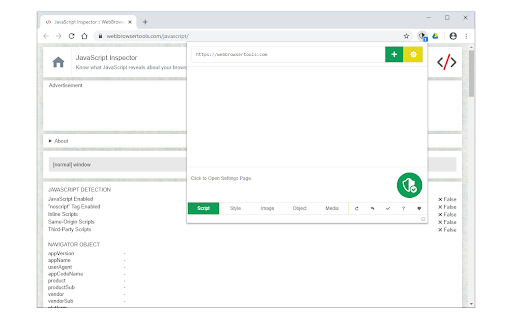
No-Script Suite Lite provides an extra security for your browser. It allows JavaScript (inline & external) to be executed only by trusted websites of your choice. Some websites are added to the white-list by default, but you can add or remove items at any time.

Important features:
a) Allows you to block all Scripts (inline and external) from untrusted websites (plus you can block Images, Objects, Styles and Media as well).
b) Simple and very lite: this Addon does not use noticeable memory or CPU form your machine.
c) You can easily switch the extension On or Off from the toolbar popup UI.
d) Add or remove websites to the white-list table easily from toolbar-popup.
e) Beside scripts, you can also block style-sheets, images, objects and media from untrusted sources. To activate, open toolbar-popup and click on the desired option at the bottom of the panel.
f) Choose desired blocking engine, Web-Request-Observer or Content-Security-Policy from the options page.
g) Add desired whitelist or blacklist rules with regular expressions.
h) The extension interface (popup and options page) supports dark mode. To switch both interfaces to dark, please press the moon icon in the popup interface, bottom-right toolbar.

Note: To read about all the new features or reporting bugs please visit addon's homepage (https://mybrowseraddon.com/noscript-lite.html).
Technical
- Version
- 0.3.9
- Manifest
- V3
- Size
- 144KiB
- Min Chrome
- 88
- Languages
- 1
- Featured
- Yes
Metadata
- ID
- ahnanjpbkghcdgmlchbcfoiefnifjeni
- Developer ID
- u5f4ced533d80f19d9c18dea3723e99b9
- Developer Email
- [email protected]
- Created
- Mar 3, 2015
- Last Updated (Store)
- Aug 18, 2025
- Last Scraped
- Jun 7, 2026
- Website
- —
- Privacy Policy
- —
Similar extensions
Alternatives to No-Script Suite Lite, ranked by description similarity.

GL's JavaScript Firewall
Blocks all JavaScript by default. You control which sites are allowed to run scripts.
36
★ 5.0

AdBlocker Lite
Block ads seamlessly on popular websites.
5.0K
★ 3.4

Popup Blocker (Lite)
A fast, easy and secure way to block all unwanted popups and pop-unders!
3.0K
★ 3.9

Javascript Toggle
Activate this extension to enable or disable JavaScript in any website with just one click
77
★ 3.0

Fast Image Blocker
Blocks all images and visual content on desired websites.
10.0K
★ 3.7

Shieldmonkey
A Security-First, Open-Source Userscript Manager.
3
Block Site
Easily block websites of your choice!
100.0K
★ 3.9

Lightweight Website Blocker
Lightweight Chrome extension that blocks access to user-specified websites. Block list comes pre-loaded with common distractors.
11
Data sourced from the Chrome Web Store · last verified Jun 7, 2026.