
Onion Browser Button
Easily browse the internet using TOR proxy with just one click!
As of June 2026, Onion Browser Button has 20,000 users and a 3.42/5 rating from 45 reviews in the Productivity category.
Usersup 100.0 percent+100.0%
20.0K
20,000
Ratingdown 1.2 percent−1.2%
3.42
45 reviews
Reviewsdown 2.2 percent−2.2%
45
Version
0.2.6
Manifest V3
90-day change · In the last 90 days this extension gained 10.0K users.
History
4 snapshotsTracking since Apr 19, 2026.
View as table
| Date | Users | Rating | Reviews | Version |
|---|---|---|---|---|
| Apr 19, 2026 | 10.0K | 3.46 | 46 | 0.2.6 |
| May 4, 2026 | 10.0K | 3.46 | 46 | 0.2.6 |
| May 26, 2026 | 10.0K | 3.46 | 46 | 0.2.6 |
| Jun 7, 2026 | 10.0K | 3.42 | 45 | 0.2.6 |
| Now | 20.0K | 3.42 | 45 | 0.2.6 |
Permissions & access
- Permissions
- proxystoragenotifications
- Host access
- https://check.torproject.org/*
Screenshots
About
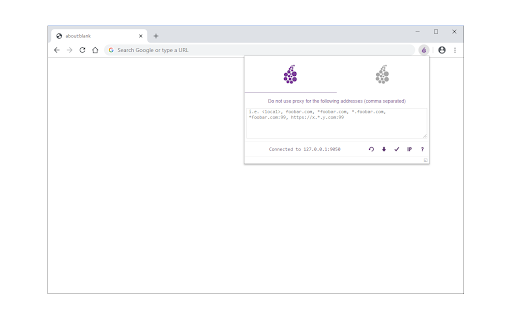
Onion Browser Button is an extension that let you easily connect to TOR network in your browser (browse under TOR proxy).

Important note: this addon does NOT belong or relate to Tor® project and has NO affiliations with Tor® anonymity software or website at all. It is basically an unofficial extension that is developed and maintained independently by its author.

Before using the addon please make sure your computer (PC or MAC) is connected to TOR. If you do NOT know how to connect your PC or MAC to the TOR network please read the following. A separate patch is prepared, to help users easily connect to the TOR network. In order to get the patch please visit this (https://github.com/jeremy-jr-benthum/onion-browser-button/releases) GitHub repo and download (mac.zip) or (win.zip) files.

After downloading the patch to your computer, please follow the below steps to connect your machine to TOR network.

1. If you have Windows machine, please download and unzip "win.zip" file to your computer, and if you have Mac download and unzip "mac.zip".

2. For windows machine, please open downloaded "win" folder and run "run.bat" file within the folder. For Mac please open "win" folder and run "run.sh" file.

3. You will see the screen with 6 options. In order to start TOR connection on your computer, please press 1 on your keyboard, once "Tor is connected successfully!" message is displayed, you can use Tor Browser Button add-on to connect your browser to the TOR network. To stop TOR connection please press 2. In order to get a new TOR identity, please press 5 and to restart TOR connection, please press 6 on your keyboard.

Note: The extension interface supports dark mode. To switch the interface theme to dark, please press the moon icon in the bottom-right toolbar.

To report bugs, please visit the addon's homepage (https://mybrowseraddon.com/tor-button.html) and fill out the bug report form.
Technical
- Version
- 0.2.6
- Manifest
- V3
- Size
- 108KiB
- Min Chrome
- 88
- Languages
- 1
- Featured
- No
Metadata
- ID
- fockhhgebmfjljjmjhbdgibcmofjbpca
- Developer ID
- u945d559d572e22612b859d592da9a903
- Developer Email
- [email protected]
- Created
- Dec 31, 2018
- Last Updated (Store)
- Jul 23, 2025
- Last Scraped
- Jun 7, 2026
- Website
- —
- Support URL
- https://mybrowseraddon.com/tor-button.html
Similar extensions
Alternatives to Onion Browser Button, ranked by description similarity.

Browse with Onion
Easily browse desired websites with tor (onion) proxy!
3.0K
★ 2.7

Dark Mode
A global dark theme for the web.
2.0M
★ 3.6

Offline Mode
Disconnect your browser from the internet with offline mode.
5.0K
★ 3.5

Settings Button
Easily open settings in a new tab via the toolbar button.
406

Torry
Torry - Search Anonymously with Tor
977
★ 3.9

Tab Manager
Easily organize all your open tabs in multiple windows from toolbar popup!
1.0K
★ 3.6

TorBox Control
Manage your TorBox downloads from your browser
2.0K
★ 4.6

Proxy Switcher
Easily switch between multiple proxies via toolbar popup.
40.0K
★ 3.8
Data sourced from the Chrome Web Store · last verified Jun 7, 2026.