
SAL
To stop those annoying sounds
As of June 2026, SAL has 15 users and a 5.00/5 rating from 2 reviews in the fun category.
Usersdown 6.3 percent−6.3%
15
15
Ratingno change0%
5.00
2 reviews
Reviewsno change0%
2
Version
1.0
Manifest V3
History
3 snapshotsTracking since Apr 1, 2026.
View as table
| Date | Users | Rating | Reviews | Version |
|---|---|---|---|---|
| Apr 1, 2026 | 16 | 5.00 | 2 | 1.0 |
| May 2, 2026 | 17 | 5.00 | 2 | 1.0 |
| Jun 1, 2026 | 19 | 5.00 | 2 | 1.0 |
| Now | 15 | 5.00 | 2 | 1.0 |
Permissions & access
- Permissions
- None declared
- Host access
- None declared
Screenshots

About
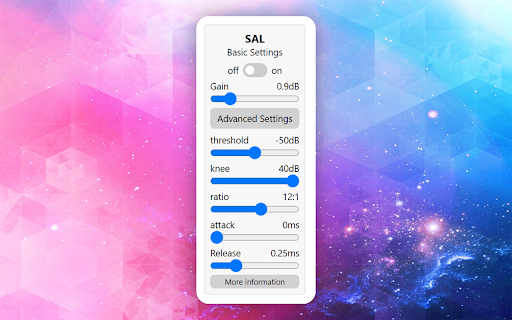
SAL gracefully transforms into the SMOOTH AUDIO LEVELER, a virtuoso in the realm of digital acoustics. 🔊 Fed up with the wild ride of unpredictable audio levels during your online adventures? Fret not, for SAL is here to usher in tranquility. With ninja-like finesse, it expertly smoothens audio levels, delivering a serene and harmonious auditory journey. 🐱👤🎵 Embrace the symphony of balanced sound with SAL, your trusty audio companion. For whom is this extension for 🐱🐉 Introducing an innovative solution for the perpetual frustration of fluctuating audio levels while watching videos. Say goodbye to the annoyance of constantly adjusting your speaker volume with this extension. It ensures a consistent audio experience by automatically maintaining a steady volume for the videos you watch. Are you tired of the sudden jolts in volume that leave you straining to hear or recoiling from the blast of sound? Imagine watching a movie without the constant need to fiddle with volume controls, where the audio remains balanced and enjoyable throughout. If you've ever experienced the irritation of a video starting off too quiet, only to then become too loud, this extension is your ideal companion. Embrace a seamless audio experience and bid farewell to the hassle of manual volume adjustments. Upgrade your viewing pleasure with this indispensable tool designed for your auditory comfort. Disclaimer: Results may vary depending on many factors, and we don't provide any guarantee of the extension working as expected. While we strive for excellence, use at your discretion, and we are not responsible for any unforeseen outcomes or disruptions in audio experiences. Furthermore, please NOTE that using this extension does not guarantee protection against dimension shifting, time travel, or encounters with intergalactic beings. Any such events are purely coincidental and not attributable to the functionality of this product. Viewer discretion is advised. This extension doesn't collect any type of data from your device.
Technical
- Version
- 1.0
- Manifest
- V3
- Size
- 18.84KiB
- Min Chrome
- 88
- Languages
- 1
- Featured
- No
Metadata
- ID
- hepgfnibgmknejeonjihiedmciicopie
- Developer ID
- uffb75ee641953c7cb0fcf23c1d0a20c2
- Developer Email
- [email protected]
- Created
- Dec 13, 2023
- Last Updated (Store)
- Dec 13, 2023
- Last Scraped
- Jun 1, 2026
- Website
- —
- Support URL
- https://github.com/T-NAVe/SAL
Similar extensions
Alternatives to SAL, ranked by description similarity.

Audio Enhancer Pro
Professional volume control, 10-band EQ, AI audio enhancement, and immersive 3D spatial audio for your browser
1.0K
★ 5.0

Volume Control
Audio volume control for Chrome™. Set sound level for each tab separately with audio control and sound booster.
100.0K
★ 4.3

Volume Controller
Audio Volume Controller for Chrome. Set sound level for each tab separately with audio sound booster
20.0K
★ 4.2

Volume Sizzler
Volume Manipulator!. This extension can be used to amplify, adjust bass, and as well as adjust treble. Have fun! Enjoy.
143
★ 4.6

Happppppppppy Browssssssing!!!!!!
Chrome Extension to happy browsing :D
1

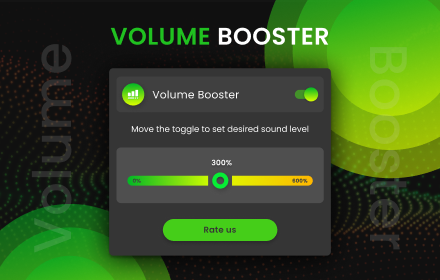
Volume Booster
Control tab volume. Boost tab sound up to 600%.
4.0K
★ 4.8
Sound Booster
Customize music file by volume booster tool. Allow you to increase the volume of your audio and video files
10.0K
★ 4.4

One-Click Audio Compressor
Tames audio levels for Youtube, Disney Plus, and other video services, so you don't have to switch the volume every 5 seconds!
3.0K
★ 4.0
Data sourced from the Chrome Web Store · last verified Jun 1, 2026.