
close_tab(s)
Easily close tabs with in-page elements.
As of May 2026, close_tab(s) has 2,000 users and a 4.62/5 rating from 73 reviews in the Functionality & UI category.
Usersno change0%
2.0K
2,000
Ratingno change0%
4.62
73 reviews
Reviewsno change0%
73
Version
4.0.5
Manifest V3
History
3 snapshotsTracking since Apr 20, 2026.
View as table
| Date | Users | Rating | Reviews | Version |
|---|---|---|---|---|
| Apr 20, 2026 | 2.0K | 4.62 | 73 | 4.0.5 |
| May 5, 2026 | 2.0K | 4.62 | 73 | 4.0.5 |
| May 28, 2026 | 3.0K | 4.62 | 73 | 4.0.5 |
| Now | 2.0K | 4.62 | 73 | 4.0.5 |
Permissions & access
- Permissions
- scriptingstoragetabs
- Host access
- <all_urls>
Screenshots

About
More easy and fast way to close tabs.

Allows you to easily close tabs with in-page elements.


Features:
----------------
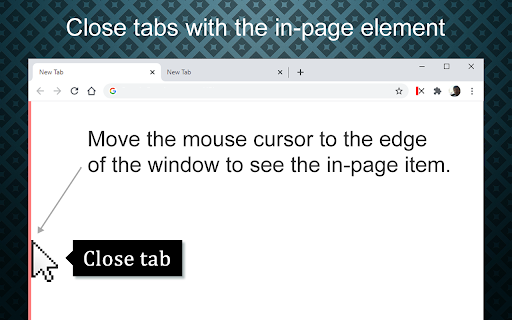
• You can close the active tab by clicking to the selected in-page edge element.
• In-page element only appears when you move the mouse cursor to the selected edge.
• You can change the features of the in-page element, like hover color, thickness, click event type and position.
• Use toolbar icon or context menu to close tabs.


Limitations:
--------------------
Since Chrome is not allowing, we can't add in-page element into the following pages:
chrome:// - chrome-extension:// - chrome-devtools:// - view-source: - data: - chrome.google.com/webstore/ - New tab page.

But, toolbar icon and context menu options will continue to work on all pages without any limitation.


Note on permissions:
-----------------------------------
• with v4.0, new "scripting" permission request added. In previous versions, i was using "chrome.tabs.executeScript()" to reflect settings changes into pages, but with Manifest V3, it is moved to "chrome.scripting.executeScript()", which requires "scripting" permission.

• "Read and change all your data on the websites you visit" - That is necessary to insert In-Page element into pages. I do not read your data from any website, nor do i modify it.


Changelog:
-------------------
v4.0.x
Coming Soon ... :
• Binding actions.
• Custom translations.

New features:
• Pinned tabs will not be closed (by default).
• Store data in memory for faster access.

Updates:
• Upgraded to Chrome Manifest V3.
• Closing multiple tabs is now faster.
• The name of the extension has been changed to 'close_tab(s)'.
• Some UI changes.

Fixes:
• Fixed an issue with slow-loading sites.


v3.0.x
New features:
• New add-on features for bottom and right positions.
• Tooltips now customizable.
• In-page element opacity feature.
• Right-click on the selected edge, shows selected options.
• Context menu options added.
• Auto maxizing new windows feature added.
• Toolbar icon popup page added.
• Spanish and Portuguese language support added.

Updates:
• Settings page redesigned.
• In-page element positions restructured.
• New toolbar icon images available.


v2.0.x
New features:
• New in-page closer positions added.
• You can change thickness of the in-page element.
• Toolbar icon is added. Clicking to the toolbar icon will close the active tab.
• You can change the toolbar icon image.
• Multi language support is added, so please help to translate.
• Preferences synced with Chrome (if signed in).

Updates:
• Renamed to 'Close This Tab'.
• New Options/Settings page.
• Injecting the element into dynamically loaded pages.


v1.0
• Initial version
Technical
- Version
- 4.0.5
- Manifest
- V3
- Size
- 240KiB
- Min Chrome
- 110
- Languages
- 5
- Featured
- Yes
Metadata
- ID
- hdoplfhlfoagdghmfamhnakmjjffeila
- Developer ID
- u0de25d948b0c6a550f959837f740c2e6
- Developer Email
- [email protected]
- Created
- Feb 14, 2013
- Last Updated (Store)
- May 19, 2025
- Last Scraped
- May 28, 2026
- Website
- —
- Support URL
- —
- Privacy Policy
- —
Similar extensions
Alternatives to close_tab(s), ranked by description similarity.

Thready - Vertical Tabs
Vertical tabs, bookmarks, history and readling list in side panel.
1.0K
★ 4.1

Middle Click Close Tab
Closes the tab when middle-clicking on an empty space
35

Hide That!
This extension can hide or remove selected elements on a page. Useful for removing invasive adverts, banners and overlays.
10.0K
★ 4.4

Tab Manager in Side Panel
Compatible with built-in and adds more easy-to-use features, lives in side panel
1.0K
★ 4.5

Tab Positioner
Choose where tabs appear, and which tab is focused when others disappear.
1.0K
★ 4.5

Close Tab Extension
Adds a context menu item to close the current tab.
10

Smart Sessions - Tab Manager
Save & restore your browser sessions. Auto saving, multiple sessions and more.
6.0K
★ 4.1

Last Active Tab Switcher
Switch to the previously active tab when closing the current tab, and provide a tab history menu.
77
★ 4.2
Data sourced from the Chrome Web Store · last verified May 28, 2026.