
Hide That!
This extension can hide or remove selected elements on a page. Useful for removing invasive adverts, banners and overlays.
As of May 2026, Hide That! has 10,000 users and a 4.44/5 rating from 54 reviews in the Functionality & UI category.
Usersno change0%
10.0K
10,000
Ratingup 0.2 percent+0.2%
4.44
54 reviews
Reviewsup 1.9 percent+1.9%
54
Version
3.7.0
Manifest V3
History
2 snapshotsTracking since May 1, 2026.
View as table
| Date | Users | Rating | Reviews | Version |
|---|---|---|---|---|
| May 1, 2026 | 10.0K | 4.43 | 53 | 3.7.0 |
| May 29, 2026 | 10.0K | 4.43 | 53 | 3.7.0 |
| Now | 10.0K | 4.44 | 54 | 3.7.0 |
Permissions & access
- Permissions
- contextMenustabsstoragewebNavigation
- Host access
- None declared
Screenshots


About
The primary feature of this extension allows users to hide any element on the page with a simple right-click menu action.

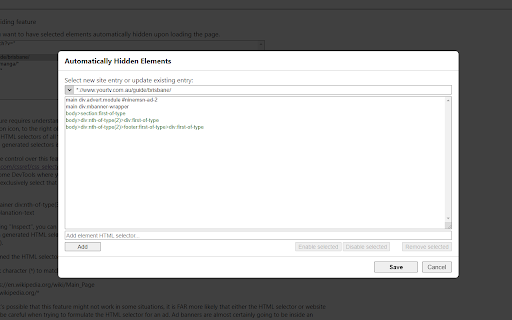
Advanced features on the Options page also allows the user to automatically close invasive popup windows, as well as automatically hide selected elements when the page is loading.

Several other customizable settings are also available on the Options page.

NOTE:
- The primary right-click functionality of this extension does not permanently hide the element. Any page refresh will bring back the full page as intended. To automatically hide elements when loading a page please try the ‘Automatic Hiding’ feature on the Options page.
- Once the extension is added to Chrome, any pages you already have open will need to be refreshed for the extension to start working.
- The icon menu for chrome extensions should display to the right of the address bar (a puzzle piece).


-- UPDATE NOTES --

3.7.0 (13th April 2024):
- Added ability to close “about:blank” popups when opened from a specified website.
- Displays “unsaved changes” warning message on the Options page.

3.6.0 (14th April 2023):
- Migrated to new Chrome extension manifest version 3.

3.5.0 (18th November 2022):
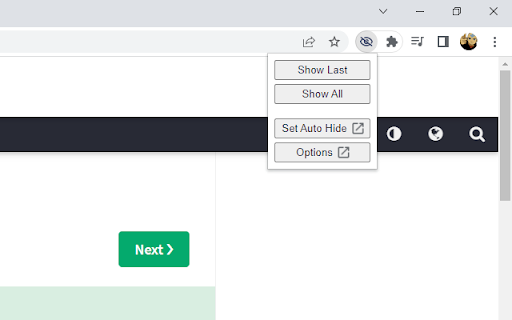
- Added "Show Auto Hidden" button in the icon menu to redisplay automatically hidden elements.
- Added "Rerun Auto Hide" button in the icon menu to rerun automatic hiding.

3.4.0 (8th September 2022):
- Added a user-friend option for the Automatic Hiding feature in the icon menu (“Set Auto Hide”) which will automatically generate the necessary element selectors for all your hidden elements on the current page.
- Set newly added items as green, to indicate they are unsaved.

3.3 (21st March 2021):
- Switched to using Chrome's local storage for storing the settings data (instead of syncing the data to your Google account). This allows for a higher data storage limit.

3.2 (31st December 2020):
- Allow user to disable/enable individual automatically hidden sites or elements.

3.1 (22nd December 2020):
- General improvements and bug fixes
- Added option to show/hide help text on the Options page.

3.0 (29th November 2020):
- Added new ‘Automatic Hiding’ feature on the Options page.
- Split the ‘Advanced Features’ section on the Options page into the ‘Automatic Closing’ section and the new ‘Automatic Hiding’ section.
- Improved help text and advanced feature explanations.
- I apologise if any of your Option settings for this extension were reset upon upgrading to version 3.0.

2.2 (6th September 2020):
- Added new 'Export Settings' section to the Options page. This will allow a user to import/export their settings.

2.1 (9th January 2020):
- Enhanced the 'Advanced Features' option that closes listed popup sites. There is now a dropdown list that displays the address of recent new tabs or popups. This means the user doesn't have to manually capture the initial address of the popup site.

2.0 (December 2019):
- Added new 'Advanced Features' section to the Options page.
- Added 'Advanced Features' option that can immediately close listed popup sites.
Technical
- Version
- 3.7.0
- Manifest
- V3
- Size
- 79.91KiB
- Min Chrome
- 88
- Languages
- 1
- Featured
- Yes
Metadata
- ID
- kjheknompfelomdgfloikfbnjmaiflfe
- Developer ID
- uee4c29956f3c40e151a9624a30518113
- Developer Email
- [email protected]
- Created
- Mar 17, 2018
- Last Updated (Store)
- Apr 15, 2024
- Last Scraped
- May 29, 2026
- Website
- —
- Support URL
- —
- Privacy Policy
- —
Similar extensions
Alternatives to Hide That!, ranked by description similarity.

Clutter Free - Prevent duplicate tabs
Reduce tab clutter - prevent duplicate tabs, quickly search & switch tabs, and more...
30.0K
★ 3.7

Save as Shortcut
Offers the ability to save tab(s) and bookmarks as Internet shortcut files.
10.0K
★ 4.5

Tab Manager Plus for Chrome
Quickly find open tabs, see all windows in one view, find duplicates and limit tabs per window. The best Tab Manager for Chrome.
200.0K
★ 4.7

Thready - Vertical Tabs
Vertical tabs, bookmarks, history and readling list in side panel.
1.0K
★ 4.1

Quick Extension Manager
Quickly enable/disable individual browser extensions from a popup
7

Quick Tabs
A keyboard centric most recently used (MRU) ordered page list plugin with seek and switch functionality inspired by IntelliJ IDEA
30.0K
★ 4.5

close_tab(s)
Easily close tabs with in-page elements.
2.0K
★ 4.6

Tab Control
The holy grail of tab managers
431
★ 3.8
Data sourced from the Chrome Web Store · last verified May 29, 2026.