
Bookmark Iconizer
Set your icons for bookmarks which came without it!
As of May 2026, Bookmark Iconizer has 1,000 users and a 3.19/5 rating from 16 reviews in the Functionality & UI category.
Usersno change0%
1.0K
1,000
Ratingno change0%
3.19
16 reviews
Reviewsno change0%
16
Version
1.7.6
Manifest V3
History
1 snapshotsTracking since Apr 29, 2026.
View as table
| Date | Users | Rating | Reviews | Version |
|---|---|---|---|---|
| Apr 29, 2026 | 1.0K | 3.19 | 16 | 1.7.6 |
| Now | 1.0K | 3.19 | 16 | 1.7.6 |
Permissions & access
- Permissions
- bookmarks
- Host access
- None declared
Screenshots

About
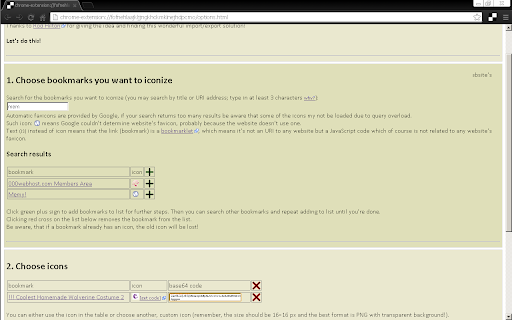
Some of your bookmarks don't have any favicon (icon)? Well, then add one!
Google Chrome doesn't let you do this natively ¯\_(°∩°)_/¯ So this extension uses a hack on Google Chrome, that works ;)

FEATURES:
→ If your bookmark doesn't have an icon (or has a blank icon) this will let you set it a favicon!
→ This is permanent, so favicons stay even if you turn off or uninstall this extension :D Unlike in every other extension I saw! (That's why I made this one.)
→ If you leave it, though, it will provide you a simple quick and dynamic search through your bookmarks :)
→ This extension allows you also to set favicons also for bookmarklets (=scripts)! \o/

USER'S SAY:
→ "A tiny bit of fiddling around involved but worth it."
→ "it's a bit fiddly but it works"

INCOVENIENCES:
→ Google Chrome doesn't let extensions managing favicons. The only way to do this is to import bookmarks (one or more) from a backup file with a fixed favicon stored in it. This extension will let you choose bookmarks, choose favicons, create such backup file automatically and then you'll have to export it and import it again. There's no other way ¯\_(°∩°)_/¯
→ And while it's importing bookmarks which you already have, it results in duplication of them. No worries, the duplicates are all in one directory (folder) at the end of Bookmarks Bar.
→ In Google Chrome favicon is related to a bookmark's address (URL) and is permanent (when set in this way). So if *you* change favicon once, you can't change it again. The workaround is to change the URL of bookmark a little (e.g. add "#" or "/" at the end, or empty parameter "?sth" or "&sth") – for Chrome it will be a new bookmark.
→ While you can set a favicon for bookmarklets (scripts) it's probably not possible to set if for bookmarklets with only anonymous function, like: "javascript:(function(){…})()". Sorry. I also had to edit half of my bookmarklets.
→ It is not possible in Google Chrome to change icons of folders. Sorry. I'm sad, too.

ANY PROBLEMS WITH THIS EXTENSION?
Questions, problems, requests – report on GitHub:
→ https://github.com/Kaligula0/bookmark-iconizer/issues

If you like it then please buy me a beer 🍺 (donate me on PayPal: [email protected]) ;)

= Version history =
1.7.6 – updated png2base64 tools and popup description
1.7.5 – fix dealing with bookmarklets that include double quote (")
1.7.3 – fix dealing with bookmarklets that include number sign (#)
1.7.2 – update manifest to v3
1.7.1 – minor text modification in popup
1.7.0 – more detailed Store description, more detailed instructions, fixed dead links
1.6.0 – fix: auto-remove newly imported duplicates; more instructions
1.5.6 – added data policy (extension doesn't collect/send *any* data), icon bug fix
1.5.3 – scroll fix, disabled some useless functions
1.5.2 – scroll fix
1.5.1 – minor fixes
1.5.0 – fixed importing URIs with quotes, added info about manual import (because Google has removed automatic import feature from Chrome extensions)
1.4.0 – debugging options included
1.3.1 – minor fixes
1.3.0 – iconized bookmarks code in form of a link
1.2.0 – iconized bookmarks code enveloped in an iframe
1.1.0 – added [get code] link for default favicons in table
1.0.0 – first deployment
Technical
- Version
- 1.7.6
- Manifest
- V3
- Size
- 22.92KiB
- Min Chrome
- 88
- Languages
- 1
- Featured
- Yes
Metadata
- ID
- hbnmehpggmbpiackncinpnlgkgbgmpjk
- Developer ID
- u7b7fa3e2a7e805b94bc17f0f9ff06b54
- Developer Email
- [email protected]
- Created
- Jun 21, 2013
- Last Updated (Store)
- Mar 12, 2024
- Last Scraped
- May 26, 2026
- Website
- —
- Privacy Policy
- —
Similar extensions
Alternatives to Bookmark Iconizer, ranked by description similarity.

New Tab Lite
A Fast and Light weight new tab
55
★ 5.0

Bookmark Favicon Changer
Change bookmark favicon
40.0K
★ 4.0
Tab Finder - by floverdevel
Find and navigate to an opened tab
1.0K
★ 4.6

Easy Open Bookmarks
Click the button to open the Chrome bookmarks page
27

BookmarkCleaner
Checks bookmarks for broken links.
24
★ 3.5

Bookmark Sorter - Automatically Sort Bookmarks
Automatic bookmark sorting by date + manual options. Real physical sorting. Live Search, alphabetical sorting, cross-device sync.
2.0K
★ 3.8

Better Chrome Bookmarks Page
Replaces Chrome's built-in bookmarks page with a better, feature-rich interface
4

Icon Changer
Change and customize icons for any webpage or entire website with Icon Changer. Make your browser unique and comfortable for you.
4.0K
★ 5.0
Data sourced from the Chrome Web Store · last verified May 26, 2026.