Tab Finder - by floverdevel
Find and navigate to an opened tab
As of June 2026, Tab Finder - by floverdevel has 1,000 users and a 4.64/5 rating from 25 reviews in the Functionality & UI category.
Usersno change0%
1.0K
1,000
Ratingno change0%
4.64
25 reviews
Reviewsno change0%
25
Version
1.1.0
Manifest V3
History
1 snapshotsTracking since May 2, 2026.
View as table
| Date | Users | Rating | Reviews | Version |
|---|---|---|---|---|
| May 2, 2026 | 1.0K | 4.64 | 25 | 1.1.0 |
| Now | 1.0K | 4.64 | 25 | 1.1.0 |
Permissions & access
- Permissions
- tabs
- Host access
- None declared
Screenshots


About
Do you have too many opened tabs in your browser?
Do you have too many windows opened in your browser?

Tab Finder - by floverdevel is your friend.

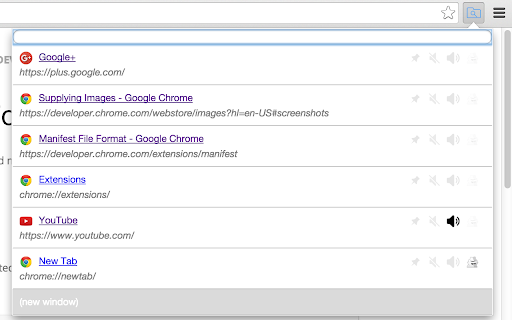
It displays the list of currently opened tabs, even those in others windows, even those in Incognito Mode if you allow the extension to run in Incognito Mode (look for the «Allow in incognito» checkbox in your browser's extensions list «chrome://extensions/»).

It filters the list by searching by tab's title and/or tab's URL.

It navigates to the selected tab (select a tab by clicking on it or using the arrows keys then the Enter key), and brings its containing window to the foreground.

It can create a new tab in current window (or in a new window using the shift key).
If your search looks like a valid URL, the new tab will navigate to this URL, otherwise the new tab will trigger a Google search.

Don't forget to rate and leave me a comment if you like and/or hate this extension.

# Change Log
All notable changes to this project will be documented in this file.

This project adheres to [Semantic Versioning](http://semver.org/).

## coming soon
- display pinned tabs on top of list

## 1.1.0
2024-05-31
- White background for icon for dark mode
- Manifest v3 compliant
- Respect the dark mode of the operating system

## 1.0.0
2020-11-15
- Initial public release on Github.com
- add a default shortcut to activate the extension (Ctrl+Space)

## 0.5.3
2017-11-28
- fix "new tab" text was not readable

## 0.5.2
2017-11-28
- fix highlighted text was not aligned vertically

## 0.5.1
2017-11-27
- fix text overlapping when title or url are too long
- fix search input placeholder text

## 0.5.0
2017-11-23
- close a tab _(pro tip : you can do it with middle-click too)_
- about version is displayed at the bottom of popup

## 0.4.0
2017-10-26
- ESC key closes the popup
- minor bugfix and optimization

## 0.3.9.2
2016-02-17
- set the manifest's minimum_chrome_version to 27.0.1453.110 so the extension can be install on older browser via the google chrome webstore

## 0.3.9.1
2016-02-17
- fix a crash on older chrome version (tested on my chrome version 27.0.1453.110).  Google Chrome webstore will not let you install but if install from source, this will help you :)

## 0.3.9
2016-02-15
- fix a crash when trying to render muted state on chrome version 45 or less

## 0.3.8
2016-01-25
- fix the behavior of the (new tab) when an empty string was supplied

## 0.3.7
2015-11-25
- fix rendering of google chrome internals urls's favicon (chrome://*)

## 0.3.6
2015-11-16
- adjust manifest file to enable packaging into chrome webstore

## 0.3.5
2015-11-16
- move README file into src folder to enable packaging into chrome webstore

## 0.3.4
2015-11-16
- added tooltip text

## 0.3.3
2015-11-02
- incognito, audible, muted and pinned icons are always display

## 0.3.2
2015-10-30
- add more icons for audible, muted, pinned

## 0.3.1
2015-10-30
- remove specials chars (thanks to @pascal_laporte)

## 0.3
2015-10-30
- icon to show if a tab is incognito
- more icons for chrome urls

## 0.2
2015-10-06
- hold the shift key to open in new window instead of a new tab

## 0.1
### initial version
2015-09-28
- do not search for text that looks like an uri, open them directly
- trigger a google search when no tab are found
- option to create a new tab
- highlight text in element
- favicon for special google chrome internals urls
- display favicon and url
Technical
- Version
- 1.1.0
- Manifest
- V3
- Size
- 38.27KiB
- Min Chrome
- 88
- Languages
- 1
- Featured
- Yes
Metadata
- ID
- hfnickpljocfadhinpemeekdeebaenlo
- Developer ID
- u3b6e28c93a76c77ecfe7f7fdb7b4e76a
- Developer Email
- [email protected]
- Created
- Dec 1, 2015
- Last Updated (Store)
- Jun 4, 2024
- Last Scraped
- Jun 1, 2026
- Website
- —
- Privacy Policy
- —
Similar extensions
Alternatives to Tab Finder - by floverdevel, ranked by description similarity.

Quick Tabs
A keyboard centric most recently used (MRU) ordered page list plugin with seek and switch functionality inspired by IntelliJ IDEA
30.0K
★ 4.5

Tab Manager Plus for Chrome
Quickly find open tabs, see all windows in one view, find duplicates and limit tabs per window. The best Tab Manager for Chrome.
200.0K
★ 4.7

Thready - Vertical Tabs
Vertical tabs, bookmarks, history and readling list in side panel.
1.0K
★ 4.1

Tab Control
The holy grail of tab managers
431
★ 3.8

Tab Positioner
Choose where tabs appear, and which tab is focused when others disappear.
1.0K
★ 4.5

Humble New Tab Page
Redesigned new tab page featuring your bookmarks, apps, most visited, and recently closed in a custom layout.
30.0K
★ 4.7

New Tab Lite
A Fast and Light weight new tab
55
★ 5.0

Clutter Free - Prevent duplicate tabs
Reduce tab clutter - prevent duplicate tabs, quickly search & switch tabs, and more...
30.0K
★ 3.7
Data sourced from the Chrome Web Store · last verified Jun 1, 2026.