
Shared Slides Clicker for Google Meet
Allows multiple users to control a Google Slides presentation from within Google Meet
As of May 2026, Shared Slides Clicker for Google Meet has 881 users and a 5.00/5 rating from 3 reviews in the Workflow & Planning category.
Usersdown 3.4 percent−3.4%
881
881
Ratingno change0%
5.00
3 reviews
Reviewsno change0%
3
Version
1.0.0
Manifest V3
History
2 snapshotsTracking since Apr 29, 2026.
View as table
| Date | Users | Rating | Reviews | Version |
|---|---|---|---|---|
| Apr 29, 2026 | 912 | 5.00 | 3 | 1.0.0 |
| May 26, 2026 | 898 | 5.00 | 3 | 1.0.0 |
| Now | 881 | 5.00 | 3 | 1.0.0 |
Permissions & access
- Permissions
- activeTabnotificationsstorageidentity
- Host access
- https://docs.google.com/presentation/*, https://meet.google.com/*
Screenshots



About
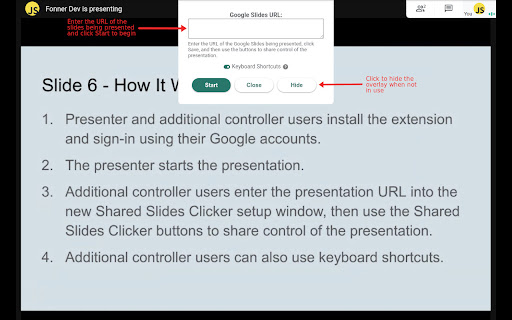
With so many people working remotely, we are all doing a lot of meeting and presenting over Google Meet.  But what do you do when multiple people need to share control of the same presentation?

Instead of just telling the presenter to go to the "next slide" over and over, use this extension to share control with other attendees easily and seamlessly.

Once the presenter who sharing their screen installs this extension, they can share control of their currently active Google Slides presentation with other users of this extension. Within Google Meet, other users can easily change slides and control videos.

Supports both the legacy and new, refreshed Meet web user interface.
Technical
- Version
- 1.0.0
- Manifest
- V3
- Size
- 2.38MiB
- Min Chrome
- 88
- Languages
- 1
- Featured
- No
Metadata
- ID
- hbfioanokcpbblpgfjggelapbcaeppop
- Developer ID
- u01fe3eafb3a4c7bbc609b8ab5a68369c
- Developer Email
- [email protected]
- Created
- Sep 14, 2020
- Last Updated (Store)
- May 21, 2023
- Last Scraped
- May 26, 2026
- Privacy Policy
- https://fonner.dev/privacy
Similar extensions
Alternatives to Shared Slides Clicker for Google Meet, ranked by description similarity.

Reactions for Google Meet
Send your reactions during the Google Meeting
30.0K
★ 4.0

Remote for Slides
Control Google Slides on any device, remotely.
100.0K
★ 4.2

Full Screen for Google Slides™
Extends Google Slides™ to the Full Screen.
10.0K
★ 4.2

GSlide Presenter
Sets Google Slide to Presentation mode while retaining chrome tabs
128
Auto Full Screen for Google Meet™
Automatically sets your Meet window to full-screen when someone begins presenting
4.0K
★ 5.0

Google Meet Shuffle Participants
Shuffle the list of participants in a Google Meet
44

Internet Clicker for Slides
An Internet Clicker for Google Slides Chrome extension
1.0K
★ 3.0

MeetRemote
This extension provides remote control for Google Meet
3.0K
★ 4.8
Data sourced from the Chrome Web Store · last verified May 26, 2026.