
Full Screen for Google Slides™
Extends Google Slides™ to the Full Screen.
As of May 2026, Full Screen for Google Slides™ has 10,000 users and a 4.20/5 rating from 5 reviews in the Workflow & Planning category.
Usersup 25.0 percent+25.0%
10.0K
10,000
Ratingdown 16.0 percent−16.0%
4.20
5 reviews
Reviewsup 25.0 percent+25.0%
5
Version
3.0.0
Manifest V3
90-day change · In the last 90 days this extension gained 2.0K users.
History
2 snapshotsTracking since Apr 24, 2026.
View as table
| Date | Users | Rating | Reviews | Version |
|---|---|---|---|---|
| Apr 24, 2026 | 8.0K | 5.00 | 4 | 3.0.0 |
| May 21, 2026 | 10.0K | 5.00 | 4 | 3.0.0 |
| Now | 10.0K | 4.20 | 5 | 3.0.0 |
Permissions & access
- Permissions
- activeTabscripting
- Host access
- None declared
Screenshots

About
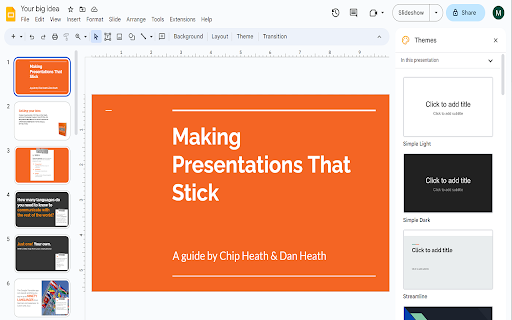
Want to make your Google Slides full screen while you're in edit mode? You can do so today when you use our
extension.

Here are the steps needed to allow Google Slides to turn into full screen mode while you can still edit the slides.

1) Install our software extension

2) Go to your Google Slide presentation

3) Click on the extension icon and choose full screen mode.

The main benefits of being able to edit Google Slides while you're in full screen are

- If you are in a Zoom call/Google Meet call, the other particpants in the call are able to view the slides more clearly in
full screen mode.

- Makes brainstorming in virtual group meetings a lot easier

Try this free software today.
Technical
- Version
- 3.0.0
- Manifest
- V3
- Size
- 118KiB
- Min Chrome
- 88
- Languages
- 40
- Featured
- Yes
Metadata
- ID
- kepghmionbgdajcmmckifnfcdcgpbjah
- Developer ID
- uc0988633aba5a3654e9fb5e4bd2d6c7c
- Developer Email
- [email protected]
- Created
- Jun 20, 2023
- Last Updated (Store)
- Jun 20, 2023
- Last Scraped
- May 21, 2026
- Support URL
- —
- Privacy Policy
- https://image-size.pdfwork.com/privacy-policy
Similar extensions
Alternatives to Full Screen for Google Slides™, ranked by description similarity.
Auto Full Screen for Google Meet™
Automatically sets your Meet window to full-screen when someone begins presenting
4.0K
★ 5.0

Full Screen Edit for Google Tasks™
Chrome extension enabling fullscreen mode for Google Tasks sidebar tool.
228
★ 3.8

Shared Slides Clicker for Google Meet
Allows multiple users to control a Google Slides presentation from within Google Meet
881
★ 5.0
Google Slide Image Zoom
Expand, Enlarge Images for Google Slides and Docs
1.0K
★ 5.0

GSlide Presenter
Sets Google Slide to Presentation mode while retaining chrome tabs
128

Google Keep - Full Screen Edit
Makes note editing take up the full browser window
20.0K
★ 4.6
Distraction Free Mode — Google Docs & Slides
The distraction free mode (▣) for Google Docs and Google Slides hides all controls and buttons and lets you focus on creation.
10.0K
★ 4.2

Full screen your Videos
Watch your videos in full screen with one click on the full screen button
3.0K
★ 3.7
Data sourced from the Chrome Web Store · last verified May 21, 2026.