
ChromeKeys
Extra keyboard shortcuts from Chrome
As of May 2026, ChromeKeys has 26 users and a 5.00/5 rating from 1 reviews in the Workflow & Planning category.
Usersdown 13.3 percent−13.3%
26
26
Ratingno change0%
5.00
1 reviews
Reviewsno change0%
1
Version
0.1.0
Manifest V3
History
2 snapshotsTracking since Apr 30, 2026.
View as table
| Date | Users | Rating | Reviews | Version |
|---|---|---|---|---|
| Apr 30, 2026 | 30 | 5.00 | 1 | 0.1.0 |
| May 29, 2026 | 29 | 5.00 | 1 | 0.1.0 |
| Now | 26 | 5.00 | 1 | 0.1.0 |
Permissions & access
- Permissions
- tabsscripting
- Host access
- *://*/*
Screenshots
About
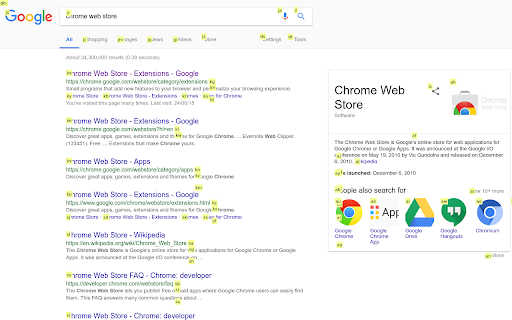
Browse the web with ease and speed using keyboard-driven shortcuts inspired by the fantastic qutebrowser and surf web browsers. Spend less time mousing around and searching through tabs.

How to click buttons, links, etc. with your keyboard:
Hit Shift+Spacebar to show the click hints, and type the hint to click the element you want.
Hit Ctrl+Shift+Spacebar to get click hints that open a link in a new tab.

How to find an open tab with given content:
Hit Alt+Enter to open a search field.  Start typing to get a list of open tabs that contain the search text.  Arrow down to the one you want and hit Enter.

Alt+Tab will flip you back to the previous tab.

Hit Esc to remove the click-hints and/or tab-search widget.
Technical
- Version
- 0.1.0
- Manifest
- V3
- Size
- 193KiB
- Min Chrome
- 88
- Languages
- 1
- Featured
- No
Metadata
- ID
- epbohekicencbbaikbdlglpkblklpcec
- Developer ID
- u77bfbb2f4b8233e13943ce0324f9c8a7
- Developer Email
- [email protected]
- Created
- Aug 20, 2018
- Last Updated (Store)
- Apr 14, 2021
- Last Scraped
- May 29, 2026
- Website
- —
- Support URL
- —
- Privacy Policy
- —
Similar extensions
Alternatives to ChromeKeys, ranked by description similarity.

Quick Tab Search
Quickly search and switch between open tabs
209
★ 5.0

browserkeynav
Fast browser navigation/interaction with keyboard only
Click using keyboard
- press 'f' to display key overlay (this will display…
—

QuicKey – The quick tab switcher
Add keyboard shortcuts to switch tabs via Quicksilver-style search or a most recently used list
10.0K
★ 4.6

Typing Tabs
Manage your browser tags with typing in a command box, easy to find any tabs
—

BackTick
BackTick: Custom Alt+Tab for Chrome
17
★ 4.8

Control Space
A kanban-style tab manager to browse, organise, search and switch tabs with one simple shortcut.
226
★ 4.4

Where Is My Tab
Quickly search and switch between open tabs with Ctrl+Shift+F
—

Launchtab
Keyboard-driven tabless browsing with a Quick Switcher modal.
7
Data sourced from the Chrome Web Store · last verified May 29, 2026.