
Agenty - Advanced Web Scraper
Web scraping software with AI to extract data from websites using point-and-click extension to get data from web crawling
As of June 2026, Agenty - Advanced Web Scraper has 10,000 users and a 4.07/5 rating from 179 reviews in the Developer Tools category.
Usersno change0%
10.0K
10,000
Ratingno change0%
4.07
179 reviews
Reviewsdown 0.6 percent−0.6%
179
Version
2.9.7
Manifest V3
History
2 snapshotsTracking since Apr 16, 2026.
View as table
| Date | Users | Rating | Reviews | Version |
|---|---|---|---|---|
| Apr 16, 2026 | 10.0K | 4.07 | 180 | 2.9.7 |
| Apr 26, 2026 | 10.0K | 4.07 | 180 | 2.9.7 |
| Now | 10.0K | 4.07 | 179 | 2.9.7 |
Permissions & access
- Permissions
- activeTabscriptingidentityidentity.email
- Host access
- None declared
Screenshots

About
AI web scraping to automatically build scraping agents that extract data from any website - no code required.

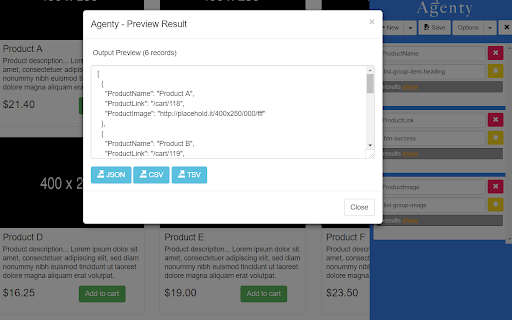
Real-time web data extraction preview and download into various formats like JSON, CSV or TSV.

Build free web scraper scripts using the Chrome extension and host on Agenty cloud for batch URL for bulk extraction, and more advanced web scraping features: like Scheduling, Anonymous website proxies, Website Crawling, Scrape 100 or millions of web pages, Extract multiple website simultaneously, uploading data to server, FTP, S3 etc.

Using the extension, you can build 3 types of agents -
1. Web scraping agents
2. Change detection agents
3. Web crawling agents

How to use
--------------------------------
1. Go to website you want to extract and then launch the extension.
2. Select agent type under "Create new" or you can use sample agents template under my agents.
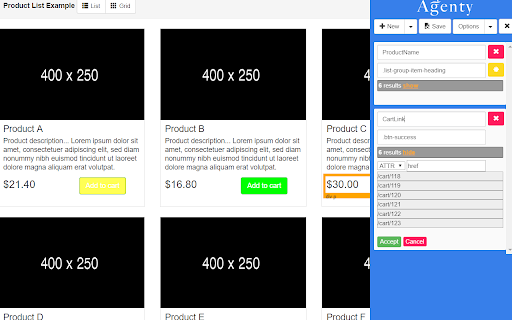
2. Click on a webpage element that you would like to extract (it will turn green). Agenty will then generate best CSS selector for that element, and will highlight (yellow) everything that is matched by that selector.
3. Now you can click on a highlighted element to remove it from the selector (red), or click on an un-highlighted element to add it to the extractor. Through this process of selection and rejection, Agenty will help you come up with the perfect CSS selector for your items need to be extracted.
4. Extract any number of fields with TEXT, HTML or ATTR (attributes) and instant output preview of extracted data.

How to edit an agent
-------------------------------
1. Go to the website URL, where the agent was created
2. Launch the Agenty extension
3. Click on the open button beside your agent to open it in Agenty.
4. Now, you can add/change anything and save it back to your account.


Features
--------------------------------
1. Extract any number of fields from a web-page.
2. Use the built-in CSS selector to generate pattern with one click.
3. Write your own custom CSS selector.
4. Choose the item you want to extract. E.g. TEXT, HTML or ATTR (Attribute)
5. See the result preview instantly as CSS selector selected.
5. Toggle the position left/right.
7. Export output in most popular file format JSON, CSV or TSV

Whether you are scraping websites with Agenty or using the API in C#, Python, Node JS, Perl, Ruby, Java or JavaScript programming language.

You can use this Chrome extension to auto-generate CSS selectors for web scraping or web automation with Playwright, Puppeteer and Selenium for website testing.

See more details : https://agenty.com
Technical
- Version
- 2.9.7
- Manifest
- V3
- Size
- 604KiB
- Min Chrome
- 88
- Languages
- 1
- Featured
- Yes
Metadata
- ID
- gpolcofcjjiooogejfbaamdgmgfehgff
- Developer ID
- ud1033904f2feac17d0326b10b1c416e5
- Developer Email
- [email protected]
- Created
- Dec 24, 2015
- Last Updated (Store)
- Feb 9, 2026
- Last Scraped
- Jun 6, 2026
- Website
- http://agenty.com/
- Support URL
- https://www.agenty.com/docs
- Privacy Policy
- https://agenty.com/company/privacy/
Similar extensions
Alternatives to Agenty - Advanced Web Scraper, ranked by description similarity.

Smart Web Scraper
Scan any web page for items and export data (JSON/CSV/Excel/Sheets)
30

Arctobius - Web Crawler
Arctobius Web Crawler is a powerful Chrome extension for creating cloud-executable crawling rules with built-in crawling feature.
180
★ 5.0

Web Page Scraping Python
🚀 Visual browser extension for web scraping: build Python scrapers, generate code, and automate site data extraction.
18

RAG Text Scraper
Extracts clean article text from a list of URLs and saves as .txt files.
26

No Code Web Scraper: Free Web Scraper, Extract Any Site to Excel
Free web scraper Chrome extension. Click to extract lists, prices, reviews, leads and emails from any website to Excel or CSV.
2.0K
★ 4.2

Quick Web Scraper - One-click Web Scraper
A free web scraper for instant results. Scrape any website with one click — no coding required.
9

Element Extractor Pro
Extract web elements and generate sample data with DeepSeek AI
10

Code Extractor Pro
Extract and convert HTML, CSS, and JavaScript code from web pages with Tailwind CSS support.
826
★ 4.0
Data sourced from the Chrome Web Store · last verified Jun 6, 2026.