
Quick Web Scraper - One-click Web Scraper
A free web scraper for instant results. Scrape any website with one click — no coding required.
As of June 2026, Quick Web Scraper - One-click Web Scraper has 9 users in the Developer Tools category.
Usersno change0%
9
9
Ratingno change0%
—
— reviews
Reviewsno change0%
—
Version
2.0.0
Manifest V3
90-day change · In the last 90 days this extension 1 version update, changed permissions.
History
11 snapshotsTracking since Apr 1, 2026.
View as table
| Date | Users | Rating | Reviews | Version |
|---|---|---|---|---|
| Apr 1, 2026 | 9 | — | — | 1.1.0 |
| Apr 10, 2026 | 7 | — | — | 1.1.0 |
| Apr 20, 2026 | 13 | — | — | 2.0.0 |
| Apr 25, 2026 | 11 | — | — | 2.0.0 |
| May 2, 2026 | 12 | — | — | 2.0.0 |
| May 9, 2026 | 11 | — | — | 2.0.0 |
| May 14, 2026 | 14 | — | — | 2.0.0 |
| May 20, 2026 | 11 | — | — | 2.0.0 |
| May 26, 2026 | 8 | — | — | 2.0.0 |
| Jun 2, 2026 | 9 | — | — | 2.0.0 |
| Jun 8, 2026 | 7 | — | — | 2.0.0 |
| Now | 9 | — | — | 2.0.0 |
Changelog
- Apr 10, 2026description
Quick Web Scraper (U-Scrap) is a lightweight Chrome extension that helps you extract structured information from the webpage you are currently viewing.

With a simple click, you can collect headings, paragraphs, links, images, tables, and other structured elements — and export them as JSON or CSV for further analysis.

Key Features:

• One-click scraping of the active webpage
• Structured data preview before export
• Export to JSON and CSV formats
• Optional pagination support (when enabled)
• Local-first processing — no cloud required
• Built using Chrome Manifest V3 security standards

How It Works:

1. Open any HTTP or HTTPS webpage.
2. Click the extension icon.
3. Press "Start Scraping".
4. Preview extracted structured data.
5. Export results to JSON or CSV.

Privacy & Security:

• No automatic background scraping
• No tracking or analytics
• No data transmission to external servers
• All processing happens locally in your browser
• Works only after explicit user interaction

The extension does not collect personal information and does not operate without user action.

Quick Web Scraper is designed for students, researchers, developers, and analysts who need structured webpage data in a simple and transparent way.
Quick Web Scraper – One-click Web Scraper

Quick Web Scraper is a lightweight and easy-to-use Chrome extension that allows you to extract structured data from any webpage instantly — with just one click. It is designed for users who want fast, clean, and efficient data extraction without any coding knowledge.

Whether you are a student, researcher, marketer, or developer, this tool helps you collect useful webpage data in seconds and export it for further use.

🔹 Key Features:
• One-click data scraping from any active webpage
• Extract visible content such as text, links, and structured elements
• Clean and user-friendly preview interface
• Download scraped data in structured formats (JSON/CSV)
• Lightweight and fast performance
• No coding or technical setup required

🔹 How It Works:
1. Open any webpage you want to scrape
2. Click on the extension icon
3. Instantly extract and preview the data
4. Download the data in your preferred format

🔹 Use Cases:
• Market research and competitor analysis
• Data collection for projects and assignments
• Lead generation and content extraction
• Quick insights from webpages

🔹 Privacy & Security:
Quick Web Scraper respects your privacy. The extension only accesses the currently active tab when you trigger it. No personal data is collected, stored, or transmitted to external servers. All processing happens locally in your browser.

🔹 Permissions:
The extension requires minimal permissions such as activeTab, scripting, storage, and downloads to function properly. These are used only to extract data from the current page, store user preferences locally, and allow file downloads.

🔹 Why Choose Quick Web Scraper?
• Simple and beginner-friendly
• Fast and efficient scraping
• No hidden tracking or data collection
• Works on most websites

Start extracting valuable data in seconds with Quick Web Scraper — your one-click solution for web scraping.
- Apr 10, 2026permissions
activeTab, scripting, storage, downloads
activeTab, scripting, storage, downloads, notifications, alarms, contextMenus
Permissions & access
- Permissions
- activeTabscriptingstoragedownloadsnotificationsalarmscontextMenus
- Host access
- None declared
Screenshots

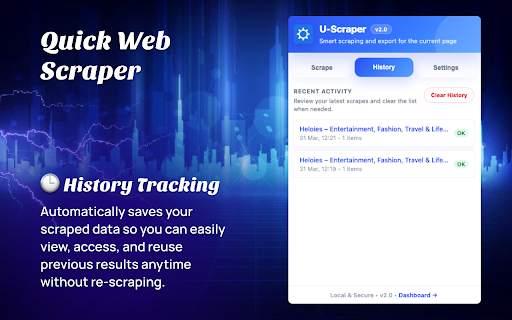


About
Quick Web Scraper – One-click Web Scraper

Quick Web Scraper is a lightweight and easy-to-use Chrome extension that allows you to extract structured data from any webpage instantly — with just one click. It is designed for users who want fast, clean, and efficient data extraction without any coding knowledge.

Whether you are a student, researcher, marketer, or developer, this tool helps you collect useful webpage data in seconds and export it for further use.

🔹 Key Features:
• One-click data scraping from any active webpage
• Extract visible content such as text, links, and structured elements
• Clean and user-friendly preview interface
• Download scraped data in structured formats (JSON/CSV)
• Lightweight and fast performance
• No coding or technical setup required

🔹 How It Works:
1. Open any webpage you want to scrape
2. Click on the extension icon
3. Instantly extract and preview the data
4. Download the data in your preferred format

🔹 Use Cases:
• Market research and competitor analysis
• Data collection for projects and assignments
• Lead generation and content extraction
• Quick insights from webpages

🔹 Privacy & Security:
Quick Web Scraper respects your privacy. The extension only accesses the currently active tab when you trigger it. No personal data is collected, stored, or transmitted to external servers. All processing happens locally in your browser.

🔹 Permissions:
The extension requires minimal permissions such as activeTab, scripting, storage, and downloads to function properly. These are used only to extract data from the current page, store user preferences locally, and allow file downloads.

🔹 Why Choose Quick Web Scraper?
• Simple and beginner-friendly
• Fast and efficient scraping
• No hidden tracking or data collection
• Works on most websites

Start extracting valuable data in seconds with Quick Web Scraper — your one-click solution for web scraping.
Technical
- Version
- 2.0.0
- Manifest
- V3
- Size
- 48.83KiB
- Min Chrome
- 88
- Languages
- 1
- Featured
- No
Metadata
- ID
- cbgfnanifjmhogpoampfpfpfekpcejpl
- Developer ID
- u909a1124375999b79287509b2155236e
- Developer Email
- [email protected]
- Created
- Feb 14, 2026
- Last Updated (Store)
- Apr 1, 2026
- Last Scraped
- Jun 8, 2026
- Website
- —
- Support URL
- —
Similar extensions
Alternatives to Quick Web Scraper - One-click Web Scraper, ranked by description similarity.

Smart Web Scraper
Scan any web page for items and export data (JSON/CSV/Excel/Sheets)
30

Dev Scraper
A user-friendly web scraper extension for extracting data from web pages.
13

Data Scraper - Extract & Copy
Select and scrape data from web pages, then copy it in JSON, CSV, or plain text format. Perfect for data extraction and analysis.
—

Web Page Scraping Python
🚀 Visual browser extension for web scraping: build Python scrapers, generate code, and automate site data extraction.
18

Scrapelight — Visual Web Scraper
Select repeated elements on any page, name fields, export as CSV or JSON
1

Webpage Data Analyzer
Analyze and save webpage data, including HTML, CSS, and images, in multiple formats (CSV, JSON).
6

DataScraper Express
Extract structured data from any webpage into CSV/JSON with point-and-click interface
13

Email Extractor
Extract email addresses from any webpage with flexible export options, fully privacy-focused.
1
Data sourced from the Chrome Web Store · last verified Jun 8, 2026.