Jelli Screencaps
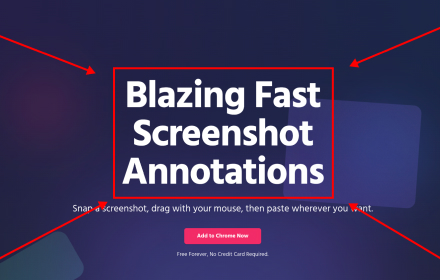
Blazing fast screenshot annotations
As of June 2026, Jelli Screencaps has 49 users and a 5.00/5 rating from 4 reviews in the Productivity category.
Usersup 4.3 percent+4.3%
49
49
Ratingno change0%
5.00
4 reviews
Reviewsno change0%
4
Version
1.9
Manifest V3
90-day change · In the last 90 days this extension 1 version update.
History
5 snapshotsTracking since Apr 21, 2026.
View as table
| Date | Users | Rating | Reviews | Version |
|---|---|---|---|---|
| Apr 21, 2026 | 47 | 5.00 | 4 | 1.8 |
| May 6, 2026 | 53 | 5.00 | 4 | 1.8 |
| May 17, 2026 | 47 | 5.00 | 4 | 1.8 |
| May 31, 2026 | 50 | 5.00 | 4 | 1.8 |
| Jun 6, 2026 | 47 | 5.00 | 4 | 1.9 |
| Now | 49 | 5.00 | 4 | 1.9 |
Changelog
- May 31, 2026description
Constantly pointing out things on your screen to customers, clients, and coworkers?

Jelli is the FASTEST way to annotate a screenshot and paste it anywhere. Hit a hotkey (cmd + shift + s), drag with your mouse to draw, then cmd + v to paste wherever you need. You don't even need to copy it to your clipboard, it's automatic!

Need to add text? Just type after drawing, and the text intelligently snaps to the drawn shapes so you don't even have to move it! FAST.

Great for:
- Explaining things to customers quickly
- Adding Documentation
- Highlighting bugs
- And much more!

Currently only works on the Google Chrome browser.
Constantly pointing out things on your screen to customers, clients, and coworkers?

Jelli is the FASTEST way to annotate a screenshot and paste it anywhere. Hit a hotkey (cmd + shift + s), drag with your mouse to draw, then cmd + v to paste wherever you need. You don't even need to copy it to your clipboard, it's automatic!

Without Jelli you have to:
1. Take a screenshot with a hotkey
2. Click on a little window to indicate you want to edit it
3. Click the Arrow tool
4. Draw an arrow
5. Switch to Text tool
6. Click where you want to add text
7. Click Copy to Clipboard
8. Paste where you want it to go.

With Jelli? Just hotkey, draw, type, and paste!

After drawing, the text intelligently snaps to the drawn shapes so you don't even have to move it! FAST.

Great for:
- Explaining things to customers quickly
- Adding Documentation
- Highlighting bugs
- And much more!

Currently only works on the Google Chrome browser.
Permissions & access
- Permissions
- activeTabscriptingtabsclipboardWriteidentityidentity.emailstoragecommandsidle
- Host access
- <all_urls>
Screenshots


About
Constantly pointing out things on your screen to customers, clients, and coworkers?

Jelli is the FASTEST way to annotate a screenshot and paste it anywhere. Hit a hotkey (cmd + shift + s), drag with your mouse to draw, then cmd + v to paste wherever you need. You don't even need to copy it to your clipboard, it's automatic!

Without Jelli you have to:
1. Take a screenshot with a hotkey
2. Click on a little window to indicate you want to edit it
3. Click the Arrow tool
4. Draw an arrow
5. Switch to Text tool
6. Click where you want to add text
7. Click Copy to Clipboard
8. Paste where you want it to go.

With Jelli? Just hotkey, draw, type, and paste!

After drawing, the text intelligently snaps to the drawn shapes so you don't even have to move it! FAST.

Great for:
- Explaining things to customers quickly
- Adding Documentation
- Highlighting bugs
- And much more!

Currently only works on the Google Chrome browser.
Technical
- Version
- 1.9
- Manifest
- V3
- Size
- 536KiB
- Min Chrome
- 88
- Languages
- 1
- Featured
- No
Metadata
- ID
- gmkihagkgfjnpogddihgpghdgpbojpad
- Developer ID
- u2ea246b719821673fa0df7e466741f57
- Developer Email
- [email protected]
- Created
- Jan 5, 2025
- Last Updated (Store)
- May 29, 2026
- Last Scraped
- Jun 6, 2026
- Website
- jelli.io
- Support URL
- https://jelli.io/
- Privacy Policy
- http://jelli.io/privacy
Similar extensions
Alternatives to Jelli Screencaps, ranked by description similarity.

MarkScreen - Annotate Webpages & Screenshot
Annotate webpages with pen, arrows, text & blur. Capture clear screenshots for bug reports, feedback, and docs. No account needed.
12
ScreenClip - Screenshot, Comment & Annotate
Take screenshots, add annotations & comments
70.0K
★ 3.7

Mac Screenshots - SnipMac
Mac web screenshot tool. Easily capture a region or the current screen, then crop and annotate it using the editor.
24
★ 5.0

Page Marker - Web Paint on Pages
Draw or highlight on any website in real time. Add text, lines, and shapes, then make screenshot the result.
10.0K
★ 5.0

Screshot
Capture and edit screenshots instantly from your browser
5

Draw on Screen
Draw, highlight, and annotate on any webpage with Draw on Screen — the simplest way to comment as you browse!
3.0K
★ 4.6

Screenshot Extension
Take a screenshot and save it to a location of your choice.
89

Free Screenshot Tool
Professional screenshot tool with full page, selection, and scrolling capture capabilities
6
Data sourced from the Chrome Web Store · last verified Jun 6, 2026.