
Page Marker - Web Paint on Pages
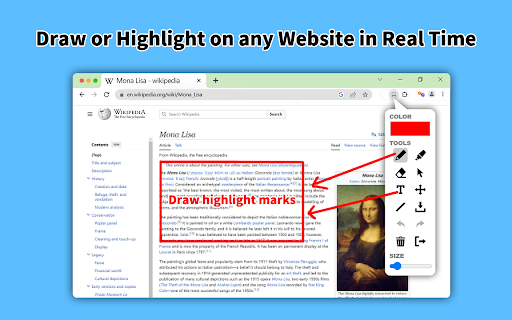
Draw or highlight on any website in real time. Add text, lines, and shapes, then make screenshot the result.
As of June 2026, Page Marker - Web Paint on Pages has 10,000 users and a 5.00/5 rating from 16 reviews in the Productivity category.
Usersno change0%
10.0K
10,000
Ratingno change0%
5.00
16 reviews
Reviewsup 14.3 percent+14.3%
16
Version
1.4
Manifest V3
History
2 snapshotsTracking since Apr 18, 2026.
View as table
| Date | Users | Rating | Reviews | Version |
|---|---|---|---|---|
| Apr 18, 2026 | 10.0K | 5.00 | 14 | 1.4 |
| May 10, 2026 | 10.0K | 5.00 | 15 | 1.4 |
| Now | 10.0K | 5.00 | 16 | 1.4 |
Permissions & access
- Permissions
- activeTabstoragescriptingidentityidentity.email
- Host access
- None declared
Screenshots
About
Draw or highlight on any website in real time. Add text, lines, and shapes, then make screenshot the result.

Are you accustomed to highlighting important text in books or do you want to draw directly on websites in real-time from your browser? Perhaps you need to share your screen for tasks like reporting technical issues, creating product demonstrations, or crafting how-to tutorials.

Whether you're a student, a professional, or just someone who loves browsing the web is a must-have extension. You'll have access to an array of advanced annotation tools, including a pencil, highlighter, color picker, arrow, polygon, text, emoji, and more.

 It contains the tools you need:
 - Pencil tool - draw custom lines
 - Text tool - add annotation
 - Emoji - add fine emoji on any web pages
 - Bucket fill tool - fill shapes and drawn with any color from palette
 - Line tool - put start and end point to paint straight line
 - Quadratic curve - draw a quadratic curve with the selected line width
 - Bezier curve - paint a bezier curve with the selected line width
 - Polygon tool - paint a polygon with the selected line width
 - Ellipse tool - draw an ellipse or a circle with the selected line width
 - Eyedropper tool - pick a color from the web page or your drawings
 - Screenshot tool - screenshot maker allows saving result in PN or JPG

Privacy Policy
By design, your data stays at all times on your Google account, never saved in our database. Your data aren’t shared with anyone, including the add-on owner.
We complies with privacy laws (especially GDPR & California Privacy Act) to protect your data.
All data you upload are automatically deleted every day.
Technical
- Version
- 1.4
- Manifest
- V3
- Size
- 150KiB
- Min Chrome
- 88
- Languages
- 54
- Featured
- Yes
Metadata
- ID
- kablckeallljpgnkaifaeckgkaejhpjp
- Developer ID
- uc39f11ad9fbfe95185f8544c47e8e264
- Developer Email
- [email protected]
- Created
- Feb 5, 2024
- Last Updated (Store)
- Oct 28, 2025
- Last Scraped
- Jun 5, 2026
- Support URL
- https://www.livepolls.app/support
- Privacy Policy
- https://www.livepolls.app/privacy
Similar extensions
Alternatives to Page Marker - Web Paint on Pages, ranked by description similarity.

Web Paint Tool - Page Marker & Editor to Draw on web
Draw, annotate, and mark up any web page with a versatile set of drawing tools. Add text, shapes, and highlights to web content.
295
★ 5.0

Draw on Screen
Draw, highlight, and annotate on any webpage with Draw on Screen — the simplest way to comment as you browse!
3.0K
★ 4.6

ScreenDraw Pro
Draw, highlight, blur, and annotate on any webpage with keyboard shortcuts
4

Draw On Any Web Page
Use this extension to draw on any webpage like freehand, rectangle, circle, undo, print, line, and clear options
81

Draw on Page
One-click to draw on page! Start drawing on pages instantly. Highlight, take screenshots, share ideas with this browser page marker.
1.0K
★ 4.6

Draw on Web
Draw and highlight on any website live. Add text, shapes, and lines. Move, undo, or redo your drawings.
50
★ 5.0

Screenshot Extension
Take a screenshot and save it to a location of your choice.
89

WebSketcher
Draw on any web page with ease.
11
★ 5.0
Data sourced from the Chrome Web Store · last verified Jun 5, 2026.