
Read Selected
Reads selected text on any site with voice options.
As of May 2026, Read Selected has 421 users and a 4.00/5 rating from 1 reviews in the Productivity category.
Usersup 34.1 percent+34.1%
421
421
Ratingno change0%
4.00
1 reviews
Reviewsno change0%
1
Version
3.2
Manifest V3
History
3 snapshotsTracking since Apr 1, 2026.
View as table
| Date | Users | Rating | Reviews | Version |
|---|---|---|---|---|
| Apr 1, 2026 | 314 | 4.00 | 1 | 3.2 |
| May 1, 2026 | 334 | 4.00 | 1 | 3.2 |
| May 29, 2026 | 383 | 4.00 | 1 | 3.2 |
| Now | 421 | 4.00 | 1 | 3.2 |
Permissions & access
- Permissions
- contextMenusactiveTabstoragescripting
- Host access
- None declared
Screenshots

About
Read Selected is a powerful Chrome extension designed to enhance your browsing experience by converting selected text into speech with a variety of voice options. Whether you're reading articles, studying, or simply want to listen to text instead of reading, Read Selected offers a seamless and accessible way to engage with web content.

Key Features:
Voice Selection: Choose from a variety of voices to suit your preference and enhance your listening experience.
Stop Button: Easily stop the speech at any time with a convenient stop button that appears while text is being read.
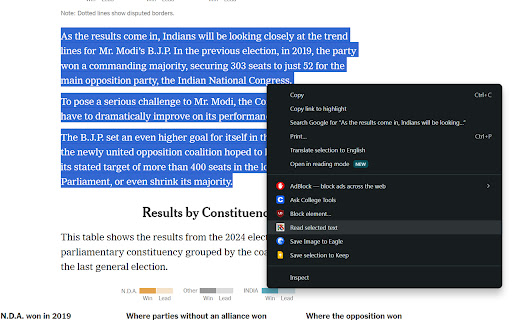
Context Menu Integration: Right-click to read selected text aloud from any web page for a smooth and intuitive user experience.
Customizable Settings: Adjust speech rate and pitch to match your personal listening preference.

How It Works:
Select Text: Highlight any text on a web page that you want to be read aloud.
Right-Click: Right-click on the selected text and choose "Read selected text" from the context menu.
Listen: The selected text will be read aloud using the chosen voice. A red stop button will appear on the screen, allowing you to stop the speech at any time.
Stop Speech: Click the red stop button to immediately stop the text-to-speech process and remove the button from the screen.

Technical Details:
Voice Selection: Read Selected integrates with the Web Speech API to provide a range of voices. Users can select their preferred voice from the extension's popup menu.
Stop Button: A dynamically generated stop button appears when text is being read, providing users with an easy way to stop the speech.
Offline Capabilities: While primarily using online services for voice synthesis, Read Selected can also function with built-in voices available on your device.

Privacy and Security:
Read Selected respects your privacy. The extension processes selected text locally and only sends the necessary data to text-to-speech services for voice synthesis. No personal information is collected or stored.

Ideal Use Cases:
Reading Articles: Listen to long articles or blog posts without straining your eyes.
Studying: Use Read Selected to review study materials or notes.
Accessibility: Provides an accessible way for users with reading difficulties to engage with web content.
Multitasking: Listen to text content while doing other tasks, improving productivity and convenience.

How to Get Started:
Install the Extension: Add Read Selected to your Chrome browser from the Chrome Web Store.
Select Your Voice: Open the extension's popup and choose your preferred voice.
Start Reading: Select text on any web page, right-click, and choose "Read selected text" to start listening.
Technical
- Version
- 3.2
- Manifest
- V3
- Size
- 36.78KiB
- Min Chrome
- 88
- Languages
- 1
- Featured
- No
Metadata
- ID
- gmhbhkikokpnmhfnijpkfdobdchodpkg
- Developer ID
- u5017bfb69b2984d6949480b94bc1355e
- Developer Email
- [email protected]
- Created
- Jun 4, 2024
- Last Updated (Store)
- Nov 7, 2024
- Last Scraped
- May 29, 2026
- Website
- —
- Support URL
- —
- Privacy Policy
- https://linkheroplus.com/readselected
Similar extensions
Alternatives to Read Selected, ranked by description similarity.

Text-to-Speech Reader
Reads selected text aloud using your system's Text-to-Speech.
—

Listen
Listen selected text
383
★ 4.7

Read It: Text to Speech Voice Reader
A Chrome extension to read selected text, whole webpages, and PDFs aloud.
27

Read text out loud
Read text out loud is a Chrome extension that converts written text into clear and natural-sounding speech.
2.0K
★ 4.2

Read Out Loud
Use Read out loud to read aloud on any site. This online TTS tool lets you enjoy text to speech and read text out loud easily.
10.0K
★ 4.7

Intelligible Readers
Read out loud user-selected text.
3

Text to Voice Converter
Activate this extension and convert any selected text into voice with a simple right-click.
12
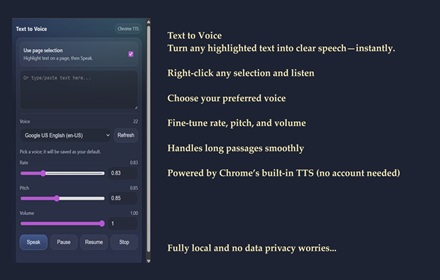
SKDOSS Text to Voice (TTS API)
Speak selected or typed text using Chrome TTS voices.
63
Data sourced from the Chrome Web Store · last verified May 29, 2026.